Website to Mobile App Conversion Blueprint
Master website to mobile app conversion with this practical blueprint. Learn to audit features, rebuild with Expo, and launch faster using modern starter kits.
 Damini
Most website to mobile app conversion advice starts with the wrong promise: take the responsive website, place it inside a WebView, add an icon, and call the project finished. That approach can produce an installable package, but it rarely produces a product people want to keep using. An installed app creates expectations around speed, navigation, offline recovery, permissions, notifications, and device integration that a browser page doesn't automatically satisfy.
The better question isn't, “How do we put every website screen on a phone?” It's, “Which user journeys deserve a persistent mobile product?” In this blueprint, the answer depends on product behavior, API readiness, performance constraints, and the amount of native value you can deliver. A smaller app for saved content, repeat purchases, field work, messaging, or camera-based tasks is often more defensible than a complete clone of a website.
Table of Contents
- Why Cloning Your Website Fails on Mobile
- Choosing the Right Conversion Architecture
- Preparing Your Backend and APIs for Mobile
- Rebuilding the Frontend with Expo and React Native
- Adapting Web UX for Native Mobile Expectations
- Testing Pipelines and App Store Launch Strategy
Why Cloning Your Website Fails on Mobile
A website and a mobile app can share a brand, account system, and data layer without sharing the same information architecture. That distinction matters because a website usually serves discovery, broad navigation, search visibility, and occasional visits. An app competes for a place on the home screen and must justify that persistence every time it opens.
A 1:1 clone carries over desktop assumptions that become expensive on a phone. Dense navigation, hover-dependent controls, browser-oriented sessions, large payloads, and pages designed for wide screens do not become mobile-native just because a WebView renders them inside a store-distributed shell. The shell adds app-store friction, permission handling, signing, release management, and device testing while leaving the original weaknesses intact.
 A laptop and smartphone displaying the same website, held by a hand on a wooden desk.
Mobile is also no longer a secondary distribution channel. In mid-2024, more than 96% of the global digital population used a mobile device to connect to the internet, and during the second quarter of 2024, people spent almost 60% of online time browsing the web on mobile phones, according to Statista's mobile internet data. Your website can therefore act as the acquisition surface, while the app becomes the repeat-use layer for authenticated, frequent, or notification-driven workflows.
Start with repeat behavior, not screen inventory
Before choosing a framework, classify the website's capabilities:
- Keep on the web: Editorial landing pages, public documentation, SEO-led acquisition pages, and infrequent informational journeys often benefit from browser access and shareable URLs.
- Redesign for native: Saved content, messaging, repeat purchases, field operations, camera workflows, and frequently revisited dashboards can justify a dedicated mobile experience.
- Remove from the first release: Administrative tools, rarely used settings, complex reporting screens, and low-frequency routes may create testing and maintenance costs without improving activation.
This classification prevents a common failure mode. Teams spend time reproducing every route, then discover that the app's most important first-session action is buried under the same navigation hierarchy that made sense on desktop. A good conversion project identifies one activation event, such as completing a search, saving an item, booking a service, or submitting a field report, and builds the mobile experience around reaching it quickly.
Practical rule: If the app doesn't make a frequent task faster, more reliable, or more useful on a phone, the store listing won't create durable demand.
The commercial context supports this distinction. Worldwide mobile-app downloads reached approximately 257 billion in 2020, while consumer spending on mobile apps reached about $167 billion in 2022 and approximately $171 billion in 2023, as reported in Statista's mobile apps market overview. Those figures describe a mature software channel, not a shortcut for packaging websites. Apps earn repeat use through identity, saved state, notifications, offline access, and workflows that fit the device.
Technical conversion is not product redesign
A wrapper can be appropriate for a narrow use case. It may help validate demand, support a service that already works well on mobile web, or provide a temporary distribution layer while a native product is designed. It becomes dangerous when the team mistakes successful compilation for successful conversion.
The hidden costs appear after the first build:
- Performance debt becomes visible. A slow website still loads inside the app, but users now expect an installed product to respond like one.
- Authentication paths change. Cookies, redirects, password resets, social sign-in, and session persistence need testing in an embedded environment.
- Payments can break. Browser redirects and checkout assumptions may not fit mobile delivery or store billing rules.
- Native features remain absent. A shell doesn't automatically provide useful push notifications, camera flows, biometrics, deep links, or offline recovery.
- Maintenance expands. The team now owns app releases, permissions, device compatibility, app-store metadata, and review requirements.
The right conversion plan is selective. Keep the website as the broad discovery and acquisition surface, then rebuild the narrow set of workflows that benefit from a persistent mobile context. For a practical walkthrough of the initial decision process, see this guide to making a website into an app. The important outcome isn't a mobile copy of every URL. It's a product with a reason to be installed.
Choosing the Right Conversion Architecture
Architecture should follow user workflow rather than team preference. A wrapper, PWA, and cross-platform rebuild can all be valid, but they solve different problems. The fastest route to an app-store package isn't automatically the fastest route to retention, and the most native route isn't automatically justified for a product whose users visit occasionally.
Use the decision matrix below as a starting point. “Offline support” means more than displaying a cached shell. It includes deciding what data remains available, how edits are queued, and how the interface explains synchronization or failure.
Conversion Architecture Decision Matrix
| Approach | Offline Support | Hardware Access | App Store Presence | Best Use Case |
|---|---|---|---|---|
| WebView wrapper | Limited unless separately engineered | Possible through plugins or a bridge, but adds integration work | Yes, subject to store review and product-value requirements | A stable mobile web product that needs rapid distribution and modest native behavior |
| Progressive Web App | Strong for cached web experiences, with platform-specific limitations | Browser-dependent and narrower than a native client | Usually no traditional app-store listing requirement | Browser-first products where direct installation and low friction matter more than store discovery |
| Cross-platform rebuild with Expo and React Native | Designed explicitly in the client architecture | Broad access through native modules and maintained libraries | Yes | Products with repeat-use workflows, custom mobile UX, offline states, or device features |
| Platform-specific native rebuild | Deepest platform integration | Broadest control over iOS and Android behavior | Yes | Products whose performance, hardware integration, or platform-specific interaction is central to their value |
When a wrapper is enough
Choose a wrapper when the existing mobile website is already fast, stable, touch-friendly, and valuable without substantial redesign. The wrapper should add a real capability, not merely change the launch location. Deep links, secure authentication, push notifications, native sharing, or a focused device workflow can make the shell useful.
Don't use a wrapper to hide unresolved web problems. Embedding an unoptimized page can create slow startup, broken cookie behavior, unreliable payment redirects, and poor error recovery. It can also leave the team with two interfaces to maintain, while neither one feels deliberately designed for a phone.
When a PWA is the better benchmark
A PWA is a useful lower-friction baseline because it tests whether the mobile web experience can earn repeat use without immediately introducing native build and store overhead. Case-specific reports collected by Progressier's PWA statistics reference include a 17% conversion increase for Lancôme, a 4x year-over-year conversion increase for Treebo, and 30% higher conversion than its native app for Ola in Tier 3 Indian cities. These results belong to those deployments, so they shouldn't be treated as universal forecasts.
Use the PWA as a serious product option, not as a consolation prize. It can reveal whether faster delivery, caching, install prompts, and focused mobile UX improve behavior before a team commits to native infrastructure. If users need deep hardware access, predictable store discovery, or dependable offline workflows, the PWA's limits become part of the architecture decision.
When to rebuild with Expo and React Native
A cross-platform rebuild makes sense when the app has a distinct mobile job to perform. That job might involve camera capture, location-aware field work, saved data, messaging, frequent account activity, or a workflow that must remain usable during network interruptions. Expo and React Native let one product team target iOS and Android while still using native primitives where the experience needs them.
The trade-off is preparation. A rebuild requires API contracts, authentication changes, mobile state management, error states, device testing, and release operations. It isn't a way to avoid product decisions. It makes those decisions unavoidable, which is exactly why it can produce a stronger result.
Preparing Your Backend and APIs for Mobile
A mobile frontend exposes backend weaknesses quickly. Browser pages can hide inefficient queries behind large screens, persistent connections, or repeated navigation. A phone app needs deliberate payloads, predictable state transitions, resilient retries, and responses that remain useful when the connection is slow or temporarily unavailable.
Start with an endpoint inventory before creating screens. Map each app journey to the requests it needs, including authentication, profile loading, lists, detail views, writes, uploads, payments, notifications, and account deletion. Then record payload size, latency, caching behavior, pagination, error formats, and permission requirements. The aim is to identify the smallest reliable contract that supports the user task.
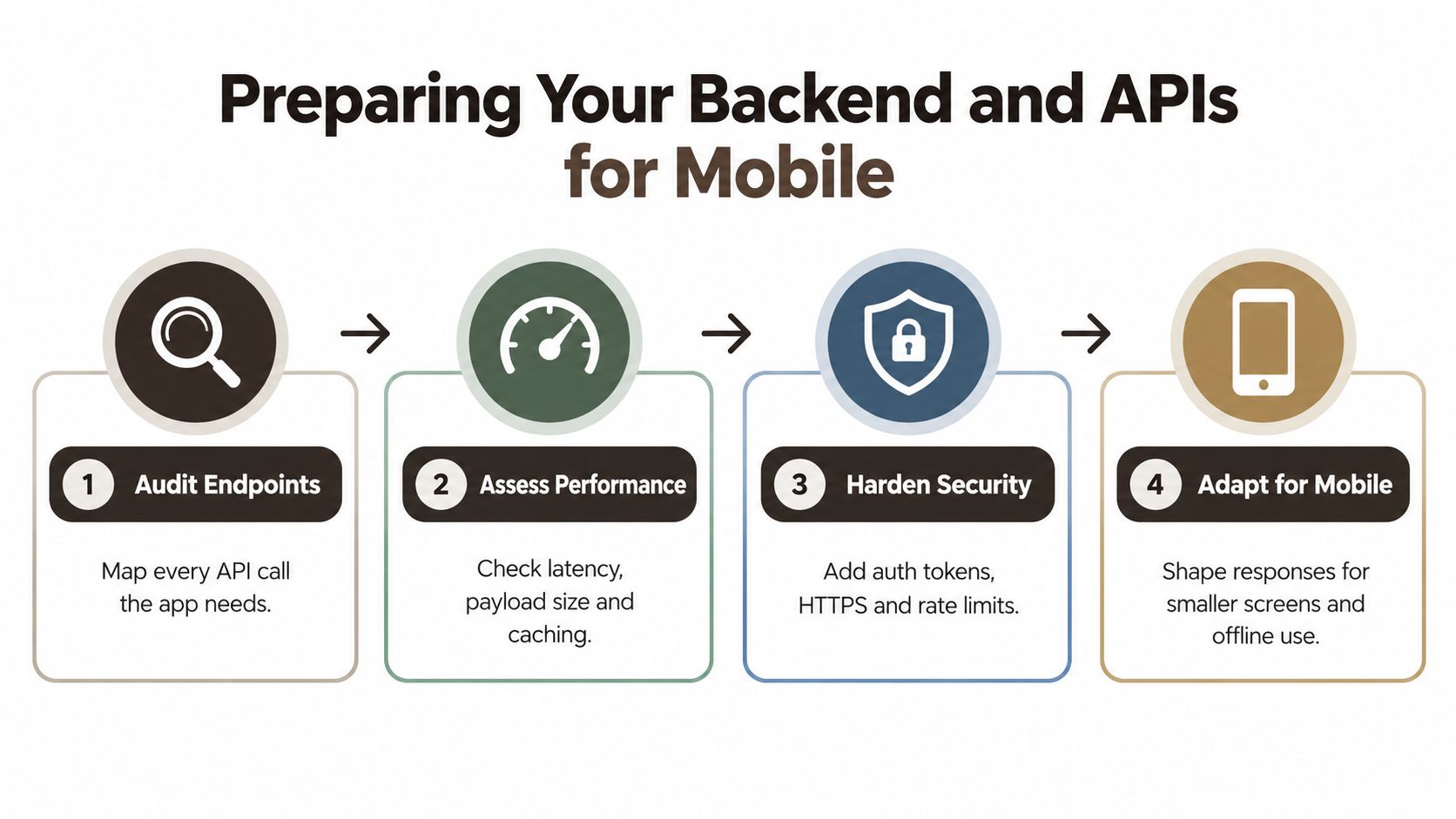 A flowchart detailing four key steps for optimizing backend APIs for mobile application integration and performance.
Replace browser assumptions with mobile contracts
A web session often depends on cookies, browser redirects, and storage behavior that doesn't transfer cleanly to an installed client. Mobile authentication should define token issuance, secure storage, refresh behavior, logout, expiry, password recovery, and return paths from external identity providers. Whether the backend uses REST or GraphQL matters less than whether the contract is explicit and testable.
A useful mobile API should also provide:
- Small responses: Return only the fields needed for the current screen, with pagination for long collections.
- Stable errors: Give the client an actionable status and message instead of an HTML error page.
- Idempotent writes: Let the client retry safely when a request times out after the server has accepted it.
- Versioned changes: Avoid breaking an installed client when the web product evolves.
- Upload resilience: Support progress, cancellation, retry, and recovery for files captured on a device.
- Consistent timestamps and identifiers: Make sorting, synchronization, and local state predictable across platforms.
The backend may not need a total rewrite. Existing business logic and data can often remain in place, but browser-specific controllers and oversized page payloads usually need a cleaner mobile-facing layer. For implementation guidance, this API design best-practices resource is a useful companion to the endpoint audit.
Design failure and offline states before the happy path
Offline support isn't a loading spinner with a friendly message. Decide what the user can read, create, edit, or submit without a connection. Then define how the client stores pending actions, displays their status, handles conflicts, and confirms successful synchronization.
For a commerce workflow, the app might allow browsing cached products but require a live connection at checkout. For field operations, it might save a draft locally, queue an upload, and show whether the record is pending or synchronized. These are product decisions, not merely networking details.
One source estimates API readiness alone can take two to four weeks, with interface work commonly taking another two to four weeks, as described in this conversion guide. Treat that work as part of the conversion, not as an obstacle discovered after the frontend has been designed. A polished screen backed by an unreliable contract will still produce a fragile app.
Rebuilding the Frontend with Expo and React Native
Expo and React Native are most effective when the team treats them as a product platform, not as a way to render web screens with different syntax. Start with the mobile information architecture, identify the activation journey, and create feature boundaries around user tasks. Reuse domain types, validation rules, and backend behavior where that reduces risk, but don't preserve web navigation just because it already exists.
 Screenshot from https://www.applighter.com
A practical project structure separates routes, features, shared UI, data access, and platform services. Keep screens thin. Let feature modules own their query logic, mutations, loading states, and empty states, while shared components handle typography, spacing, buttons, forms, and feedback. This makes it easier to change a workflow without turning every screen into a dependency hub.
Build the foundation deliberately
Authentication should be an early vertical slice, not a final integration task. Wire sign-in, sign-out, session restoration, password recovery, and protected navigation before building a large collection of screens. The team should be able to verify the complete account journey on both platforms while the codebase is still small.
State management also needs clear boundaries. Server state, local form state, navigation state, and device state have different lifecycles. Treating them all as one global store makes cache invalidation and offline recovery harder to reason about. Use typed API clients, schema validation at the boundary, and explicit loading, error, empty, and stale states.
Opinionated starter kits can remove configuration work around navigation, authentication, state management, API wiring, and development tooling. That doesn't replace product engineering, but it can keep a team from spending its first sprint connecting libraries that the app needs before its first meaningful feature exists. The Expo and React Native tutorial provides a useful reference for setting up this kind of foundation.
Use AI assistance without outsourcing architecture
AI-assisted tools can accelerate repetitive implementation, especially when the repository contains strong conventions. Cursor plugins, Claude Code rules, typed contracts, and component patterns can help generate screens, tests, and adapters that fit an existing structure. They work poorly when the project has no agreed file boundaries, naming rules, or data model.
Give the tools constraints:
- Define the feature's route, API contract, state transitions, and acceptance criteria first.
- Keep platform-specific code behind small interfaces.
- Require loading, empty, error, retry, and permission states in every generated flow.
- Review security-sensitive code, especially token handling, file access, payments, and deep-link parsing.
- Ask for tests around transformations and mutation behavior instead of trusting visual similarity.
The following video can help teams assess the practical setup before choosing how much infrastructure to adopt.
The main advantage of a starter kit is not that it makes a rebuild automatic. It gives developers a coherent starting architecture, so their time goes into choosing the right mobile product and polishing its critical workflows. That distinction keeps the project honest. Boilerplate can be reduced, but product decisions still have to be made.
Adapting Web UX for Native Mobile Expectations
Responsive design changes dimensions. Native UX changes behavior. A converted app should make the user feel that controls, transitions, permissions, and recovery paths belong on the device, even when the backend and some business rules are shared with the website.
Start with navigation. Desktop users can scan a broad header, hover over menus, and move between multiple columns. Phone users need a small number of obvious destinations, thumb-reachable controls, platform-standard back behavior, and a predictable response to gestures. Put primary destinations where the hand naturally reaches them, and keep secondary actions available without turning every screen into a menu puzzle.
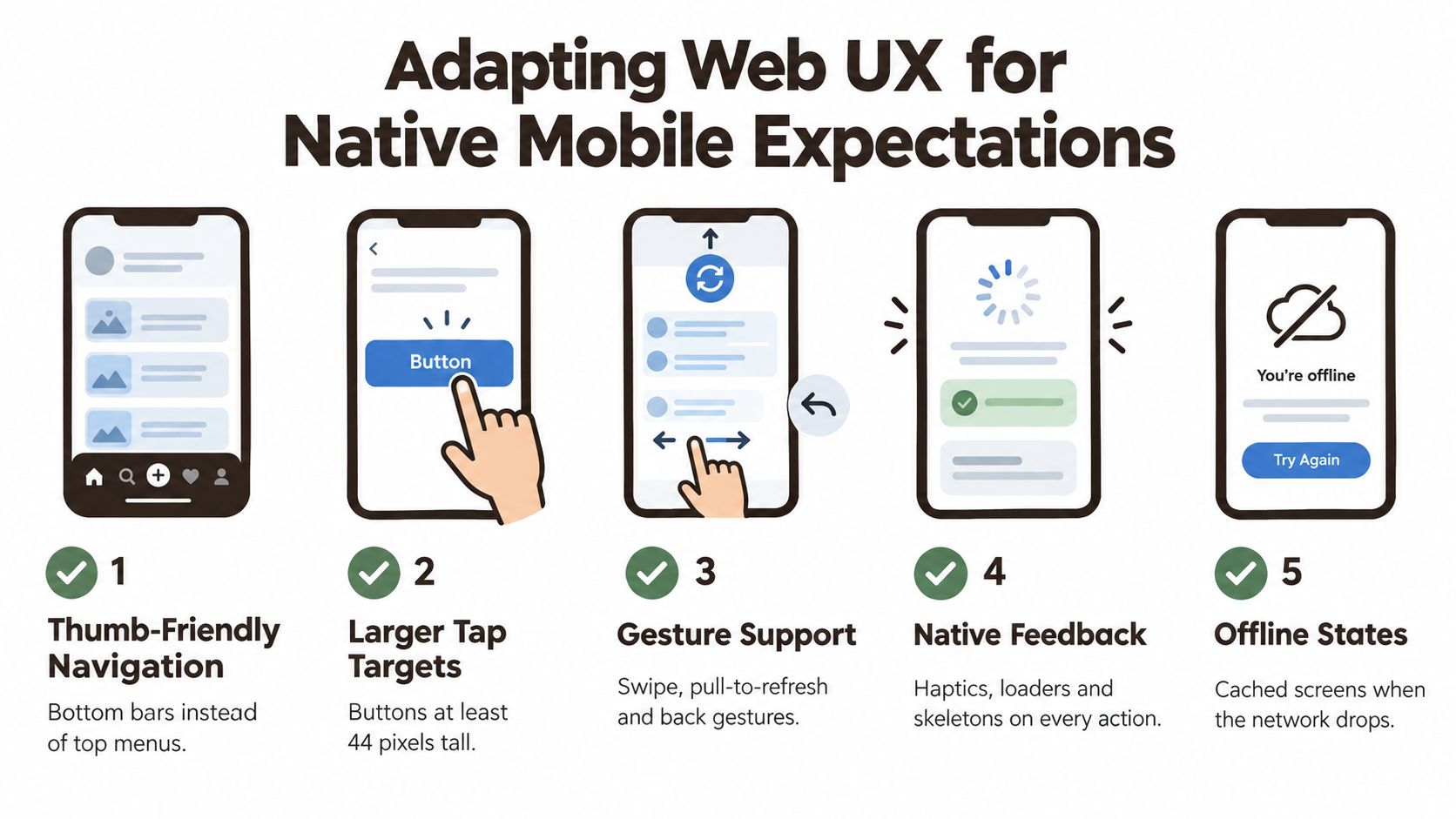 An infographic illustrating five key design principles for adapting web user experiences for native mobile applications.
Design the moments between screens
A native-feeling experience communicates state continuously. A tap should produce immediate feedback, a list should show its loading shape, and a failed request should explain what the user can do next. Avoid blank screens that make a network delay look like a crash.
Deep links deserve the same attention. A notification or shared URL should open the relevant content, preserve the intended authentication path, and return the user to the original destination after sign-in. Test links from a cold launch, a backgrounded app, and an already open session. A route that works only when the app is already running isn't a complete deep-link implementation.
Permissions should appear when the related value is clear. Ask for camera access when the user starts a scan, not during the first launch before the app has explained the feature. If the user declines, provide a usable alternative and a path to settings where appropriate. This approach makes the permission request part of a task instead of an interruption.
For teams refining the broader discipline behind these decisions, what is conversion optimization offers helpful context on reducing friction between user intent and completed action.
Set a performance budget before polishing
Performance work starts before profiling a release candidate. Minimize JavaScript and image payloads, cache immutable assets, defer modules that aren't needed for the first screen, and use optimized list rendering for long collections. Measure cold start, time to interactive, frame drops, API latency, and crash-free sessions on low-end Android hardware as well as current iPhones.
The budget should be attached to user journeys, not just technical dashboards. A search screen might need to become interactive quickly even if a secondary image loads later. A camera workflow needs responsive capture and upload feedback. A saved-content screen should show cached data immediately and identify when it needs a refresh.
A faster app isn't only more pleasant. It gives the native rebuild a reason to exist instead of turning the website's latency into a new kind of frustration.
Audit keyboard behavior, safe areas, scrolling, orientation, text scaling, system back actions, and interrupted requests on physical devices. Emulators can validate many layouts, but they won't expose every interaction between an actual keyboard, a slow network, a camera permission, and a low-memory device. Native value lives in those details.
Testing Pipelines and App Store Launch Strategy
A working development build is not a launch candidate. The final conversion phase has to prove that the app survives real account journeys, interrupted connectivity, device differences, permissions, payments, and store distribution. A release pipeline should make those checks repeatable rather than relying on one developer's phone and memory.
Start with a narrow vertical slice and expand only after it works across representative iOS and Android devices. For an Expo project, EAS Build can provide repeatable build artifacts, while CI can run linting, type checks, unit tests, and platform-specific checks before a release candidate is distributed. Keep environment configuration explicit, and separate development, staging, and production services so test accounts and data don't leak into the live product.
Measure activation before installs
Installs are useful for distribution analysis, but they don't prove that the app delivered value. Instrument the sequence from install to permission decision, login, first meaningful action, and return use. Track failures at each transition, then segment results by device, geography, acquisition source, and new versus returning user.
Industry benchmarks cited by this mobile onboarding and retention analysis) indicate typical retention of roughly 26% on day one, 13% on day seven, and about 7% on day thirty. Those benchmarks are directional, not targets to copy blindly. They do show why an onboarding flow that earns an install but fails to reach activation is a weak success signal.
A closed beta is the right place to test onboarding length, login friction, permission timing, notification content, and recovery from failed requests. Recruit users who resemble the intended audience, observe where they hesitate, and compare cohorts rather than relying on anecdotal feedback. The first release should answer whether the chosen workflow is valuable, not whether every planned feature has been ported.
Validate the release candidate
Use a launch checklist that covers the complete product:
- Account journeys: Test registration, verification, sign-in, password reset, session expiry, logout, and account deletion.
- Device behavior: Test deep links, keyboard overlap, safe areas, back navigation, camera or location access, backgrounding, and interrupted uploads.
- Data integrity: Verify retries, duplicate submissions, stale caches, offline drafts, synchronization, and conflict handling.
- Commercial flows: Confirm that the chosen payment path works on both platforms and that users receive the correct entitlement after purchase or restoration.
- Store readiness: Prepare privacy disclosures, support details, reviewer access, screenshots, metadata, and clear explanations of the app's mobile value.
Regression testing should focus on high-risk journeys rather than only checking whether screens render. The regression testing best practices for 2025 resource is useful when turning those journeys into a repeatable release discipline. Run the same account, payment, deep-link, and offline scenarios after changes to authentication, navigation, API contracts, or native modules.
App-store submission is part of product delivery, not an administrative task at the end. Review the current Apple and Google requirements, provide working access to protected features, and avoid presenting a thin wrapper as the finished product. If the app's mobile value is clear in the first session, the store listing, QA plan, and analytics all support the same proposition.
AppLighter gives Expo and React Native teams an opinionated starter kit with authentication, navigation, state management, Vibecode DB with a Supabase adapter, Hono and TypeScript edge APIs, and AI-assisted tooling already wired into the foundation. Visit AppLighter to start the website to mobile app conversion with less boilerplate and more time for the native workflows that make an app worth installing.