State Management in React Native That Actually Works
Master state management in React Native with practical patterns, library trade-offs, and a clear framework for picking the right tool for your app size
 Parth
Parth
You're probably in the exact phase where React Native state stops feeling simple.
A settings toggle updates one screen, then two unrelated components re-render. A fetch result vanishes after a tab switch because the screen unmounted. Someone suggests Redux for everything. Someone else says Zustand fixes everything. Meanwhile, your auth token survives in one environment, disappears in another, and the cart logic now lives in three places.
That's usually not a library problem first. It's a categorization problem.
The most reliable approach to state management in React Native is to separate state by what it is: local UI state, shared client state, and server state. Once those stop living in the same bucket, the architecture gets simpler. Re-renders shrink. Screens stop forgetting things. Persistence becomes intentional instead of bolted on.
Table of Contents
- The State Problem in Real React Native Apps
- Three Kinds of State You Need to Tell Apart
- Comparing the Major State Libraries
- React Native Specifics That Change the Equation
- Code Patterns You Will Actually Use
- Matching the Stack to Your App Size
- How AppLighter Wires State Out of the Box
- Decision Checklist and Common Questions
The State Problem in Real React Native Apps
The mess usually starts small. A counter gets passed down three layers because only one nested child needs it. A modal open state begins in the right component, then another screen needs to trigger it, so the state moves upward. An auth session gets stored, but hydration timing means part of the app renders before the token is available.
None of that is unusual. It's how React Native apps grow.
A big shift in the ecosystem happened when Hooks in React 16.8, released in 2019, made useState and useReducer the default building blocks for local component state, while Redux had already established the centralized store pattern after its 2015 release. That timeline matters because teams moved from store-heavy designs toward lighter combinations of local hooks, shared stores, and dedicated data layers, as described in this overview of the evolution from Redux to Zustand.
What over-centralizing looks like
When everything goes into one global store, the symptoms are predictable:
- UI state pollutes the store with things like bottom sheet visibility, selected tab index, or whether an input is focused.
- Remote data becomes stale because API responses are treated like permanent client state instead of cached server state.
- Persistence gets sloppy because teams persist too much, then debug hydration bugs on app launch.
Practical rule: If a piece of state only matters to one screen or one component subtree, it usually doesn't belong in a global store.
The common failure mode
React Native magnifies bad state decisions because screen transitions, app restarts, and low-end devices expose problems earlier than many web apps do. A local useState resets on navigation unmount. A broad Context provider re-renders more than you expected. A giant Redux slice makes straightforward flows feel ceremonious.
The fix isn't choosing one winning library. It's naming the problem correctly before you choose the tool.
Three Kinds of State You Need to Tell Apart
The cleanest mental model I've found is simple: not all state is the same job.
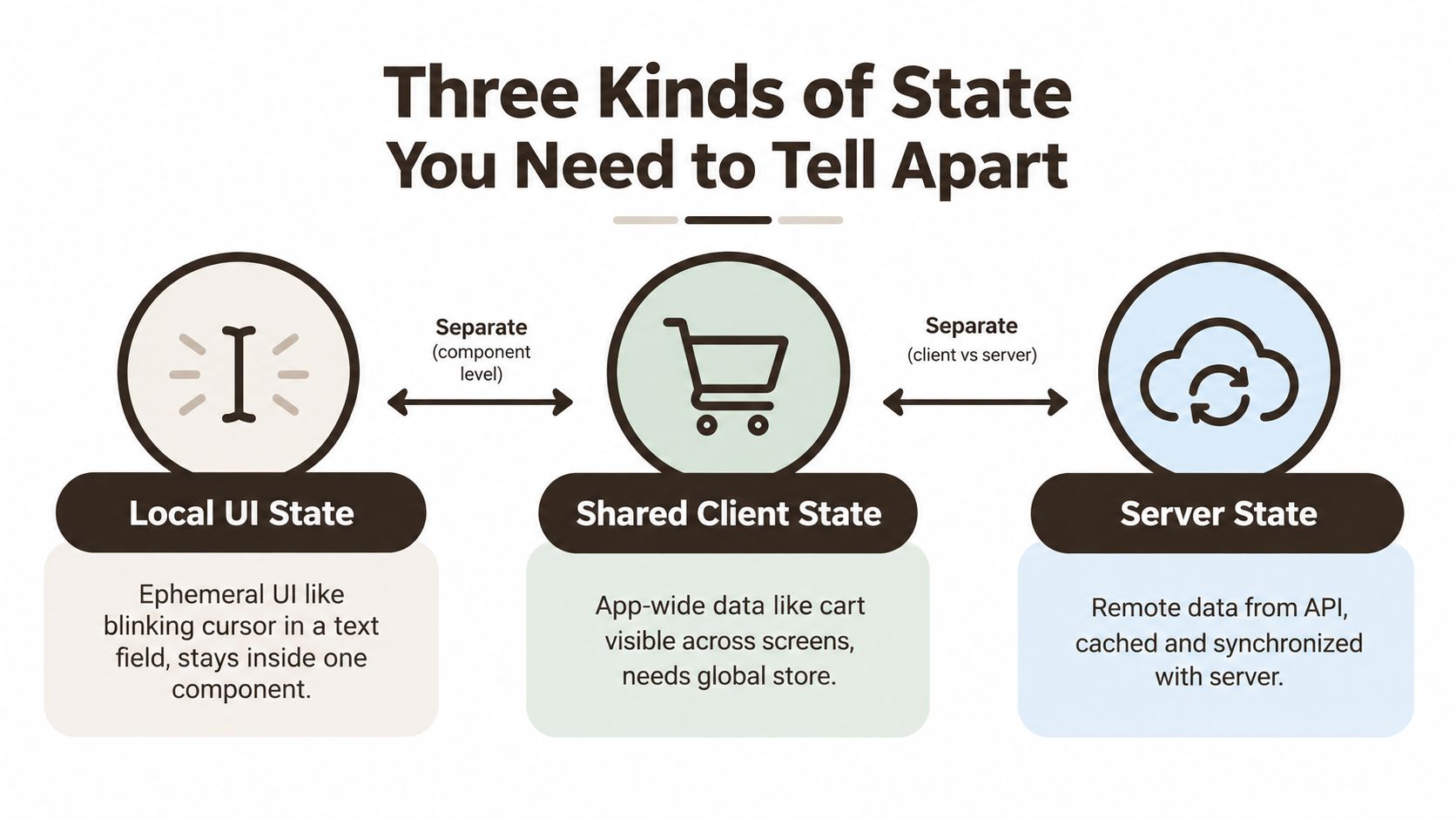 A diagram categorizing the three kinds of state in frontend development: local UI, shared client, and server state.
Local UI state
This is the blinking cursor in a text input. The open state of a sheet. The selected chip in a filter row. A temporary loading spinner for one button.
It lives with the component tree and should usually die with it. useState and useReducer are still the right defaults here because they keep behavior close to the screen that owns it.
Shared client state
This is the shopping cart visible across tabs. The authenticated user session. A draft that several screens edit. Feature flags already downloaded into the app.
This state belongs to the app, not one component. It needs a store or shared mechanism that multiple screens can read and update without prop drilling. That's where Context, Zustand, Redux Toolkit, Jotai, Recoil, or MobX enter the conversation.
Server state
This is your product catalog, notifications feed, or account data fetched from an API. It can be stale, missing, loading, partially cached, or invalid after a mutation.
That makes it different from client state. It needs fetching, caching, deduplication, background refresh, error handling, and offline-aware behavior. Recent guidance increasingly argues that server state should usually sit in a dedicated query layer rather than a global store, and that choosing one tool per state type is often healthier than forcing a universal store, as noted in Patterns.dev's React 2026 guidance.
A quick visual explanation helps if you want a second pass on the distinction:
Why teams get stuck
Most state pain comes from mixing these categories together:
- Local state gets promoted too early and ends up global for no reason.
- Shared client state becomes a dumping ground for fetched API data.
- Server state gets persisted like local preferences, even though it should be refreshed and invalidated.
Server state isn't “global state with fetch calls.” It has a different lifecycle, different failure modes, and different tooling needs.
Once you classify state first, library choice gets easier and less ideological.
Comparing the Major State Libraries
The usual debate asks which library wins. In practice, each tool has a shape it fits well.
A 2025 comparative study reported that Redux still held 59.6% developer adoption and was used in 72% of large-scale applications, while Zustand had grown to 46.7% usage among active React Native developers in that dataset. The same study said Context API was preferred by 67% of developers for smaller to medium-sized applications with light state needs, and that Zustand adoption in the broader React community increased from 28% to 41% over the previous year. Those numbers point to a split market: Redux remains strong in large codebases, while lighter tools keep gaining ground for mobile teams that want less ceremony, according to the 2025 state management comparative study.
What each tool is actually good at
| Library | Best For | Trade-offs | Boilerplate |
|---|---|---|---|
useState / useReducer | Screen-local interactions, transient UI, contained logic | Breaks down when multiple screens need the same state | Low |
| Context API | Theme, auth user, locale, low-frequency shared values | Broad updates can re-render large subtrees if you structure it poorly | Low to medium |
| Redux Toolkit | Large teams, strict conventions, complex update flows, debugging-heavy apps | More files, more ceremony, slower prototyping | High |
| Zustand | Shared client state in small to mid-size apps, fast setup, selector-based subscriptions | Fewer conventions means teams must enforce structure themselves | Low |
| Recoil | Graph-like dependencies and fine-grained updates | Long-term risk if your team is cautious about ecosystem stability | Medium |
| Jotai | Atomic state with granular subscriptions and flexible composition | Can feel fragmented if the team over-atomizes everything | Medium |
| MobX | Observable-driven reactivity, mutable-feeling stores, teams already comfortable with that model | The mental model differs from idiomatic React, which can confuse mixed-experience teams | Medium |
Real trade-offs under mobile conditions
Context is often oversold as “good enough for everything.” It isn't. It works well for values that change infrequently, like theme or current user metadata. It gets awkward when high-frequency updates hit a broad provider tree. If you've ever had one provider wrap the app and watched unrelated screens re-render, that's the tax.
Zustand is a strong default when you need shared client state without Redux structure. It stays close to React's hook ergonomics and makes selector-based subscriptions straightforward. If you want a visual example of splitting broad providers into narrower boundaries, the Split Context Home library is a useful design reference for thinking about separation, even outside state tooling.
Redux Toolkit still earns its place. In bigger teams, the value isn't fashion. It's predictability. Reducers, actions, middleware, and a consistent project shape make it easier to review code and trace changes. Where it hurts is early velocity. For many mobile products, Redux solves tomorrow's governance problem at the cost of today's iteration speed.
If you're deciding specifically between query-layer and store-layer responsibilities, this React Native comparison of TanStack Query, Zustand, and Redux is useful because it frames the overlap clearly instead of pretending they do the same job.
Short version
- Use hooks first for UI that stays local.
- Use Context sparingly for stable, low-frequency shared values.
- Use Zustand by default when shared client state grows past Context.
- Use Redux Toolkit deliberately when team size, process, and complexity justify it.
- Use atom-based tools when granular subscription control is the central requirement, not as a trend choice.
React Native Specifics That Change the Equation
State decisions that feel harmless on the web can feel expensive on mobile.
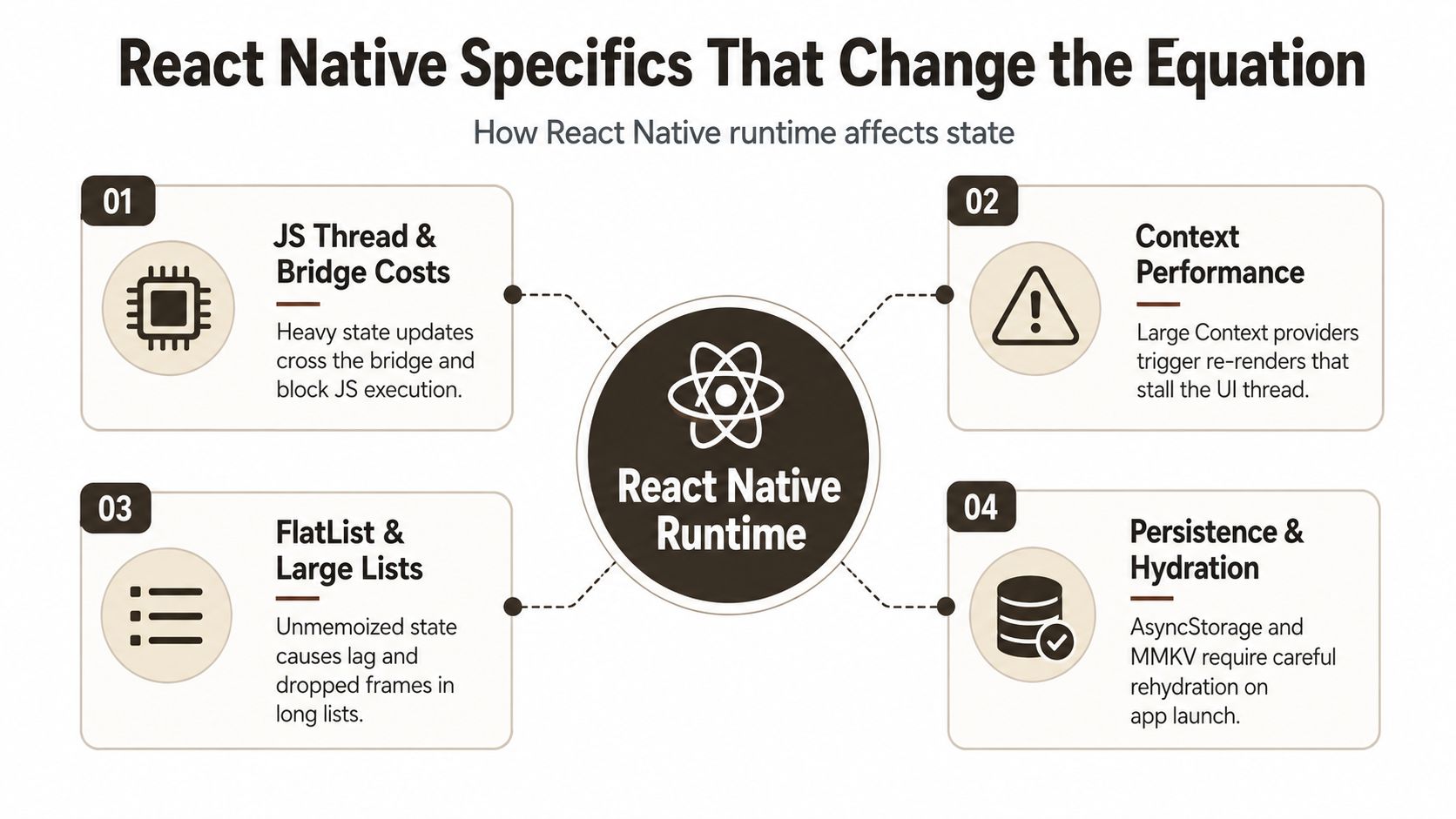 An infographic detailing four key challenges regarding state management within the React Native runtime environment.
Large lists punish broad subscriptions
The easiest place to feel bad state architecture is a FlatList. If rows subscribe too broadly, or a parent reads too much state and passes it downward, updates ripple through the list. On mobile, that turns into visible jank much faster.
In a 500-item FlatList test with 150 ms polling, Zustand showed about 0.8 ms JS-thread overhead per update, Redux Toolkit about 1.2 ms, and Jotai about 0.6 ms. The practical takeaway from the Agilesoft Labs benchmark is not that one library magically wins everything. It's that selective subscription models matter when updates are frequent or list-heavy.
Startup cost matters more than people admit
A lot of React Native apps are judged in the first second. Heavy client-state setup shows up there.
One 2026 benchmark reported Zustand at about 1.1–1.2 KB gzipped with negligible first-contentful-paint impact under 10 ms, while Redux Toolkit was about 13.8–14.8 KB gzipped and added roughly 34–40 ms of parse and FCP cost in the same tests, according to the 2026 benchmark on bundle and startup cost. In Expo apps especially, that difference isn't theoretical.
On mobile, a “small” architectural tax repeats at launch, rehydration, and every noisy update path.
Persistence and navigation add hidden complexity
React Navigation changes what “local” means because screens mount and unmount based on stack and tab behavior. A screen-level useState can be perfect or completely wrong depending on whether you need the state to survive tab switches, deep links, or backgrounding.
Then there's storage. AsyncStorage is fine for many persisted values. MMKV is often a better fit when you care about cold-start reads and frequent access. The hard part isn't choosing storage. It's deciding what deserves persistence at all. Persisting ephemeral UI state usually creates bugs, not resilience.
Hermes and the New Architecture help runtime characteristics, but they don't rescue a provider tree that updates too broadly. Selector-based reads, memoized derived values, and narrower subscriptions still do most of the work.
Code Patterns You Will Actually Use
The best way to compare patterns is to build the same kind of feature with each one and notice the shape.
Local toggle with useState
import React, { useState } from 'react';
import { View, Text, Switch } from 'react-native';

export function NotificationsToggle() {
  const [enabled, setEnabled] = useState(false);

  return (
    <View>
      <Text>Push notifications</Text>
      <Switch value={enabled} onValueChange={setEnabled} />
    </View>
  );
}
Trade-off: almost zero setup, but the moment another screen needs this value, you'll move it or lift it.
Theme with Context
import React, { createContext, useContext, useMemo, useState } from 'react';

const ThemeContext = createContext<{
  theme: 'light' | 'dark';
  toggleTheme: () => void;
} | null>(null);

export function ThemeProvider({ children }: { children: React.ReactNode }) {
  const [theme, setTheme] = useState<'light' | 'dark'>('light');

  const value = useMemo(
    () => ({
      theme,
      toggleTheme: () =>
        setTheme((current) => (current === 'light' ? 'dark' : 'light')),
    }),
    [theme]
  );

  return <ThemeContext.Provider value={value}>{children}</ThemeContext.Provider>;
}

export function useTheme() {
  const ctx = useContext(ThemeContext);
  if (!ctx) throw new Error('useTheme must be used inside ThemeProvider');
  return ctx;
}
Trade-off: built in and clean for stable shared values, but broad providers become expensive if you keep adding unrelated state.
Cart with Zustand and selectors
import { create } from 'zustand';

type CartItem = { id: string; name: string; qty: number };

type CartState = {
  items: CartItem[];
  addItem: (item: Omit<CartItem, 'qty'>) => void;
  removeItem: (id: string) => void;
};

export const useCartStore = create<CartState>((set) => ({
  items: [],
  addItem: (item) =>
    set((state) => {
      const existing = state.items.find((i) => i.id === item.id);
      if (existing) {
        return {
          items: state.items.map((i) =>
            i.id === item.id ? { ...i, qty: i.qty + 1 } : i
          ),
        };
      }
      return { items: [...state.items, { ...item, qty: 1 }] };
    }),
  removeItem: (id) =>
    set((state) => ({
      items: state.items.filter((i) => i.id !== id),
    })),
}));
import React from 'react';
import { Button, Text, View } from 'react-native';
import { useCartStore } from './useCartStore';

export function CartBadge() {
  const count = useCartStore((s) =>
    s.items.reduce((sum, item) => sum + item.qty, 0)
  );

  return <Text>Cart: {count}</Text>;
}

export function AddToCartButton() {
  const addItem = useCartStore((s) => s.addItem);

  return (
    <Button
      title="Add item"
      onPress={() => addItem({ id: '1', name: 'Coffee' })}
    />
  );
}
Trade-off: very little boilerplate, better control over subscriptions, but your team has to define its own store boundaries.
Cart with Redux Toolkit
import { configureStore, createSlice, PayloadAction } from '@reduxjs/toolkit';

type CartItem = { id: string; name: string; qty: number };

const cartSlice = createSlice({
  name: 'cart',
  initialState: { items: [] as CartItem[] },
  reducers: {
    addItem: (state, action: PayloadAction<{ id: string; name: string }>) => {
      const existing = state.items.find((i) => i.id === action.payload.id);
      if (existing) {
        existing.qty += 1;
      } else {
        state.items.push({ ...action.payload, qty: 1 });
      }
    },
    removeItem: (state, action: PayloadAction<string>) => {
      state.items = state.items.filter((i) => i.id !== action.payload);
    },
  },
});

export const { addItem, removeItem } = cartSlice.actions;

export const store = configureStore({
  reducer: { cart: cartSlice.reducer },
});
import React from 'react';
import { Button, Text } from 'react-native';
import { useDispatch, useSelector } from 'react-redux';
import { addItem } from './store';

export function CartBadge() {
  const count = useSelector((state: any) =>
    state.cart.items.reduce((sum: number, item: any) => sum + item.qty, 0)
  );

  return <Text>Cart: {count}</Text>;
}

export function AddToCartButton() {
  const dispatch = useDispatch();

  return (
    <Button
      title="Add item"
      onPress={() => dispatch(addItem({ id: '1', name: 'Coffee' }))}
    />
  );
}
Trade-off: more ceremony, but the codebase becomes easier to standardize across a larger team.
| Pattern | Boilerplate | Selector Model | Best For |
|---|---|---|---|
useState | Low | None | Local component UI |
| Context API | Low to medium | Coarse unless you split contexts carefully | Theme, auth, locale |
| Zustand | Low | Fine-grained selectors | Shared client state |
| Redux Toolkit | High | Strong selector pattern with established conventions | Complex, team-scaled apps |
If you want the same comparison from a broader React angle, this guide on state management in React is a useful companion because the same category split carries over well.
Matching the Stack to Your App Size
Tool choice should follow app shape, not hype cycles.
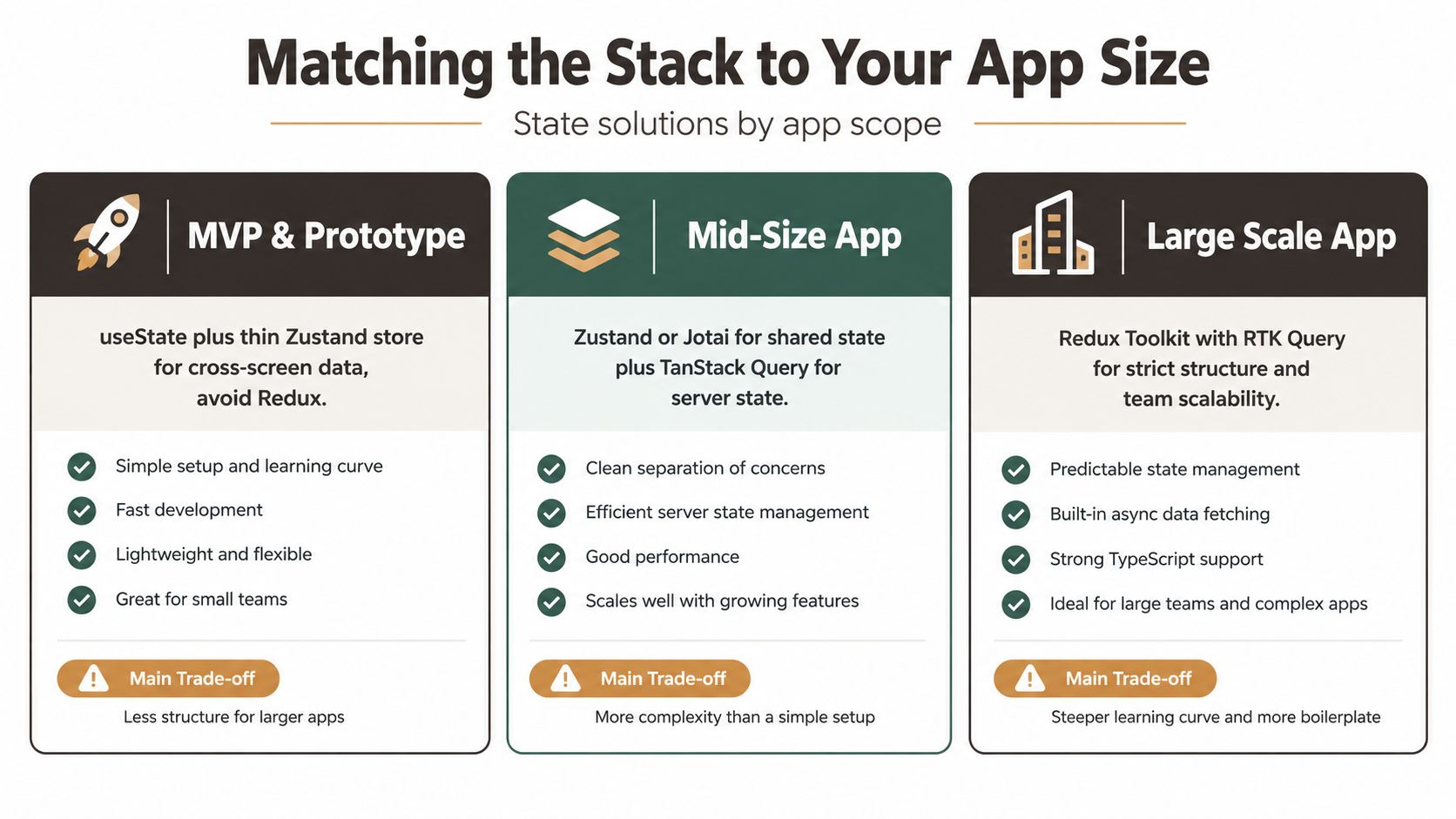 A comparison chart showing recommended state management libraries for MVP, mid-size, and large-scale React Native applications.
MVP and prototype
If you're shipping an MVP, don't start with Redux unless the team already has a strong reason. Hooks plus a thin Zustand store are usually enough. Keep local UI state in components. Put cross-screen data like auth session, onboarding progress, or a draft entity in a small shared store.
The main thing to avoid is architecture theater. Early apps change too quickly for heavy ceremony to pay back.
Mid-size product
Once the app has multiple flows, more developers, and screens that coordinate shared data, structure starts to matter more. Zustand with clearer slices works well, or Redux Toolkit if the team wants stronger conventions from the start. Server data should already be separate from client state by this point.
A lot of teams reach for Redux because the app feels “big.” A better question is whether the team needs strict state conventions, auditability, and predictable mutation patterns. If not, lighter tooling often holds up longer than expected.
Enterprise and workflow-heavy apps
The deciding factor here usually isn't raw state volume. It's operational complexity. Offline-first behavior, queued mutations, role-based permissions, device handoff, and long-lived workflows push architecture choices more than whether you have ten or fifty slices.
Recent commentary on offline-first and workflow-heavy React Native apps highlights patterns like layered persistence, finite-state machines for critical flows, and handling synchronization or conflict resolution as separate concerns rather than generic global state, as discussed in this 2025 deep dive on advanced state management.
If your app must survive flaky networks and resume complex user journeys, architecture matters more than the logo on the state library.
For teams debating whether Context still scales into that middle tier, this Context API vs Redux comparison helps clarify where each starts to strain.
How AppLighter Wires State Out of the Box
Most starter kits still treat state as one setup step. That's usually the wrong abstraction.
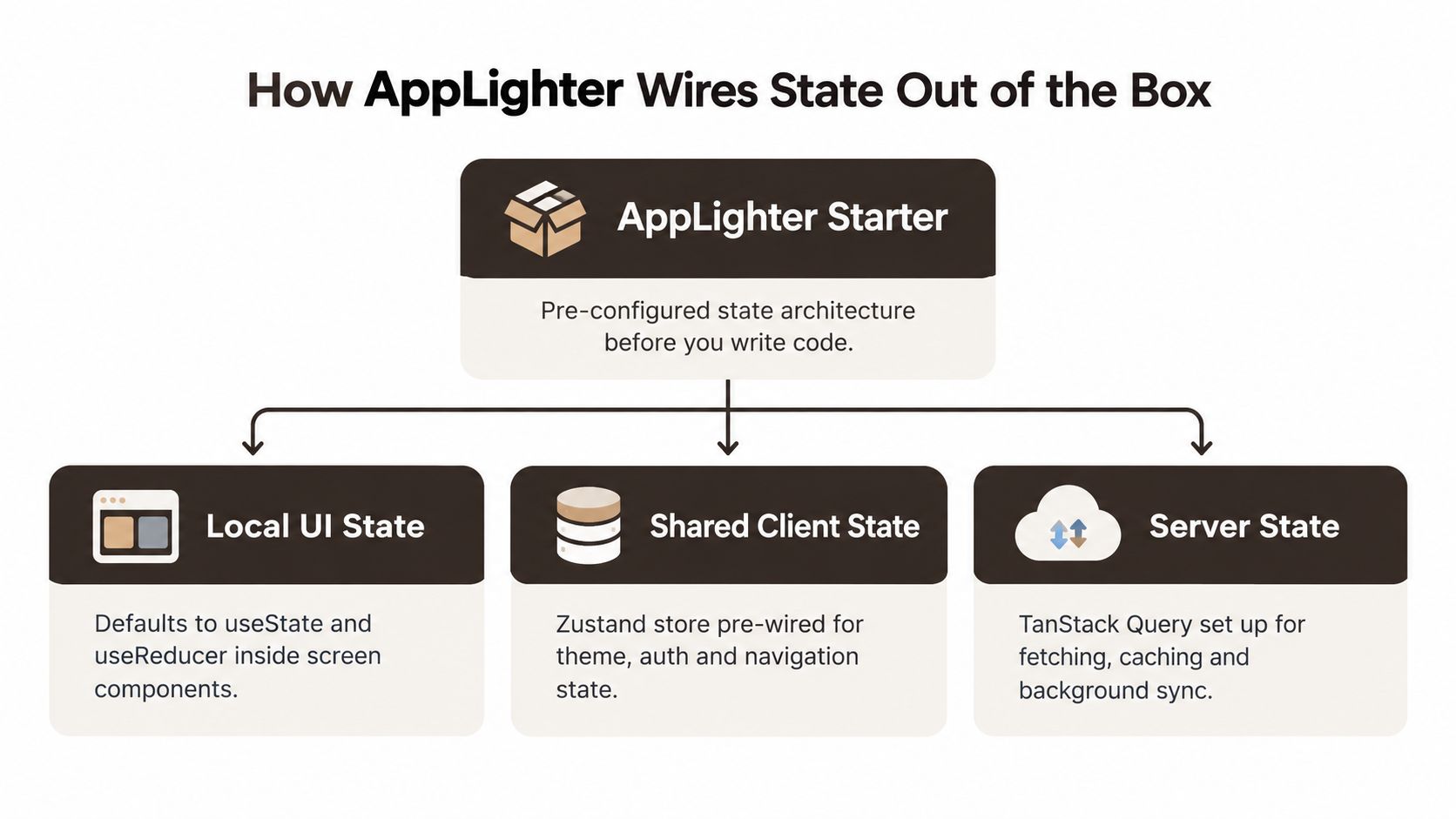 A diagram illustrating how AppLighter Starter manages local UI, shared client, and server state in React Native applications.
A more useful starter separates categories from the beginning. AppLighter does that by leaving local UI state inside screens with useState and useReducer, wiring shared client state with Zustand slices, and keeping server state behind a query layer instead of pushing fetched records into a global store.
What that structure looks like
The practical result is a folder shape that makes ownership obvious:
stores/for shared client state such as auth session, user preferences, or app-wide UI flagsservices/for API and backend integration logichooks/for screen-facing query and mutation hooks- screen components for local UI state and reducer-based view logic
That split prevents a common mistake. Teams don't end up stuffing fetched entities, optimistic mutation state, and sheet visibility into the same store.
Where the trade-off is
This kind of starter accelerates the boring setup phase. Zustand slices, typed store access, query hooks, auth wiring, and persistence defaults are already in place. Persisted client slices can use MMKV-backed middleware so session-like state is available quickly on cold start, while database reads stay in the query layer.
The trade-off is that no starter owns your architecture forever. Once your app gains more offline logic, cross-team feature flags, or workflow orchestration, you still have to decide where those concerns live and whether the starter conventions still fit.
Decision Checklist and Common Questions
Use this quick filter before choosing anything:
- Mostly local UI with minimal sharing: stay with hooks.
- Shared client state across screens: pick Zustand or Redux Toolkit based on team structure and complexity.
- Mostly fetched data from APIs: keep it in a query layer, not a global client store.
- Strict review culture, auditability, or large team coordination: Redux Toolkit is often the safer organizational choice.
- Offline sync and multi-step workflows: decide storage, rehydration, and sync strategy before debating library brands.
Common questions
A frequent question: Is server state really separate from Redux?
Yes. It should usually live with your data-fetching layer because it needs caching, invalidation, background refresh, and mutation handling more than generic global access.
How do you handle offline sync? Pair a query client with local persistence such as MMKV or SQLite, then add a sync queue for writes and conflict handling. Don't treat that as ordinary global state.
When do you outgrow a starter setup? Usually when persisted slices multiply, feature ownership spreads across teams, or you need tighter control over rendering boundaries than broad store conventions provide.
Revisit the choice every six months. State architecture ages with the product.
If you want a React Native starter that already separates local UI state, shared client state, and server state instead of forcing everything into one bucket, AppLighter gives you that structure up front. It's built for Expo apps with navigation, auth, Zustand-based client state, and a dedicated data layer already wired so you can spend time on product logic instead of rebuilding the same state setup again.