Master Mobile App Localization in Expo
Master mobile app localization for React Native and Expo. Learn practical workflows, i18n setup, RTL handling, and release engineering for global launches.
 Parth
Parth
You've shipped the MVP, tested the English interface on a handful of devices, and the first international users are already arriving. Then a German button wraps onto a second line, an Arabic screen puts the back arrow on the wrong side, and a payment label falls back to English because one key was hardcoded in a component nobody remembered.
That isn't a translation problem. It's a release engineering problem. Mobile app localization changes the code, layout, content, store presence, payments, and quality checks that sit around your product. For Expo and React Native teams, the sustainable approach is to prepare the application early, release languages gradually, and measure each locale as a product experiment rather than treating translation as a final checklist.
Table of Contents
- Defining Mobile App Localization and Internationalization
- The Business Case for Global App Markets
- Setting Up i18n in React Native and Expo
- Handling RTL Layouts and Dynamic Text Expansion
- Integrating Translation Management and CI Workflows
- Testing Strategies and Common Localization Pitfalls
- Measuring Success Through Locale Experiments
Defining Mobile App Localization and Internationalization
A useful distinction separates two jobs that developers often combine. Internationalization, or i18n, prepares the application for multiple languages and markets. Localization, or l10n, adapts that prepared application to a particular audience.
Internationalization is the architectural work. You move user-facing strings out of components, replace hardcoded dates and currencies with locale-aware formatting, support plural rules, and design layouts that can accommodate different scripts and text lengths. Localization is the market-specific work that follows. It includes translated interface copy, culturally appropriate imagery, local store metadata, regional pricing language, and a user experience that feels intentional rather than mechanically converted.
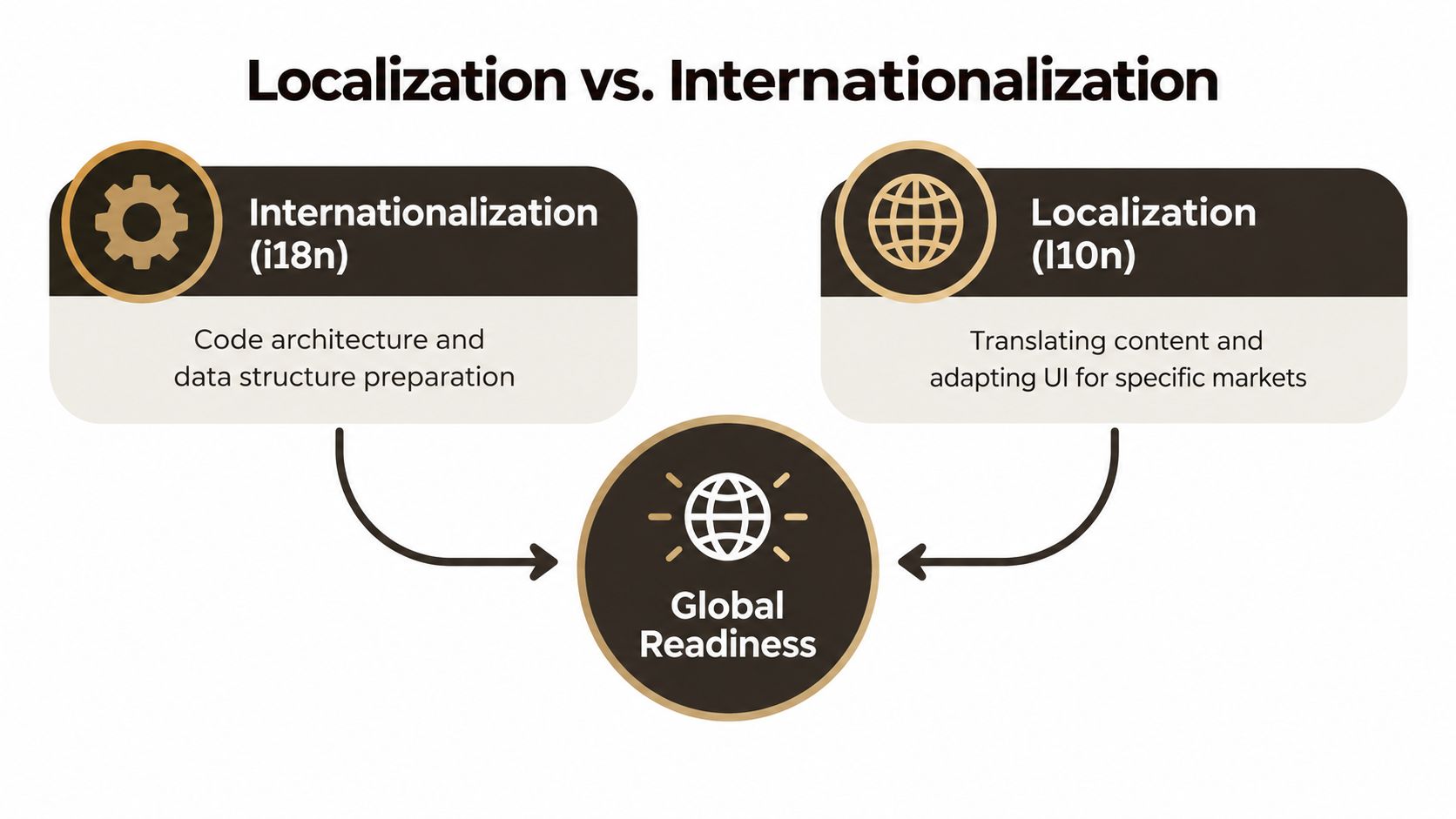 A diagram explaining the difference between internationalization and localization to achieve global readiness for software products.
Think of i18n as constructing a house with adaptable plumbing, wiring, doors, and room dimensions. Localization is furnishing that house for a specific family. The structure must support the furnishing, but the furniture, colors, labels, and appliances still need to fit the people who live there.
What localization changes in practice
Suppose a fitness app displays “Run 3 miles on 04/07 for $9.99.” A translated sentence alone doesn't resolve the product decisions. The app still needs to determine whether the date means April 7 or 4 July, whether the user expects miles or kilometres, how the price should be displayed, and whether the subscription disclosure uses familiar local terminology.
The same applies to app store presentation. A localized build can still underperform if its title, description, screenshots, onboarding, permissions, notifications, and support content remain in English. A worldwide survey of 800 consumers found that almost half of installed apps were available in respondents' native language, while native-language availability varied sharply between markets, from 78% of respondents in the United States to 14% in the Netherlands (survey details).
Practical rule: Treat every user-visible string, image, price, measurement, and store asset as localizable until you have a reason not to.
For a useful broader checklist covering context, cultural adaptation, and workflow decisions, review these localization tips for software teams. In an Expo MVP, you don't need enterprise-level process on the first day. You do need stable translation keys, a fallback language, locale-aware formatting, and a way to detect new untranslated content before it reaches production.
The Business Case for Global App Markets
An Expo MVP can attract users in several countries before the team has translated a single store listing. A founder may see downloads from Android-heavy markets, while subscription revenue comes mainly from iOS users elsewhere. That early signal changes the localization decision. Download potential and monetization potential aren't the same thing. A large audience may install frequently but convert poorly, while a smaller market may have a stronger need for the problem your app solves.
Industry reporting that cited App Annie data stated that five of the ten leading countries for iOS downloads and revenue in 2024 were non-English-speaking markets. The same report said that non-English-speaking countries represented 80% of Google Play's top five markets (market context and App Annie reporting). English-only product presentation can therefore exclude markets that already contribute meaningfully to app distribution and revenue.
Select markets with a joined-up scorecard
Start with evidence from current users rather than a global language ranking. Review organic traffic, store visits, support requests, trial starts, and payment attempts by country. Then check product fit, acquisition channels, regulatory requirements, competitor coverage, and the translation capacity your team can sustain after launch.
Platform mix belongs in the same decision. In 2025, Google Play accounted for about 90% of downloads in markets including India, Indonesia, Brazil, and Mexico, while 63% of downloads in the United States came through Apple's store (platform mix analysis). These differences affect store-listing work, purchase behavior, device coverage, and the commercial value of a language rollout. They also determine which release paths and review checks an Expo team must maintain.
A practical prioritization table might look like this:
| Question | What to inspect |
|---|---|
| Demand | Are users from the market already discovering or requesting the app? |
| Product fit | Does the local audience have a clear use case for the product? |
| Platform economics | Which store drives relevant acquisition and payment activity? |
| Operational cost | Can the team review copy, support users, and test the interface? |
| Competitive space | Does localization create a meaningful advantage or enter a crowded category? |
Make the first rollout small enough to observe and support. Translating every screen into every possible language creates review debt, expands the QA matrix, and makes failures harder to diagnose. A limited group of high-value locales produces cleaner feedback when onboarding, paywall, retention, support, and refunds are segmented by locale and platform.
Payment adaptation is part of the experiment
A subscription decision depends on more than translated copy. Users also judge whether the price looks familiar and whether the checkout method appears trustworthy. Paddle reports that localized currencies increase conversions by 25% on average, while local payment methods raised checkout conversion from 4.3% to 6.5% in the cited benchmark (currency and payment localization data).
Treat those figures as benchmarks, not forecasts. Compare them with your category, price point, fees, payment mix, and target market. For a mobile app, the rollout may involve store pricing, tax disclosures, billing language, currency formatting, and server-side transaction handling. Do not infer transaction currency from device language alone. A traveller can use an English device while purchasing in another market.
The market experiment should compare a country and platform combination, not just English against translated strings. Track product-page conversion, checkout initiation, payment success, trial-to-paid conversion, refunds, retention, and net revenue. Keep locale versions tied to a release configuration, record translation changes, and review results after enough traffic has accumulated to separate copy effects from platform or acquisition differences.
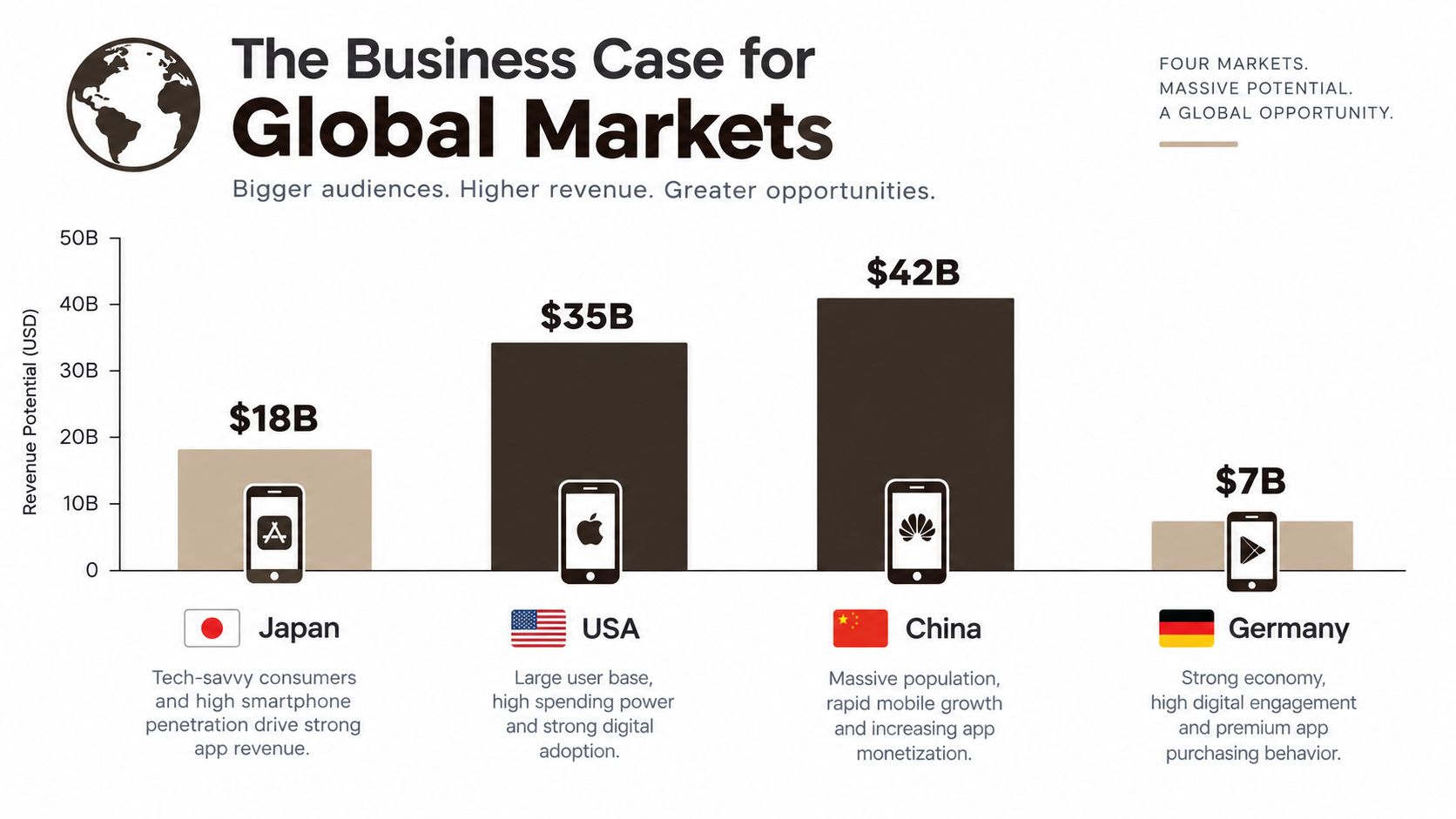 A bar chart comparing the app revenue potential of Japan, USA, China, and Germany in billions of dollars.
Setting Up i18n in React Native and Expo
For a new Expo application, separate device-locale detection from translation storage. expo-localization tells you what locale the device prefers. i18next manages resources, fallback behavior, interpolation, and pluralization. They solve different problems, so using them together is more maintainable than forcing one package to do both.
react-native-i18n can be adequate for a small prototype, but i18next has a broader ecosystem and clearer support for namespaces, interpolation, language switching, and ICU-style message handling. Whichever library you choose, keep the application's translation contract stable. Components should request semantic keys such as checkout.paymentFailed, not raw English sentences.
If you're starting an Expo project, the Expo getting started guide is a useful companion for the surrounding navigation, build, and application structure.
Organize resources by product area
A single translation JSON file becomes difficult to review as the application grows. A feature-oriented structure keeps ownership and context visible:
locales/en/common.jsonlocales/en/auth.jsonlocales/en/paywall.jsonlocales/de/common.jsonlocales/de/auth.jsonlocales/ar/paywall.json
Use the same key structure in every locale. Keep translator comments or descriptions near ambiguous keys, especially for words such as “Open,” “Charge,” or “Account” that can change meaning based on context. Don't use visible copy as a key, because changing the English wording then becomes a breaking change for the translation system.
At startup, read the preferred locale from expo-localization, normalize it to the languages you support, and fall back from a regional tag such as pt-BR to a base language when appropriate. If neither is available, use a deliberate fallback such as English. A missing translation should never leave a blank button or crash a screen.
Format values through the locale
Keep dates, numbers, and currencies out of translation strings whenever possible. Use JavaScript's Intl.DateTimeFormat, Intl.NumberFormat, or a message-formatting layer that understands the active locale. The translation should define the sentence, while the formatter supplies the value.
For example, a translation can contain a named placeholder for an item count, while the pluralization engine chooses the correct form. English commonly distinguishes singular and plural, but Arabic and Russian use richer plural categories. Concatenating a number with a translated noun, or adding an “s” in code, will fail as soon as the language changes.
Use one translation call for the complete message rather than assembling fragments:
- Fragile:
You havepluscountplusitems - Stable:
inbox.itemsRemainingwith a count variable and locale-aware plural rules
Test missing variables as deliberately as missing keys. A translator can return a grammatically valid sentence that still breaks if the code passes userName while the resource expects name. Type-safe key access, schema validation, and a development warning for fallback usage catch these failures before release.
Handling RTL Layouts and Dynamic Text Expansion
RTL support isn't a mirrored translation file. Arabic and Hebrew change the reading direction, visual hierarchy, alignment, icon placement, and sometimes the expected navigation flow. A screen that looks correct in English can become unusable when the layout engine mirrors only some elements.
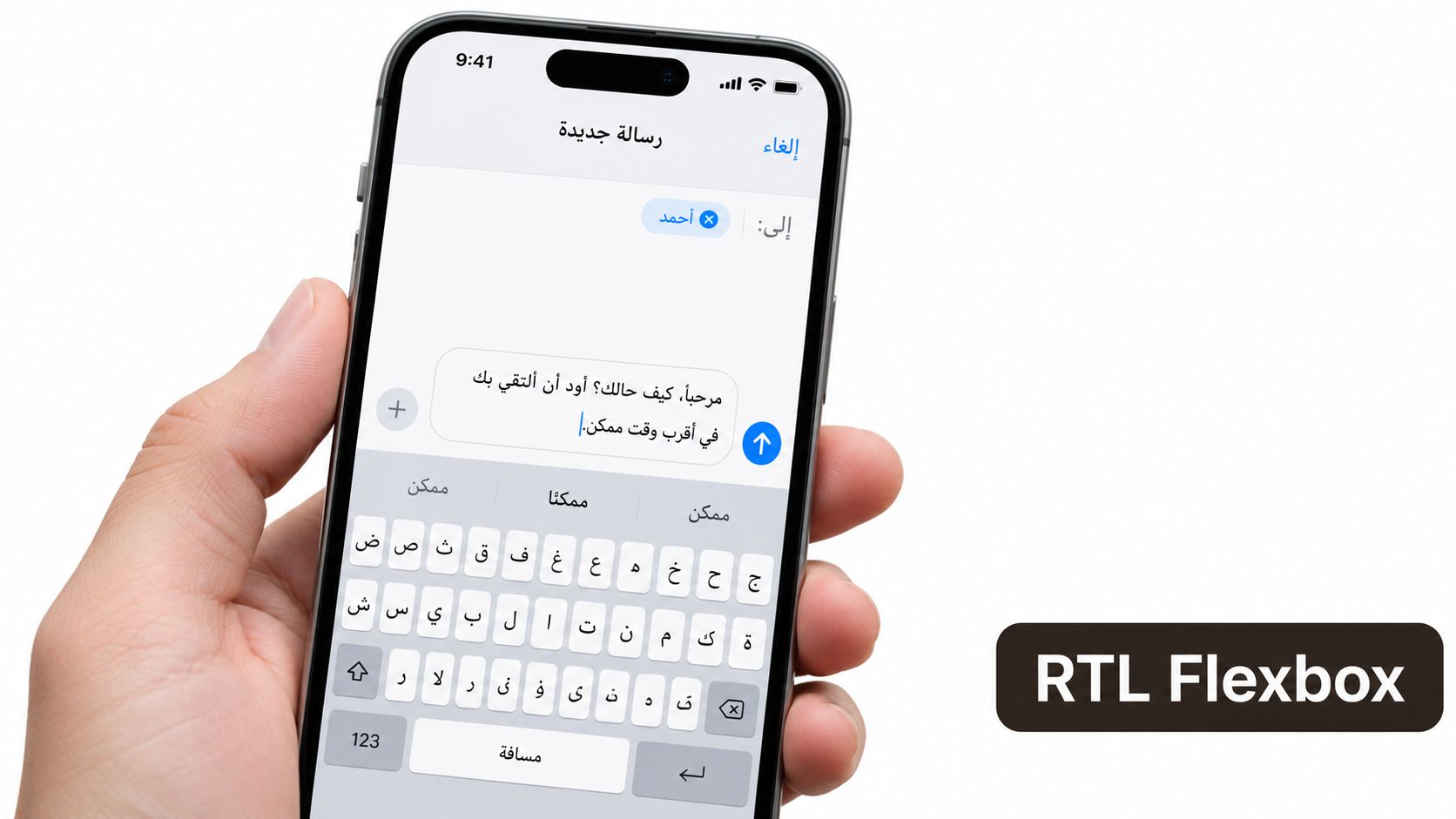 A hand holding a modern smartphone displaying a messaging app interface localized for the Arabic language.
Build with logical spacing
Use marginStart, marginEnd, paddingStart, and paddingEnd instead of left and right properties for directional spacing. Prefer flexDirection, alignment rules, and container relationships over absolute positioning. A leading icon should sit at the logical start of a row, not permanently at the physical left edge.
React Native's I18nManager controls RTL behavior, but changing direction can require an application reload and should be treated as a build and testing concern, not a toggle hidden behind a production setting. Test cold launch, authentication, navigation, modals, gestures, and persisted state after changing the locale.
Not every icon should mirror. Directional arrows, back controls, and progress indicators often should. Brand marks, clocks, media controls, and symbols with a fixed meaning may need to remain unchanged. Define this deliberately in the component rather than applying a blanket transform to every image.
Design for expansion before translation arrives
Text expansion exposes hardcoded dimensions quickly. A short English call to action can become a longer phrase in German or a different line shape in Arabic. Avoid fixed heights on buttons, cards, banners, and error messages. Let text wrap, set sensible minimum dimensions, and check the result with large accessibility font settings.
A practical review pass should inspect:
- Buttons with long labels and loading states.
- Forms with validation messages and keyboard focus.
- Tab bars and navigation headers.
- Empty states, paywalls, and promotional banners.
- Notifications and text containing user-generated names.
Use numberOfLines only when truncation is acceptable. If you must truncate, provide a way to reveal the full message. Ellipses can hide a critical payment condition or error recovery instruction.
Images deserve the same treatment. Don't bake translatable words into onboarding illustrations or screenshots. Store text separately from artwork, and prepare alternate assets when an image relies on culture-specific references, symbols, or directionality. A flexible layout with poor imagery still feels foreign, while a translated interface with text embedded in English graphics remains visibly incomplete.
Layout rule: If a screen only works when every string has the same length, it isn't internationalized yet.
Integrating Translation Management and CI Workflows
A shared spreadsheet usually works until the first active feature cycle. Developers add keys, translators edit a different copy, someone pastes values into JSON, and a release ships with one locale missing a new error message. The problem isn't that spreadsheets are always bad. The problem is that they have no reliable relationship with branches, code review, screenshots, or build status.
A translation management system such as Crowdin, Lokalise, or Phrase gives the team a central workspace for source strings, translation status, terminology, context, and review. The important decision is to connect it to the same Git workflow that controls the application.
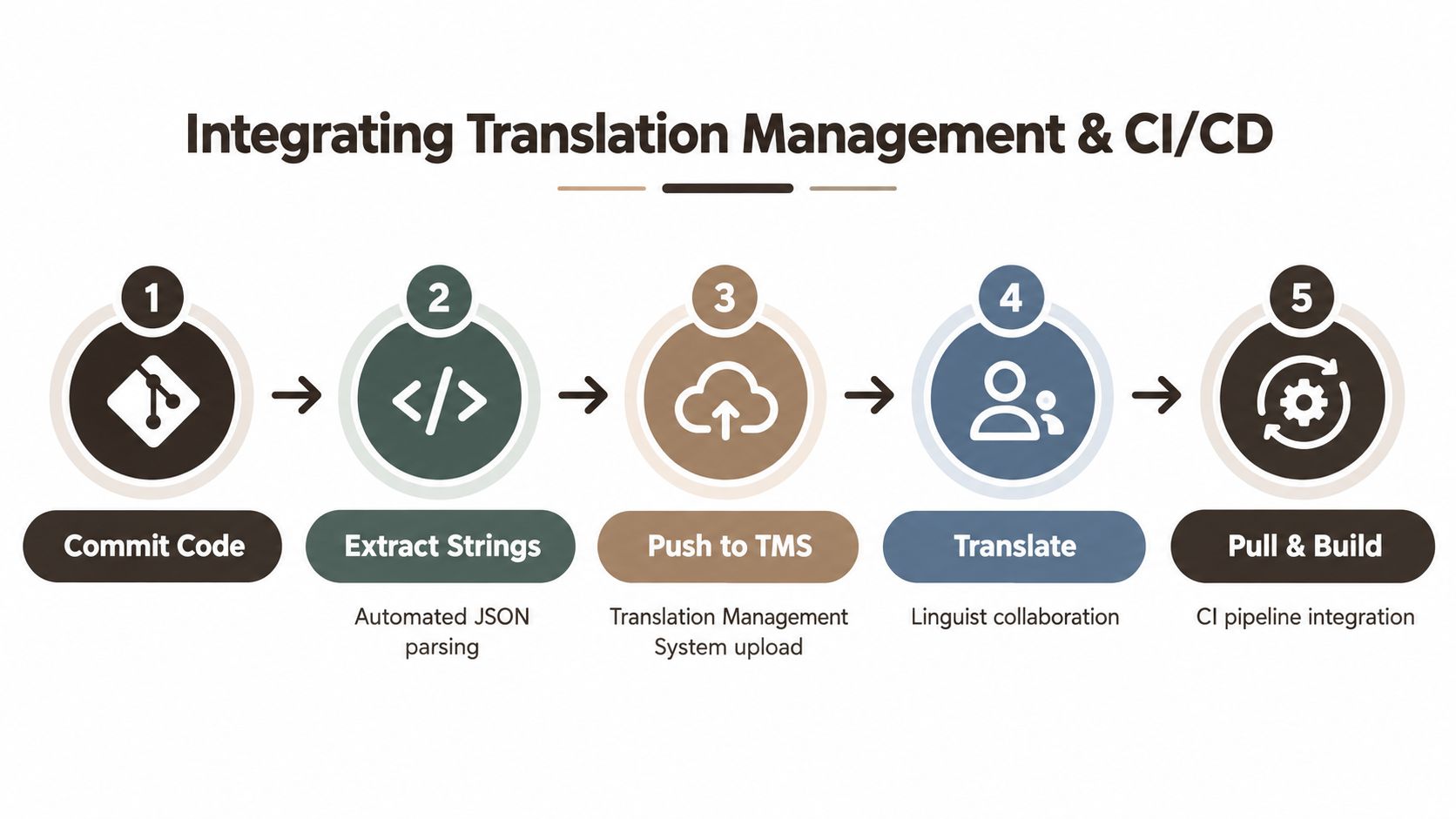 A diagram illustrating the five-step workflow for integrating translation management systems with CI/CD development pipelines.
Make translation part of the pull request
A workable Expo pipeline can follow this sequence:
- A developer adds semantic keys with the feature.
- CI extracts or validates the resource files.
- The changed source strings are pushed to the TMS.
- Translators receive screenshots, notes, and glossary context.
- Approved files return through a pull request.
- The build checks key parity, placeholders, and fallback usage.
The exact CLI and API commands depend on the TMS, but the governance should remain simple. Source-language changes belong with the feature branch. Translated resources should be reviewable as code. A pull request should fail when a locale contains malformed JSON, an unknown placeholder, or a missing key required by a production screen.
For a practical treatment of mobile build automation, the CI/CD guide for mobile provides useful context around build jobs, environment separation, and release controls.
Keep quality proportional to risk
An MVP doesn't need to block every release while a low-priority marketing sentence waits for review. It should block a release when a translated payment label is truncated, a navigation control is missing, or an authentication error renders as an empty string.
Set severity rules that reflect user impact:
- Block: broken navigation, invisible controls, invalid interpolation, unreadable payment or consent text.
- Review before release: onboarding copy, empty states, support instructions, and notification text.
- Defer safely: low-impact promotional wording that can remain in a reviewed fallback language.
Some teams use remote language delivery to update approved copy without waiting for a full store release. That can reduce turnaround for content changes, but it also introduces versioning, caching, rollback, and app-store policy considerations. Don't use remote updates to bypass review of code-dependent strings or to conceal an incomplete release.
The sustainable goal is continuous localization, where each feature carries its strings, context, tests, and translation status. Translation shouldn't start after the English build is already in production. It should move alongside development closely enough that the team sees language quality as part of “done.”
Testing Strategies and Common Localization Pitfalls
A translation can be linguistically correct and still fail inside the product. The text may be assigned to the wrong screen, a placeholder may disappear, a label may overflow, or the fallback may display English in a critical flow. AI-assisted translation speeds up first drafts, but it doesn't remove the need for terminology control, contextual review, and human judgment for sensitive or dynamic content.
Don't ask translators to review isolated JSON values if you can give them screenshots or a preview build. “Save,” “Subscribe,” and “Continue” can require different translations depending on what the button does. Context is part of the source material.
Start with pseudo-localization
Pseudo-localization creates deliberately distorted test strings before real translations are ready. A development locale might add brackets, accented characters, and extra length to every source string. It can also expose strings that weren't extracted because hardcoded English remains visually unchanged.
Use it to catch:
- Fixed-width buttons and clipped headings.
- Text embedded directly in JSX or native configuration.
- Layouts that collapse under longer labels.
- Unsupported characters and font fallback.
- Incorrect assumptions about capitalization.
- Missing interpolation variables.
Pseudo-localization won't tell you whether a German sentence sounds natural or whether an Arabic icon choice is culturally appropriate. It does provide a fast structural test that belongs in development and CI.
Combine automated and human checks
Screenshot tests can render key routes across supported locales and device sizes. Compare snapshots for navigation, sign-in, onboarding, subscription, settings, empty states, and error recovery. Dynamic data should be controlled so the test detects layout changes rather than random content differences.
A useful minimum quality system has four layers:
- Static validation checks JSON syntax, key parity, placeholder names, and unsupported nesting.
- Pseudo-localized rendering stresses dimensions before translations arrive.
- Locale screenshot tests expose visual regressions across important flows.
- Human linguistic review checks tone, terminology, cultural meaning, and context.
Monitor fallback-language usage in development and production analytics. A fallback event should include the key, locale, screen, app version, and feature area, while avoiding sensitive user content. That turns an invisible quality issue into a ticket the team can prioritize.
For broader context on automated mobile quality practices, these mobile testing insights from AskYourQA can help teams compare device coverage, regression checks, and automation trade-offs.
AI-generated or user-generated text needs extra safeguards. Dynamic messages can contain unsafe wording, inconsistent product terms, or culturally inappropriate suggestions. Route high-risk strings through human review, maintain a glossary for product language, and block release when a translation affects consent, money, account access, or safety.
Measuring Success Through Locale Experiments
A localized release earns its place when it answers a product question with evidence. “We translated the app” describes completed work. “Users in this market complete onboarding more often after the release, while payment success stays flat” describes a measurable experiment.
Treat locale as a first-class analytics dimension. Record the resolved app locale, country or transaction market where relevant, platform, app version, and experiment cohort. Do not use device language as a substitute for country. A user may speak one language, live in another market, and pay through a third region.
Measure the path, not just the install
A localized store listing can attract installs without producing activated users. Track the full journey:
- Store page view to install.
- First launch to onboarding completion.
- Onboarding completion to core action.
- Core action to paywall view.
- Paywall view to checkout initiation.
- Checkout initiation to payment success.
- Trial start to paid conversion.
- Paid conversion to retention.
- Refunds, support contacts, and fallback-language events.
The user behavior analysis guide helps structure event reviews around product journeys instead of vanity metrics.
For an Expo MVP, use feature flags or remote configuration to control locale exposure without rebuilding the binary for every experiment. Roll out by market where possible, retain a comparable English or previously shipped cohort, and record every product change alongside the release. A language change shipped with new pricing, onboarding logic, or payment methods is a bundle of changes, not a clean translation test.
If currency and payment methods change together, label the experiment accordingly. Otherwise, the result cannot distinguish translated copy from familiar pricing, a trusted payment method, or their combined effect.
Paddle's cited benchmark reports localized currencies increasing conversions by 25% on average, and local payment methods increasing checkout conversion from 4.3% to 6.5% (payment localization benchmark). Treat those figures as context, not a forecast. Judge the release by net revenue after platform fees, refunds, taxes, translation costs, support load, and acquisition spend.
Turn results into rollout rules
Set the next action before launch:
- Expand when activation is strong, support demand is acceptable, and monetization has a credible path.
- Improve when onboarding performs well but payment or retention lags.
- Audit when fallback events, refunds, or support tickets rise.
- Pause when product fit remains weak after the experience and payment flow are localized.
This keeps language coverage tied to release quality. Ship a small set of well-supported locales, measure results by platform and app version, then add coverage when the evidence supports the operational cost.
AppLighter gives Expo and React Native teams a production-oriented foundation for mobile MVPs, including application structure and tooling for maintainable localization workflows. Use it to prepare locale-aware screens, run release experiments, and iterate on global app experiences through AppLighter.