Artificial Intelligence UX Design: Principles and Patterns
Artificial Intelligence UX Design explained: principles, assistant patterns, error recovery, React Native and Expo guidance, and how to test AI features.
 Damini
AI UX design is the practice of designing how people understand, direct, check and recover from software behaviour that is probabilistic and can act on their behalf.
You've generated a convincing mobile prototype. The layout looks finished, the assistant answers fluently, and the main task works in a demo. Then someone submits an unclear request, loses their connection, or asks the assistant to undo a change. The screen still looks polished, but the person is stuck.
That's the practical challenge of artificial intelligence UX design: making uncertain behaviour usable, not just making generated output attractive.
Table of Contents
- What AI UX Design Means and How It Differs
- Principles and Ethical Limits to Set First
- Suggestion and Assistant Patterns That Keep Users in Control
- Explainability, Error Recovery and Personalization Patterns
- Building AI Features in React Native and Expo
- Real-World AI UX Examples and What They Teach
- Testing and Measuring AI UX Before Launch
- Choose Your First AI Feature and Start Small
What AI UX Design Means and How It Differs
Think of traditional software as a vending machine. Press the same button under the same conditions, and you expect the same snack. An AI feature is closer to a barista interpreting an incomplete order: the result may be reasonable without being what you meant.
The analogy has limits. Traditional software can behave unpredictably too, and models can operate within tightly constrained workflows. The important difference is that an AI interface must accommodate interpretation, not merely execution.
What changes for the designer
Model outputs can change with the input, surrounding context, and model version. Mistakes may look plausible rather than visibly broken. When a model can use tools, its interpretation can also trigger actions outside the conversation.
Traditional UX versus AI-driven UX
| Dimension | Traditional UX | AI-driven UX |
|---|---|---|
| Output behaviour | Same input gives the same output | Output varies with input, context and model version |
| Typical failure | Visible bug or broken flow that can be reproduced | Plausible but wrong output that looks correct |
| User feedback | Click leads to a predictable result | Users need confidence cues, sources and editable results |
| Control model | User decides each step | User sets scope, approves actions and recovers from mistakes |
| Testing approach | Scripted task paths | Sampled inputs, edge cases and adversarial prompts |
| Core risk | Confusing navigation | Over-trust or under-trust in the output |
These are design tendencies, not absolute boundaries. A model-generated tag and an assistant authorised to update customer records need very different safeguards.
The core responsibilities are easier to understand as connected activities.
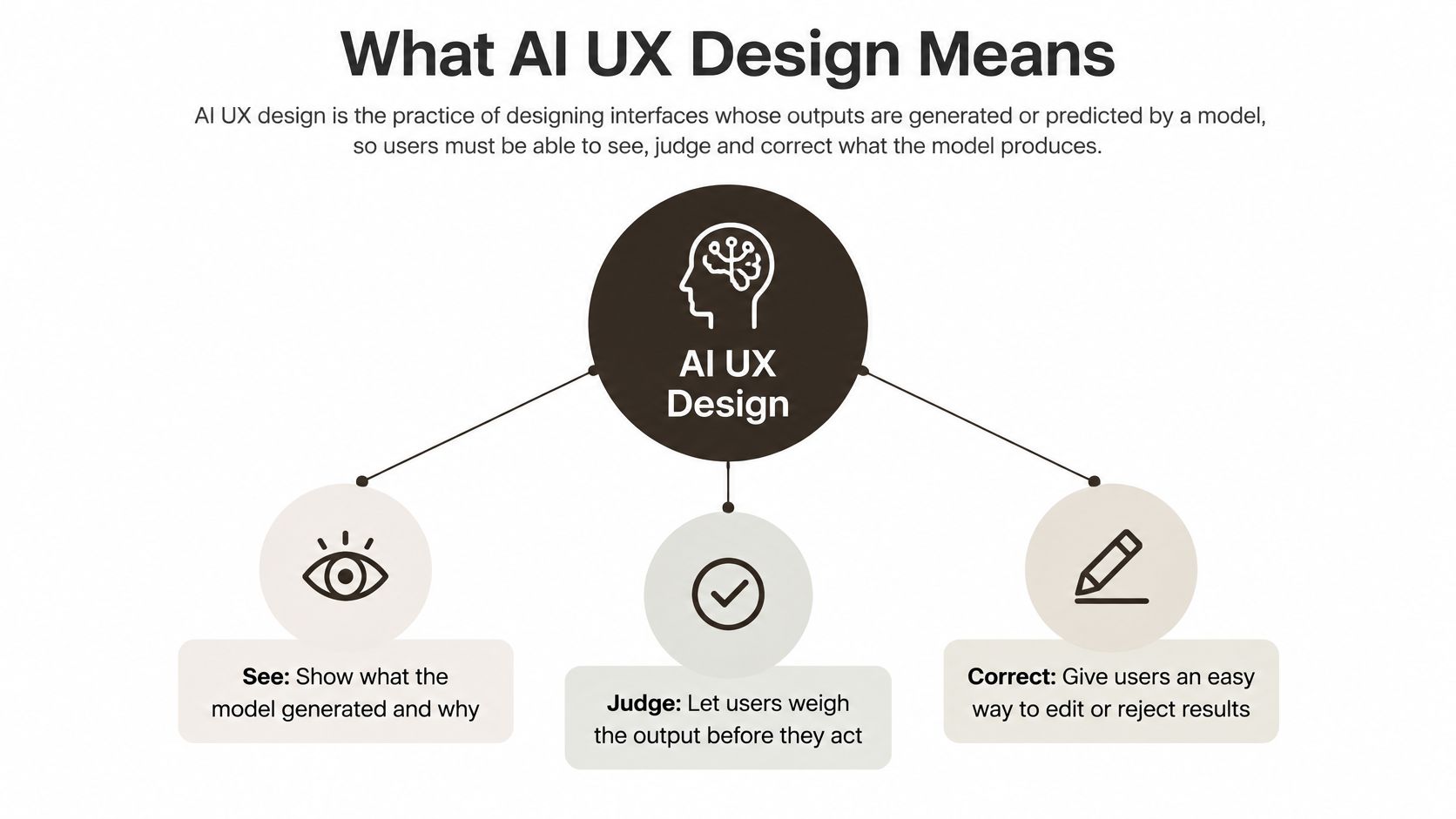 A diagram illustrating the core pillars of AI UX design: helping users see, judge, and correct model outputs.
Screen generation is only part of the work
A systematic literature review published in 2025 identified 83 empirical studies on AI-supported UX tools, with predictive AI representing 73.5% of those studies and evaluation appearing in 41 studies. That scope extends beyond generating attractive layouts.
Before implementing an assistant, map its decision points alongside its screens. The software planning insights from Faberwork, from Faberwork LLC, provide a useful companion for thinking through the path from concept to implementation.
Principles and Ethical Limits to Set First
An AI feature resembles a junior colleague who works quickly but needs a clear brief. You wouldn't give that colleague unrestricted access to customer records just because their writing sounded confident.
Start by defining responsibilities, not choosing a chat bubble.
Principles with practical consequences
- Make capabilities visible. A document assistant should explain whether it searches uploaded files, answers from general knowledge, or does both. Otherwise, users may assume it checked material it never accessed.
- Keep consequential decisions human. A scheduling assistant can propose a meeting time without automatically inviting everyone. Separate preparing an action from authorising it.
- Calibrate trust. Distinguish extracted facts from inferred suggestions. A guessed delivery date shouldn't look identical to a date copied from an order record.
- Include different interaction needs. Announce completion to screen-reader users without reading every arriving word. Keep controls reachable with keyboard and assistive navigation.
- Minimise collection. If a task needs a cropped receipt, don't upload the entire camera frame and surrounding room.
Ethical limits belong in the specification. Check whether recommendations disadvantage particular user groups, whether users understand logging and training choices, and whether confident wording gives an unsupported answer false authority.
For conversation planning, designing enterprise conversations with Yellow.ai is a useful companion resource. Treat the conversation as a bounded service, with explicit handoffs and limits, rather than a personality that can answer anything.
Accessibility includes privacy
A study of visual privacy management involving 21 blind and low-vision participants found that participants balanced independence, privacy and emotional agency, and preferred on-device processing, zero-retention guarantees, sensitive-content redaction and visible privacy indicators.
For a camera-based assistant, explain what the camera captures, what the model receives, whether a cloud service processes it, and when retained material is deleted. Include bystanders and confidential documents in the consent flow. Let users correct or delete generated descriptions without locating a separate account portal.
The practical work includes permission timing, retention controls and deletion behaviour, not just a privacy-policy checkbox. Use a mobile privacy and compliance checklist when translating these decisions into implementation requirements.
More assistance isn't automatically more autonomy. Users need control over what the assistant exposes as well as what it explains.
Before building, answer: what can go wrong, who would be hurt most, and how can the affected person recover?
Suggestion and Assistant Patterns That Keep Users in Control
An inline suggestion in a notes app appears as grey text. The user can accept it with a tap or keep typing without interruption. A chat assistant that rewrites an entire document changes much more, so it needs a stronger review boundary.
The difference is scope, not whether the interface looks conversational. A compact button can initiate a consequential action, while a large chat window might only produce a harmless draft.
Design the action lifecycle
The Guidelines for Human-AI Interaction paper synthesised more than 150 recommendations into 18 guidelines, organised around initial interaction, interaction in context, error handling and long-term use. A practical implementation is a visible control-and-recovery sequence:
- State intent before execution. Describe the operation and its scope, including affected documents or records. Users can't approve boundaries they can't see.
- Confirm consequential actions. Sending a message, deleting data or publishing content needs a meaningful approval step. Show the destination and actual content, not just a generic confirmation button.
- Expose progress and uncertainty. Identify the current activity, such as retrieving files or preparing a draft. Silence leaves users guessing whether the request failed.
- Provide a usable exit. Return editable results, retry controls and a manual or human route. Where reversal is possible, make it available beside the result.
This flow shows why an inline completion can stay lightweight while a document rewrite needs a preview.
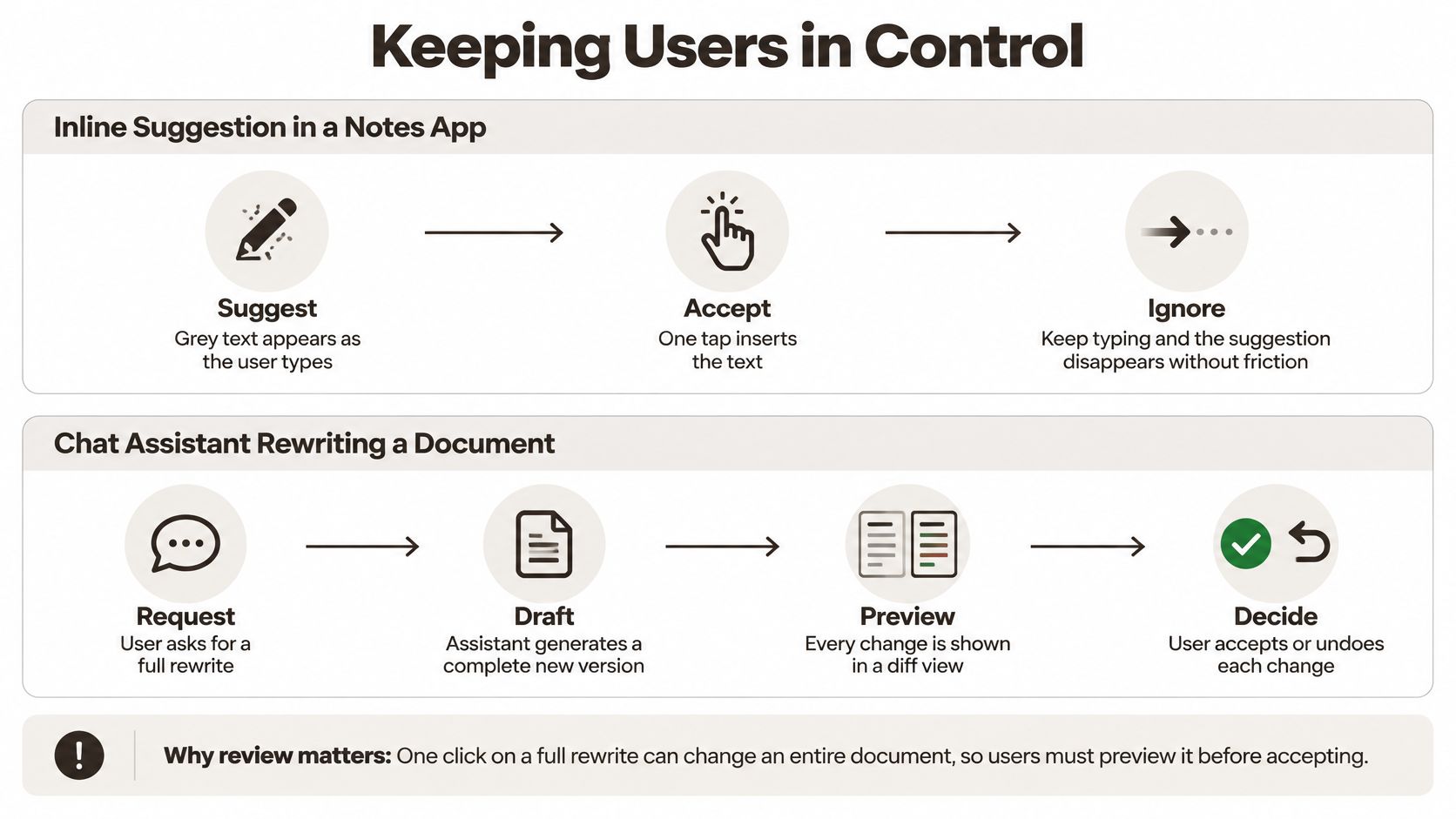 A diagram illustrating design principles for maintaining user control when using AI features in digital applications.
Match autonomy to consequences
Keep autonomous work limited to low-impact, repetitive operations with a visible override. For generated navigation, state changes, database writes or API calls, preview the proposed operation before committing it. Use transactions, version history or compensating actions where appropriate; don't promise undo for an irreversible external action.
Fitness coaching makes the distinction concrete. When exploring an experience such as GrabGains' AI training for strength and endurance, consider how someone would review a proposed workout adjustment, correct an injury constraint, or reject a recommendation.
A user's silence isn't permission. Measure whether people understand the proposed action and can interrupt it, rather than treating every completed automation as success.
Explainability, Error Recovery and Personalization Patterns
Say a receipt scanner misplaces a decimal point and saves the wrong total. The interface displays a tidy success message, so the user has no reason to inspect it. This is an illustrative failure scenario: the software completed its operation but didn't help the person verify the outcome.
The fix starts with the relationship between the evidence, the interpretation and the saved record.
Explain enough to support a decision
Put the receipt image beside the extracted total. Highlight the relevant area so users can compare the interpretation with its source.
For recommendations, offer a short explanation sheet showing relevant inputs. For factual answers, provide source links when available. Only display a confidence cue when it's grounded in a meaningful measure and changes what the user should do; a decorative percentage can imply precision you haven't established.
Rule: Explain the basis of the result, not imaginary access to the model's internal reasoning.
Give different failures different exits
A usability study evaluating 138 mobile UI screens generated by Figma, Banani and Stitch reported low Heuristic Support Rates for help and documentation, error recovery, efficiency of use and error prevention. Visual coherence didn't establish usability.
| Failure | Recovery pattern |
|---|---|
| Uncertain extraction | Show the raw input beside editable fields |
| Invented detail | Flag unsupported content and offer removal or source checking |
| Timeout | Preserve inputs and offer a safe retry |
| Refusal | Explain the boundary and offer an allowed alternative |
| Permission denied | Provide manual entry or file selection |
| Out-of-scope request | Clarify supported tasks and suggest a narrower request |
Rule: Preserve the user's work and offer a next action specific to the failure.
For generation that arrives progressively, the React Native streaming-response guide can help connect transport behaviour with interface states. Partial text should remain visibly incomplete until the request finishes.
This video offers an additional visual reference for thinking about AI interface design.
Keep personalization inspectable
Ask users to opt in with a specific benefit, such as adapting suggestions to their chosen writing style. Show the signals used, let people remove individual preferences, and provide a reset.
Keep an unpersonalized browsing path available so recommendations don't quietly narrow the user's options. Rule: People should be able to inspect and change what the product remembers about them.
Building AI Features in React Native and Expo
Mobile users switch apps, lose signal and work on small screens. Treat an AI request as a stateful operation that may outlive the visible screen, rather than a fetch call attached to a spinner.
Build the request lifecycle deliberately
- Streaming. Render partial text as it arrives, but keep the composer responsive. Connect cancellation to an
AbortController, and distinguish stopping generation from deleting the partial draft. - Permissions. Request camera or microphone access when the person activates that feature. Explain the purpose beside the control and offer text entry or file selection as a fallback.
- Inference location. Keep private or straightforward tasks on-device where device capabilities permit. For server processing, explicitly define what leaves the device and avoid bundling unrelated context into the payload.
- Offline handling. Persist pending requests with a visible status. Retry safe operations after reconnection, but require renewed approval when a delayed action could have stale consequences.
- API contracts. In a Hono/TypeScript layer, validate versioned schemas at runtime. Return a typed status, request ID and structured error; include confidence only when you have a defensible measure.
For writes, use idempotency keys so retries don't repeat the mutation. Enforce explicit timeouts and keep provider credentials server-side. A TypeScript type alone doesn't validate a model's response.
Match feedback to observed waiting
Choose feedback based on measured behaviour on your supported devices and networks. These are interface decision rules, not universal response-time guarantees.
Response time thresholds and the UI each one needs
| Response time | User perception | Interface pattern |
|---|---|---|
| Completes before a wait becomes perceptible | Feels immediate | Update the UI directly |
| Brief but perceptible wait | Action registered, result pending | Subtle spinner or skeleton placeholder |
| Long enough to interrupt attention | User needs evidence of progress | Streamed text, step labels and a cancel button |
| Long enough that leaving is reasonable | User may switch tasks or retry | Background job with optional completion notification |
Don't invent progress percentages when the backend can't measure completion. Restore the request state when the app returns to the foreground, and reconcile the result using the request ID rather than starting another operation.
Real-World AI UX Examples and What They Teach
Gmail and the dismissible suggestion
Consider composing an email with Gmail's Smart Compose. Instead of replacing the writing surface with a conversation, an inline completion appears where you're already typing.
Without that pattern, a suggestion could interrupt the writer with a dialog or require an explicit rejection. With it, the writer can continue their sentence and leave the suggestion behind.
Lesson: A low-impact suggestion should cost almost nothing to dismiss.
The writing surface remains the primary interface, rather than becoming a container for an assistant.
 A woman typing on a laptop with an artificial intelligence writing suggestion displayed on the screen.
GitHub Copilot and the review boundary
GitHub Copilot illustrates a broader range of assistance, from inline code suggestions to chat-based editing workflows. The UX question changes when the proposed edit spans files rather than completing the line under the cursor.
In a review-first workflow, the developer inspects a diff, checks surrounding code and runs tests before committing. Generated code remains a proposal, not proof that the intended behaviour works.
Lesson: Keep the commit decision with the human, even when the assistant prepares the patch.
A receipt app and the missing checkpoint
Consider an illustrative composite, not a documented customer case: an indie team builds a receipt tracker that saves extracted fields immediately. Users report incorrect totals because the success screen hides the interpretation behind a completed state.
The team changes the flow. The revised screen places the photo beside editable fields, requires acceptance before saving, and provides a reversal action afterward.
The model hasn't changed. The team has changed when the user gets to inspect its work.
Lesson: Some apparent model-quality problems need an interaction change before they need another model.
Keep a proposal close to its evidence. The farther users must travel to check it, the easier it is to accept without understanding.
Testing and Measuring AI UX Before Launch
A 2025 systematic review of 50 peer-reviewed and preprint studies found widespread GenAI use for prototyping and visual assets, alongside fragmented methods and a lack of standardised evaluation frameworks. Producing an interface and demonstrating that people can use it safely are separate tasks.
Define success around the user's outcome. A completed model response isn't a completed task if the person must repair it elsewhere.
Measure behaviour, not just generation
Behavioural metrics for AI features
| Metric | What it reveals | Signal to act on |
|---|---|---|
| Acceptance rate | Share of suggestions or results kept | High acceptance with high edit rate suggests near-miss output |
| Edit rate | How much users change the output | Rising edits after a model update can signal regression |
| Cancellation rate | Users abort mid-action | Spikes during execution warrant checking latency and scope clarity |
| Error-recovery success | Share of failures users resolve without help | Low values suggest missing or unclear recovery paths |
| Time-to-intervention | Seconds before a user overrides the AI | Very short times warrant investigating trust or obvious mistakes |
Define denominators before collecting events. For example, distinguish a suggestion that was displayed from one the user actually had an opportunity to review. Separate meaningful content edits from formatting changes.
Use user behaviour analysis to connect these events to task journeys. Record state transitions and outcomes without putting private prompts or document contents into analytics by default.
Run a lightweight mobile evaluation
- Recruit representative participants. Give them realistic tasks using material they can judge. Include people with different experience levels and access needs.
- Introduce ambiguity and adversarial inputs. Test missing context, contradictory instructions and documents containing text that tries to redirect the assistant.
- Change the operating conditions. Interrupt connectivity, background the app and test with a screen reader. Check whether completed and pending actions remain distinguishable.
- Include unfamiliar users. Avoid coaching them through the interface. Watch whether they discover limitations and recovery controls on their own.
- Record outcomes consistently. Capture task success, error recovery, latency and override behaviour for each run. Note whether a participant accepted an incorrect result.
Read conflicting signals as prompts for investigation. High acceptance alongside extensive editing can mean useful drafts that still require substantial work. Low cancellation might indicate smooth execution, or it might mean participants couldn't find the stop control.
Release criterion: People must be able to recognise a meaningful failure and recover without relying on the facilitator.
Retest after changing the model, prompt, retrieval pipeline or action permissions. Faster generation without evaluation can help a team ship flawed interactions sooner.
Choose Your First AI Feature and Start Small
Choose a task that's low-impact, frequent, easy to verify and easy to reverse. Suggested tags, draft replies that users send themselves, and summaries connected to source material are sensible starting points.
Avoid making payments, deleting records or changing access permissions your first autonomous feature. Those tasks introduce consequences that a convincing demo won't reveal.
Turn the release decision into checks
- Inspect the proposed action. Can a participant identify the scope before execution?
- Exercise the safeguards. Test confirmation, editing and reversal with actual state changes, not only static mockups.
- Interrupt the request. Check loading, failure, cancellation and offline states on a device.
- Complete the evaluation. Resolve observed blockers and repeat failed tasks with representative participants.
- Verify measurement. Confirm that acceptance, editing and cancellation events describe real user actions without exposing sensitive content.
A starter kit is optional. AppLighter supplies authentication, navigation, state management and an API layer for Expo and React Native; assembling those pieces yourself is another route when you need different architectural choices.
The immediate next step doesn't require an AI integration. Draw the feature's control flow on paper, including an incorrect result and an interrupted request. Test that prototype before writing the model call, so you know what behaviour the integration must support.
AppLighter offers an Expo and React Native starter kit with authentication, navigation, a Hono/TypeScript API layer and AI-assisted development integrations. Visit AppLighter if you want that foundation in place while you focus on your feature's control flow, recovery states and validation.