AI Mobile App Development: A Practical 2026 Guide
A practical 2026 guide to AI mobile app development covering on-device vs cloud architecture, model choices, privacy, cost, and Expo + AppLighter workflows.
 Sanket
You've probably already built the demo. A user pastes a long note, taps Summarise, and a model returns something useful. The difficult part starts after that moment: deciding where inference runs, protecting user data, keeping the interface responsive, handling failures, and controlling the cost of every successful request.
That's the shape of AI mobile app development in 2026. The model is only one component. A production feature also needs routing, authentication, storage, evaluation, observability, fallbacks, and a user experience that still works when the network disappears. This guide takes an architecture-first view, with practical choices for teams shipping across iOS, Android, and web with Expo and React Native.
Table of Contents
- Why AI Mobile App Development Is Suddenly Everywhere
- What AI Mobile App Development Actually Means
- Choosing Between On-Device, Edge, and Cloud AI
- Models, SDKs, and Integration Patterns That Work
- Data, Privacy, Performance, and Cost Trade-Offs
- Building AI Features Faster With Expo and AppLighter
- Your AI Mobile App Development Toolkit and Next Steps
Why AI Mobile App Development Is Suddenly Everywhere
An indie developer can now ship a useful AI feature without building a machine learning platform first. A weekend travel-app prototype might stream itinerary summaries from a Hono edge endpoint, cache completed results in Supabase, and fall back to a local Phi-3.5-mini model when the device is offline. The hard decision is not adding a prompt. It is choosing which parts belong on the device, at the edge, or in the cloud.
That lower barrier has changed the competitive baseline. Sensor Tower reported that apps mentioning AI were downloaded 17 billion times globally in 2024, representing about 13% of all app downloads that year, as reported in this summary of AI mobile app development statistics. Generative AI apps, including chatbots and image generators, earned nearly $1.3 billion in global in-app purchase revenue across iOS and Google Play in the same year, with revenue up nearly 180% year over year.
The wider shift matters more than any individual chatbot. Sensor Tower also recorded more than 3,000 apps mentioning AI for the first time in 2024, including over 500 games and more than 300 utilities and education apps. AI is moving into products where users may never describe the app as an "AI app". They now expect it to understand context, reduce manual work, or respond intelligently.
The hardware shift changes the default
Cloud APIs made early experiments quick, but they tied every request to connectivity, server latency, and metered usage. Modern phones make a broader architecture practical. Quantised models can handle selected tasks locally, while edge services place inference closer to the user without pushing the full workload onto the device.
The resulting trade-offs affect text rewriting, document classification, image descriptions, smart replies, and private data extraction. A local model keeps sensitive input on the phone and can respond without a network. An edge endpoint can reduce round-trip time for a larger model. A cloud model can handle complex reasoning when the user accepts the request, its latency, and its data-handling implications.
Practical rule: Don't begin with “Which AI API should I call?” Begin with “What must happen locally, what can wait, and what data may leave the device?”
The development workflow has changed as well. Stack Overflow's 2025 Developer Survey found that 84% of respondents use or plan to use AI tools in software development, based on 33,662 question respondents, while 90% said they use AI at work, according to this mobile development statistics summary. AI now appears both in shipped products and in the tools used to build them.
That speed can conceal architectural debt. A prototype may stream correctly on a strong connection, then fail on a train, expose too much context to a provider, or produce an unpredictable bill at scale. Teams that decide the inference boundary early can use Expo and React Native for the shared product layer while keeping model, privacy, and fallback choices explicit.
What AI Mobile App Development Actually Means
AI mobile app development is the practice of designing, integrating, and operating machine learning or generative AI capabilities inside a mobile application. The feature might generate text, classify an image, recommend an action, transcribe speech, retrieve information, or call tools on behalf of the user.
That's different from AI-assisted development. Cursor plugins, coding assistants, and code-generation tools help engineers write the application. An AI feature is part of the application's user-facing behaviour. The two overlap in the workflow, but they have different risks. A coding assistant can produce a flawed implementation that a developer reviews. A user-facing model can produce an incorrect answer, leak sensitive context, or trigger an unsafe tool call.
A useful design review starts with five layers:
- Inference location: Decide whether the model runs on-device, at the edge, in a central cloud service, or through a hybrid route.
- Model selection: Match capability, context length, output format, memory requirements, and response time to the feature rather than choosing the largest available model.
- Data pipeline: Define what enters the prompt, how it's retrieved, whether it's cached, and where transcripts or embeddings are stored.
- Privacy posture: Document personal data flows, consent, retention, access controls, and regional processing requirements.
- Observability: Record latency, failures, model versions, user corrections, token usage, and evaluation results without logging sensitive content unnecessarily.
Four deployment patterns
On-device inference keeps the model and input on the phone. It suits offline or privacy-sensitive tasks with bounded context and predictable output. The trade-off is limited model capacity, device fragmentation, battery consumption, and more complex native integration.
Edge AI sends a request to a regional service or edge runtime. This works well when the app needs more model capacity than a phone can provide but still needs a short network path. The device remains dependent on connectivity, and the team still owns server-side security and model operations.
Cloud inference uses hosted foundation models for tasks such as long-context reasoning, advanced tool use, and multimodal generation. It provides access to capabilities that may not fit on the device, but it introduces network latency, provider dependency, data-processing questions, and usage costs.
Hybrid inference routes each task according to its sensitivity and complexity. A local precheck might detect whether a request is safe and well-formed, an edge service might retrieve relevant account data, and a cloud model might produce the final answer. This is usually more resilient than forcing every feature through one route.
For teams that need to plan staffing, model evaluation, and operational ownership together, TekRecruiter AI engineering services offers useful context on the wider engineering discipline around AI systems. The important lesson is that a mobile AI feature is a system, not a single request.
Choosing Between On-Device, Edge, and Cloud AI
The right architecture depends on what the user is waiting for and what the application is allowed to disclose. A local model is attractive because it avoids a network round trip, but it can struggle with context size or device resources. A cloud model can reason over richer context, but the app has to manage connectivity, failure states, and the privacy implications of sending data elsewhere.
React Native's performance guidance provides a hard constraint for interactive screens. iOS and Android target at least 60 frames per second, which leaves 16.67 milliseconds per frame for all work on the UI thread, as explained in the React Native performance documentation. AI work, serialisation, and large JavaScript-side state updates shouldn't block scrolling, gestures, or navigation.
| Dimension | On-Device | Edge | Cloud |
|---|---|---|---|
| Primary strength | Privacy and offline behaviour | A balance of proximity and model capacity | Advanced reasoning and broad model capabilities |
| Connectivity | Can work offline | Required | Required |
| Data exposure | Input can remain on the phone | Sent to a service you operate or select | Sent to a hosted model provider |
| Latency profile | Avoids network delay, but depends on device performance | Shorter network path with server-side inference | Includes network round trips and provider processing |
| Cost model | Device battery, storage, and compute | Runtime and inference infrastructure | Metered usage, retries, and provider dependency |
| Best fit | Prechecks, bounded extraction, private utilities | Retrieval, routing, and moderate inference | Complex planning, long context, and tool orchestration |
| Main risk | Hardware variation and thermal pressure | Connectivity and edge operations | Latency, privacy, and recurring usage cost |
When local inference wins
Use on-device inference when the feature can tolerate a smaller model and the user benefits from offline access. Examples include extracting fields from a locally selected document, rewriting a short piece of text, generating a classification label, or preparing a request before it leaves the device.
Keep the local path narrow. Don't put a large model into the render loop, and don't make the interface wait synchronously for inference. A worker, native module, or platform-specific runtime should handle the computation while the UI displays progress and remains interactive.
When edge or cloud is justified
Edge inference makes sense when regional latency matters and the request needs more capacity than a phone can reliably provide. It also gives the team a place to apply authentication, rate limits, retrieval, schema validation, and policy checks before calling a model.
Cloud inference is appropriate for complex tasks where the model's capability directly affects product value. It's a poor fit for every tiny interaction, especially if a local rule or small model can answer immediately. A fast local precheck followed by a deferred edge or cloud call often produces a better experience than asking a remote model to handle the whole interaction.
Architecture decision: Treat every AI request as a route with a fallback, not as an isolated API call.
The fallback might be a cached result, a smaller local model, a non-AI rule-based response, or a clear “try again when connected” state. The user shouldn't lose their work because one provider timed out.
Models, SDKs, and Integration Patterns That Work
Choose a model by constraint, not reputation. Start with the task's context requirements, acceptable response time, privacy rules, output format, and device coverage. A compact quantised model can be a better product choice than a frontier model if the feature only needs extraction or classification.
For local experiments, teams can evaluate models such as Phi-3.5-mini, Gemma 2 2B, or Llama 3.2 1B and 3B through runtimes such as llama.rn, MediaPipe, or platform-native options. These are candidates, not universal recommendations. Benchmark them against the devices your users own, because desktop results say little about mobile thermals, memory pressure, or accelerator access.
For heavier reasoning, use a thin server wrapper around a hosted model. Claude or GPT-4-class endpoints can support richer context, tool use, and streaming, while your API controls authentication, prompt construction, retrieval, and output validation. The mobile client should call your application endpoint, not expose provider credentials or own the entire orchestration graph.
| Model / SDK | Runtime | Best For | Trade-Off |
|---|---|---|---|
| Phi-3.5-mini | On-device runtime or mediated local integration | Bounded text tasks and private experimentation | Device memory and quality vary |
| Gemma 2 2B | On-device runtime | Local classification, rewriting, and lightweight generation | Smaller context and reasoning ceiling |
| Llama 3.2 1B or 3B | On-device runtime | Offline assistance and structured local tasks | Requires careful quantisation and device testing |
| Claude | Hosted API through your server | Complex reasoning, tool calling, and long workflows | Network dependency and provider usage costs |
| GPT-4-class endpoint | Hosted API through your server | General-purpose generation and multimodal workflows | Requires strict routing, validation, and cost controls |
| MediaPipe or native platform runtime | Device-side execution | Platform-aware local inference | More platform-specific integration work |
Make the response contract explicit
Use schema-validated JSON whenever the application needs to act on a response. A summarisation screen can accept prose, but a travel planner that creates calendar events should receive typed fields with validation, allowed values, and an explicit failure state.
Use function calling for tools such as retrieval, calendar access, account lookups, or search. The model should request a named operation, while your server decides whether the authenticated user may execute it. Never allow a generated string to become an unchecked database query or privileged action.
Streaming improves perceived responsiveness, but it doesn't remove the need for cancellation, retry handling, and partial-response storage. Render streamed text efficiently in React Native, and avoid updating a large component tree for every token. This guide to streaming AI responses in React Native covers the client-side mechanics in more detail.
Prompt caching helps when several requests reuse stable instructions or retrieved context. Fallback chains should also be deliberate. If the cloud call fails, the app might switch to a smaller local model for a reduced task, return a cached answer, or explain why the feature is temporarily unavailable.
When the integration involves a platform library, compare native requirements, Expo compatibility, release cadence, and web support before committing. This practical guide on how to pick a mobile SDK is a useful checklist for that evaluation.
Data, Privacy, Performance, and Cost Trade-Offs
Architecture decisions determine privacy, performance, and cost together. On-device inference limits data sharing and per-request cloud charges, but it consumes memory, battery, and processing capacity. Edge and hosted inference simplify model operations and support larger models, while introducing network latency, service dependencies, and decisions about where user data travels.
Classify inputs before routing them. Private notes, health information, financial details, and account credentials may require local processing or strict regional controls. Less sensitive summarisation can use an edge or cloud path when users understand the processing, retention is limited, and access is restricted. This classification should be part of the feature design, not an afterthought added during review.
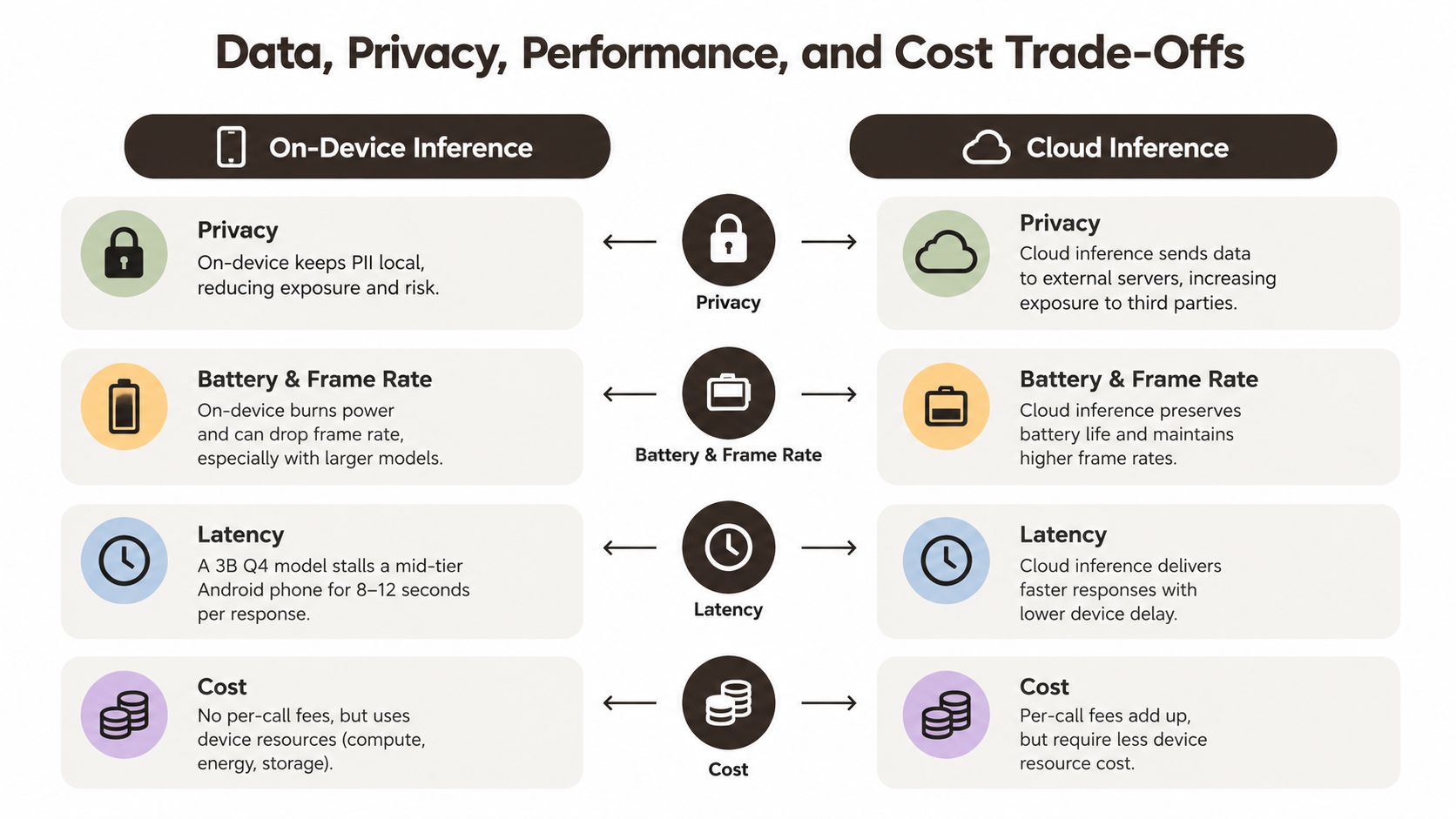 A comparison chart showing the trade-offs between on-device and cloud-based AI inference for mobile applications.
Performance is part of the product contract
A model call can be technically fast and still damage the user experience. Keep inference away from the UI thread, stream into a controlled view, cancel obsolete requests, and avoid serialising the full conversation on every keystroke. For on-device models, test cold starts, memory pressure, battery impact, and behaviour across the lower-end devices your app supports.
MLPerf Mobile repository provides a standardised way to compare on-device AI speed and accuracy on real hardware. Its recent releases include on-device LLM benchmarks for Llama 3.2 1B, 3B, and 3.1 8B, along with NPU-accelerated execution for supported chips. Device-class benchmarks are more useful than assuming a model will perform like it does on a development laptop.
Budget for the production gap
Generative AI is often framed as a prompt and API integration. Production work also includes evaluation, privacy review, authentication, observability, prompt versioning, abuse controls, store requirements, fallback behaviour, and ongoing maintenance. One mobile development trends analysis estimates that a production generative AI feature can take 6 to 12 weeks and cost roughly $25,000 to $80,000.
Developer adoption does not remove review work. AI-generated output can be plausible while still being wrong, so teams need evaluation tests for factual accuracy, formatting, refusal behaviour, and tool results. Test cases should cover partial responses and degraded network conditions as well as successful requests.
User data handling requires explicit retention and deletion rules, row-level access controls, redacted logs, and review of prompt-injection paths. The user data protection guidance offers a practical starting point for formalising those controls. These safeguards also help teams decide which inference path is appropriate before implementation begins.
Building AI Features Faster With Expo and AppLighter
A repeatable Expo foundation removes a large amount of plumbing from an AI project. The useful target isn't “generate an app instantly”. It's a typed, testable path from a mobile action to an authenticated server request, model response, persisted state, and observable failure.
One workable stack uses Expo SDK 52 and Expo Router for navigation, native Apple and Google sign-in through expo-auth-session, and a typed authentication hook that keeps session state consistent across screens. Supabase can provide Postgres, authentication, storage, and pgvector for embeddings. Hono can expose TypeScript endpoints on Supabase Edge Functions or Cloudflare Workers, while a hosted model handles complex reasoning.
 Screenshot from https://applighter.io/screens/ai-feature-flow.png
In an opinionated starter such as AppLighter, those foundations are arranged as a repeatable workflow rather than scattered setup tasks. The team still has to make the important decisions, but authentication, navigation, backend wiring, and AI-assisted development configuration don't need to be reconstructed for every prototype.
A concrete summarisation flow
Take a feature called “Summarise this trip”. The mobile screen collects the itinerary and the user's preferred style. It sends an authenticated request to a Hono endpoint instead of calling the model provider directly.
The server then:
- Builds the prompt from validated trip data and a versioned instruction template.
- Retrieves context from Supabase and
pgvectorif the user has saved preferences or related travel notes. - Calls tools server-side when the summary needs structured account data or another permitted operation.
- Streams the response back to the app so the user can read it as it arrives.
- Renders the output in a controlled
FlatListor equivalent list without blocking gestures. - Persists the transcript to Supabase with ownership checks and an appropriate retention policy.
- Checks usage before premium model calls and returns a predictable upgrade or fallback state when the allowance is exhausted.
The same codebase can target iOS, Android, and web, but shared code doesn't remove platform differences. Test sign-in flows, keyboard behaviour, streaming cancellation, storage permissions, and local model availability on each target.
The starter's environment configuration should keep provider credentials server-side and separate development, staging, and production values. Teams can then spend their time on prompt evaluation, retrieval quality, and product-specific interactions instead of repeatedly wiring sessions and screens. For broader workflow ideas, see this guide to improving developer productivity.
A streaming implementation should also make failure visible. If the connection drops halfway through a summary, preserve the partial text, show a retry action, and avoid writing an incomplete answer as if it were final.
The architecture becomes easier to review when each boundary has one responsibility. Expo owns the cross-platform client, Supabase owns authenticated data and persistence, Hono owns orchestration and policy, and the model provider supplies generation. That separation makes it possible to replace a model or route one task on-device without rewriting the whole product.
Your AI Mobile App Development Toolkit and Next Steps
A practical default stack should reduce commodity work while leaving the product decisions under your control. For an indie team, the following combination is a sensible starting point:
- Expo SDK 52 and React Native New Architecture: Use Expo and Router for the cross-platform client, then add native modules only where the feature requires them.
- AppLighter: Use a preconfigured starter foundation for authentication, navigation, state management, backend wiring, and AI-assisted development workflows.
- Supabase: Use Postgres, authentication, storage, row-level security, and vector retrieval where the product needs persistent context.
- Hono on a regional edge runtime: Keep provider credentials, tool calls, validation, rate limits, and model routing behind an application API.
- A hosted reasoning model plus a local model: Route complex work to a hosted service and keep low-risk, bounded tasks available on-device where that improves privacy or offline behaviour.
- Sentry and end-to-end tests: Track crashes and AI request failures, then exercise critical flows with Playwright or Maestro.
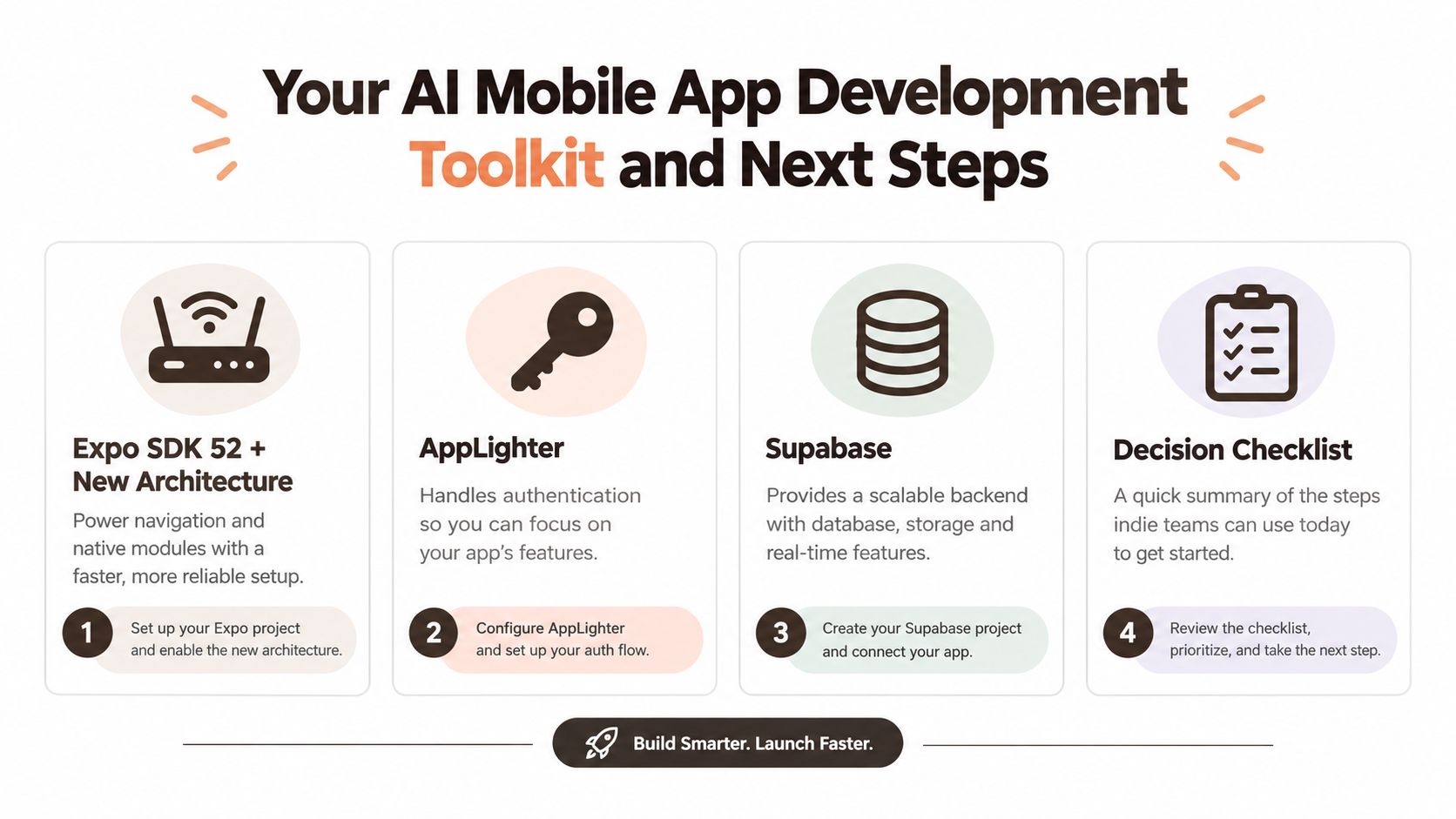 A four-step AI mobile app development toolkit guide featuring Expo, AppLighter, Supabase, and a decision checklist.
Benchmark before you expand
Measure the complete user journey, not just model quality. Record cold-start latency, time to first streamed token, completion failures, cancellation behaviour, and cost per 1,000 requests. The last metric is a measurement unit for your own dashboard, not a claim about a universal price.
Set hard fallbacks before launch:
- Cached response: Return a recent valid result when the request is repeatable and freshness permits it.
- Smaller model: Use a cheaper or local route for a degraded but useful answer.
- Graceful degradation: Replace an unavailable AI action with manual editing, search, or a clear retry state.
- Human confirmation: Require approval before generated content changes records, sends messages, or triggers external actions.
Build versus buy is also an architecture choice. Most small teams should buy commodity authentication, storage, model access, and deployment infrastructure. Their scarce engineering time is better spent on prompt design, evaluation datasets, retrieval quality, privacy decisions, and the interaction that makes the feature worth using. Teams that need additional capacity can also consider specialist options such as hiring developers from Mexico, while keeping ownership of the product architecture and acceptance criteria.
Before committing code, answer six questions:
- Architecture: What runs on-device, at the edge, and in the cloud?
- Model: Which model meets the quality and context requirement with acceptable resource use?
- Privacy: What data leaves the phone, who processes it, and how long is it retained?
- Cost: What usage ceiling stops an unexpected feature from becoming an uncontrolled bill?
- Fallback: What does the user see when the model, network, or device path fails?
- Analytics: Which events reveal usefulness, correction rate, latency, and abandonment?
That checklist turns AI mobile app development from an API experiment into a shippable product decision. With the plumbing standardised, an indie team can validate one focused feature within a sprint rather than spending a quarter rebuilding infrastructure around an untested idea.
AppLighter provides an Expo and React Native starter foundation with preconfigured app plumbing, backend wiring, and AI workflow integrations for teams shipping across iOS, Android, and web. If you're ready to choose an inference architecture and build a reliable first feature, visit AppLighter and start from a foundation designed for that workflow.