React Native State Management Guide for Mobile Apps
Master React Native state management with this practical guide to local vs global state, Context, Redux, Zustand, and patterns that work on mobile.
 Suraj
Suraj
You're testing a React Native screen on a fast simulator, and every interaction feels instant. On a lower-end Android phone, typing into a search field makes the header, tab bar, and unrelated screens update too. The app also restores an old account's cached records after someone logs out and signs in again. Those problems can look like a library issue, but they usually start earlier: unrelated kinds of state were given the same home.
Good state management begins with boundaries. Decide what a value represents, who needs it, how quickly it changes, and whether it must survive an app restart. Then choose the smallest tool that handles those needs reliably.
Table of Contents
- Why State Boundaries Matter More Than Library Choice
- What State Actually Means in a React Native App
- The Five Categories of State in a Mobile App
- Comparing Context, Redux Toolkit, Zustand, and Recoil
- A Practical Architecture for Indie and MVP Mobile Apps
- Handling Process Death, Offline, and Background Resume
- When Not to Reach for a Global Store
Why State Boundaries Matter More Than Library Choice
An indie developer starts with one Zustand store because it's quick to set up. The first version contains the current user and a preference. Later, the developer adds onboarding progress, a draft form, a modal flag, API responses, and a counter used while typing. The store still works, but its responsibilities have blurred.
Now an input update triggers subscribers that only care about account details. A screen reads cached API data as if it were the current server truth. After a logout, some records remain in memory. On a simulator, these bugs can be hard to notice. On a slower device, broad subscriptions and unnecessary work can make interactions feel less responsive.
Changing Zustand to Redux Toolkit wouldn't fix those boundaries by itself. A centralized store can make updates easier to inspect, but it can also centralize unrelated data. A lightweight store can keep subscriptions narrow, but it still needs explicit decisions about persistence, ownership, and invalidation.
Start with ownership
For every value, ask who owns the truth. A search query belongs to the screen while someone is typing. A profile fetched from an API belongs to the server, even if the app caches it. A login session involves both a credential held securely on the device and user information that may need refreshing from the backend.
Then ask who needs to read it. If one component uses a value, keep it there. If several distant screens need a client-side preference, expose that preference through a shared store. If the value is fetched, paginated, refreshed, or invalidated, use a server-state cache rather than turning the global client store into a homegrown networking layer.
Practical rule: Choose a state boundary before choosing the library. A tool can enforce or support your architecture, but it can't decide what data belongs in it.
Mobile adds another constraint: components don't live in a continuously active browser tab. The OS can suspend or kill an app, connectivity can disappear, and a user can return to a screen after an account switch. Those realities make ownership and lifecycle rules as important as render performance.
What State Actually Means in a React Native App
Local state is a value owned by a component or a small subtree. A screen might use useState to show whether a modal is open, or useReducer to handle a form with related fields, validation errors, and submission status. The state stays close to the interface that changes it.
Shared, or global, state is a value needed by components that don't share a convenient local parent. A saved display preference used on several screens is a reasonable candidate. “Global” doesn't have to mean that every component can read everything. It means the value has an owner outside any one component and is shared through an intentional mechanism.
Think of local state as a whiteboard in a small office. The people in that room can use it, and there's no reason to make the whole company depend on it. Shared client state is more like a company database: multiple teams may need access, so it needs clearer ownership and rules.
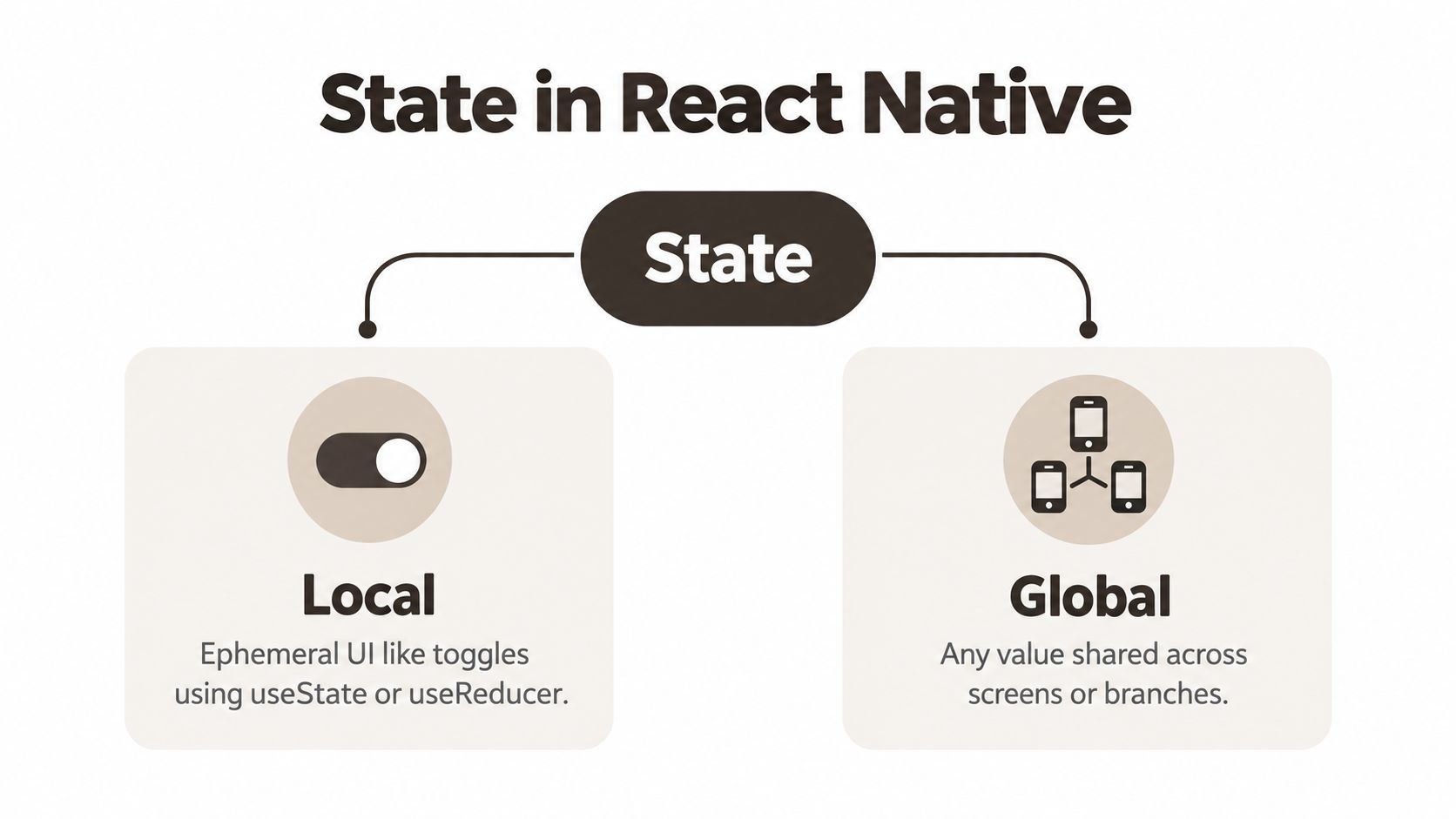 A diagram illustrating the two types of state in React Native: local state and global state management.
Separate state from props and derived values
React's one-way data flow means a parent passes data down through props. Props aren't a second source of truth. They're how a component receives values owned elsewhere. If a child needs to change a value, it calls a handler or state action provided by its owner instead of maintaining a conflicting copy on its own.
Derived values should usually be calculated from their source rather than stored again. If a screen can calculate whether a button is enabled from its form values, storing both the form and a separate isEnabled flag creates a chance for them to disagree.
Lifting state makes sense when nearby components need the same value. Put it in their nearest useful common owner and pass it down. If unrelated branches or screens need that value, a focused shared store may be cleaner than threading props through components that don't use the data.
A useful test is simple: if this component unmounts, should the value disappear? A temporary text field often should. A saved preference may not. A fetched record might remain in a cache for reuse, but it still needs a refresh and invalidation policy. Those answers reveal whether the value belongs to a component, a shared client store, a server cache, or persistent device storage.
The Five Categories of State in a Mobile App
A state value's category is a better guide to its home than the number of screens that display it. Start by identifying the source of truth, then decide whether the value needs sharing, persistence, or synchronization.
| Category | Example | Best home |
|---|---|---|
| Server state | A profile or list fetched from an API | Server-state cache |
| Session or auth state | Current login status and credential | Auth/session layer, with credentials in secure storage |
| Device state | Network availability or permission status | Platform API or focused device-state hook |
| Form state | Text, validation, and unsaved draft | Local state, reducer, or form library |
| Ephemeral UI state | Modal visibility, selected tab, temporary expansion | Component state |
Server state is data the backend owns. A query cache can manage loading, reuse cached results, refetching, and invalidation. Avoid treating a response as permanent client truth. The app should know when data is stale and what user actions require a refresh.
Session state needs a boundary between secret credentials and display data. Store credentials using secure device storage, and expose only the session information the interface needs. Authentication touches protected data and account transitions, so a dedicated mobile authentication architecture guide can help you think through token handling and session behavior separately from general UI state.
For device state, read conditions such as connectivity and permissions from the relevant platform APIs. Don't copy a transient network reading into an unrelated feature store and assume it remains accurate; device conditions can change while the app is backgrounded.
Form state usually belongs near the form. A focused reducer or form library is useful when fields depend on one another or when validation and submission produce coordinated transitions. A short search string rarely needs global storage.
Ephemeral UI state is the clearest local-state case. Keep a modal flag or a temporary tab selection inside the screen unless another component needs to coordinate with it. The fewer unrelated subscribers that see each update, the easier it is to reason about the interface.
Comparing Context, Redux Toolkit, Zustand, and Recoil
There isn't a useful winner without a workload. Compare each option by how it controls subscriptions, how much structure the team wants, and how easily developers can trace a problematic update.
Context API is built into React and works well for stable values shared through a tree, such as a theme or a rarely changing configuration. Its limitation shows up when a broad provider value changes frequently: consumers of that context can update even when they only care about an unchanged part of the value. Splitting contexts and keeping values stable can help, but Context isn't automatically a fine-grained state store.
Redux Toolkit brings a centralized model, reducer-driven transitions, selectors, and mature debugging conventions. That structure can be valuable when multiple developers need to understand complex state changes. The trade-off is additional concepts and setup compared with a small store. It's a sensible choice when predictable transitions and team-wide consistency matter more than minimizing ceremony.
Zustand gives components a store they can subscribe to through selectors. That makes it a practical option for shared client state when the team wants less setup than Redux but still needs targeted subscriptions. The risk is organizational: a flexible store can grow into the same dumping ground as any other if domains and persistence rules aren't explicit.
Recoil and Jotai use atomic state models, which let components subscribe to smaller pieces of shared state. That granularity can suit interfaces with many related, independently changing values. The cost is a different mental model: teams must make sensible atom boundaries and keep dependencies understandable. Recoil's benchmark result also illustrates that fine-grained concepts don't guarantee fast complex updates in every workload.
A standardized React e-commerce benchmark reported identical initial-page Largest Contentful Paint of 1.7 seconds and Total Blocking Time of 10 milliseconds across the compared libraries. In its complex-update test, Context API took 473.6 ms and Recoil took 497.2 ms, while simple updates were efficient across the tools. Those results are specific to that test, not a promise about your app, but they underline why startup metrics alone don't settle the choice. See the React state-management benchmark for its stated measurements.
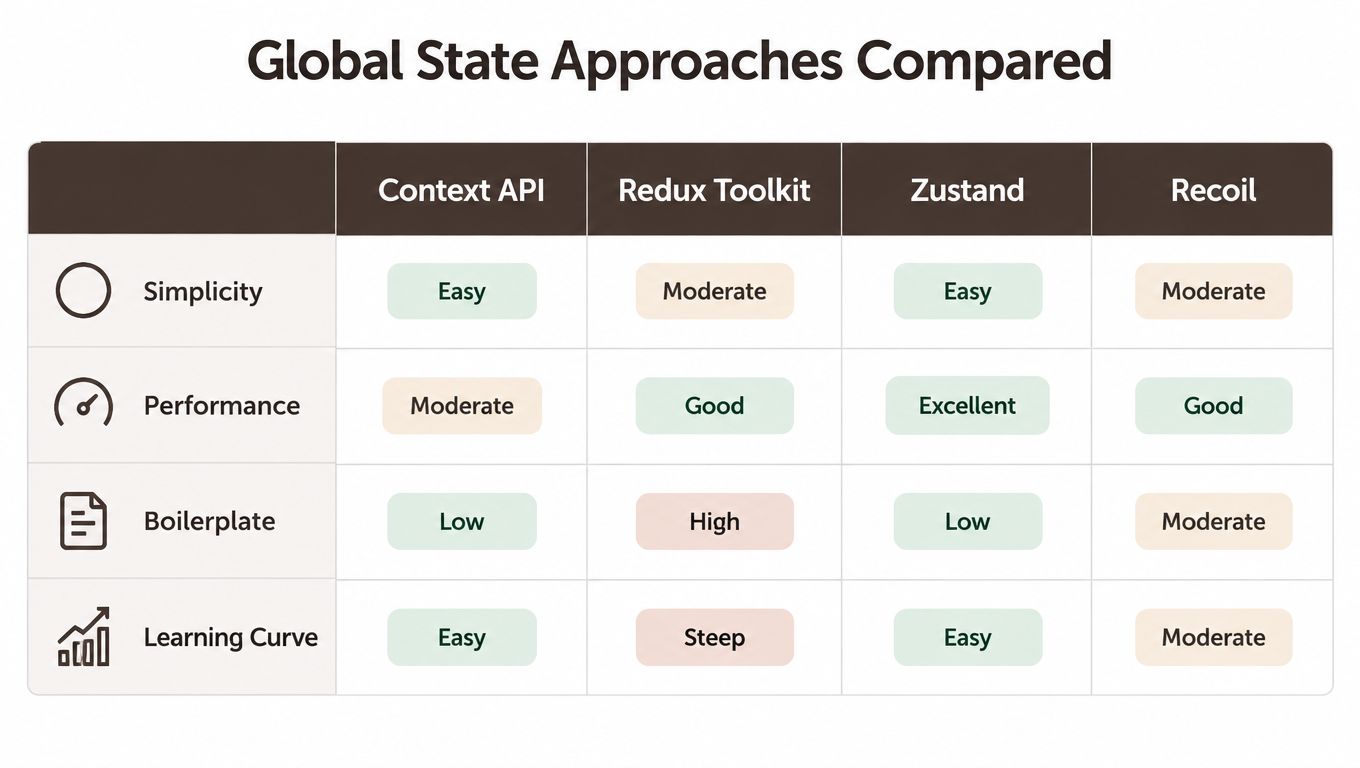 A comparison table evaluating four React global state management approaches across simplicity, performance, boilerplate, and learning curve.
Match the default to the team
A practical default for a small app is local state for local interactions, a selector-based store for shared client state, and a separate cache for server data. Choose Redux Toolkit instead when the app's update flows benefit from its conventions and debugging tools. Consider an atomic library when independent subscriptions solve a real modeling problem, not just because its benchmark looks appealing.
For React Native specifically, measure representative screens. A comparative study using React Profiler, Chrome DevTools, and Lighthouse found different trade-offs across Redux Toolkit, Context API, and Zustand: Zustand led its combined performance and developer-experience score, while Redux Toolkit was stronger under high-concurrency workloads. That's useful context, not a universal ranking. The React state architecture comparison supports a more dependable practice: subscribe to the fields a component needs, then profile the screens that matter on your app's actual update patterns.
A Practical Architecture for Indie and MVP Mobile Apps
A small app doesn't need one store for everything. A maintainable setup can use component state for temporary interactions, a selector-based store for shared client state, and a query cache for data fetched from the backend. That division keeps ownership visible without forcing every value through a single architecture.
 Screenshot from https://www.applighter.com
For shared client values such as onboarding progress or user preferences, a Zustand store can expose small selectors. Keep API records in a server-state cache such as TanStack Query, where cache keys and invalidation make the relationship to backend data explicit. A form's input, validation, and submission status can stay in a local reducer or a focused form library.
For teams using Expo, AppLighter offers a starter kit with a preconfigured Zustand layer alongside its broader mobile app setup. It's one option for starting with shared client state already wired in, but the same boundary rules apply: a starter store shouldn't become the destination for server records or every transient interaction.
Here's the shape of a screen using both shared client state and cached server data:
function ProfileScreen() {
  const showTips = usePreferencesStore((state) => state.showTips);

  const profileQuery = useQuery({
    queryKey: ['profile'],
    queryFn: fetchProfile,
  });

  if (profileQuery.isPending) return <LoadingState />;
  if (profileQuery.isError) return <ErrorState />;

  return (
    <ProfileView
      profile={profileQuery.data}
      showTips={showTips}
    />
  );
}
The selector keeps the subscription focused on showTips; the query owns the fetched profile and its loading and error states. The sketch leaves authentication transport and storage implementation to the app, because those details depend on the backend and session model. For a broader product workflow, how to build an MVP is useful context when deciding which architecture is worth adding before launch.
A starter can speed up wiring, but the important part is preserving those ownership boundaries as the feature set grows. If you want a quick visual walkthrough of this pattern, watch the video below.
Handling Process Death, Offline, and Background Resume
A mobile app can be suspended and later killed by the OS. When it starts again, in-memory state is gone. Persist only what the app needs to restore a useful and safe experience; refetch data whose authority belongs to the backend, and don't treat an old cache as proof that a session remains valid.
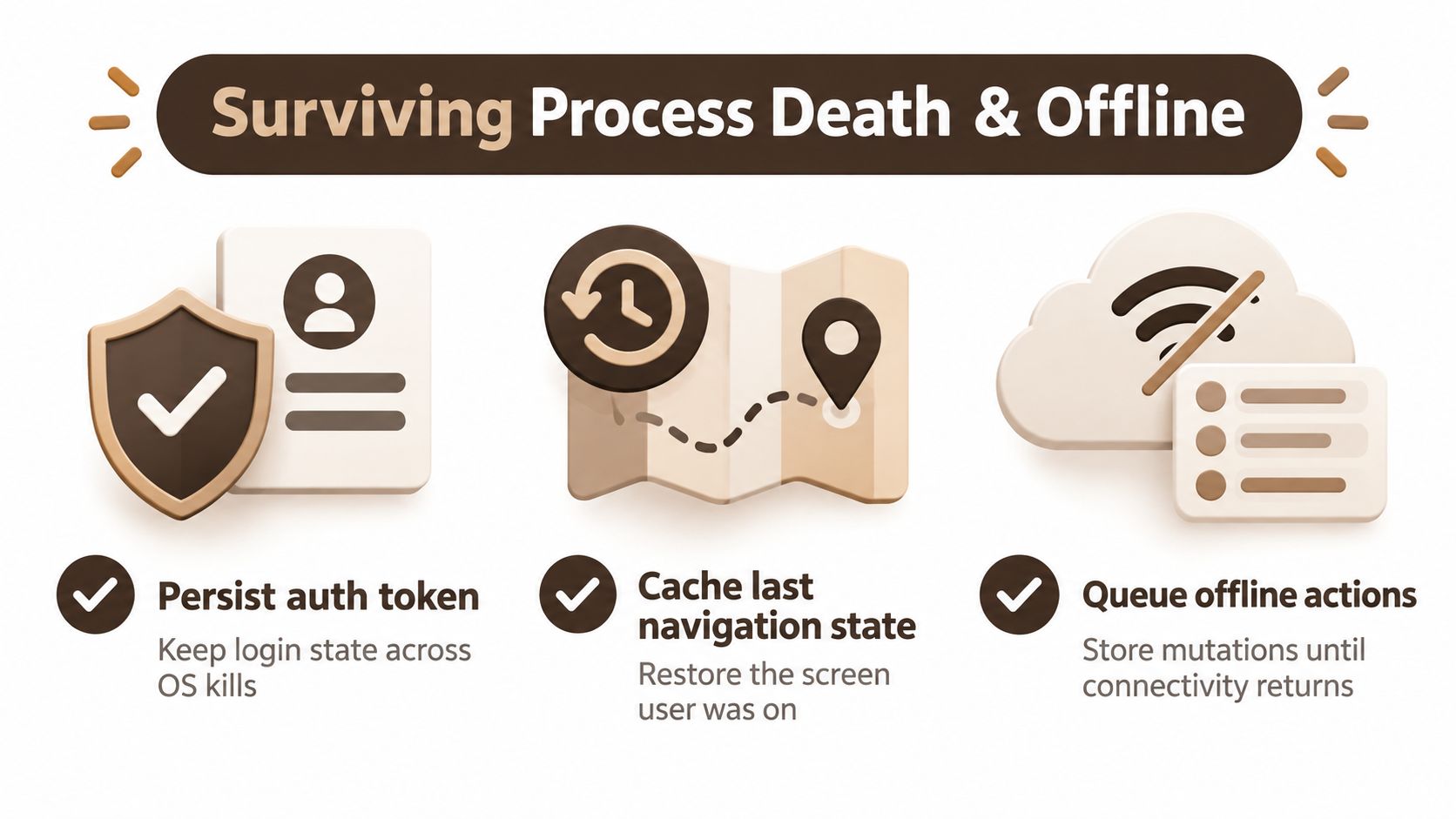 A diagram illustrating strategies for mobile app stability: persisting auth tokens, caching navigation state, and queuing offline actions.
Make lifecycle behavior explicit
Hydration creates its own edge cases. A screen may render before persisted preferences or session data finish loading, while a resume event may trigger a refetch at the same time as an existing request. Coordinate initialization and request deduplication so the UI doesn't flash stale state or send avoidable duplicate work.
Offline writes need a clear contract too. An optimistic update can make an action feel immediate, but the app must know how to retry, roll back, or resolve a conflict if the server rejects the change. A queued mutation should carry enough context to determine whether it still applies when connectivity returns. For teams working with field collection, an offline canvassing app comparison offers useful context for thinking about workflows that must continue without a reliable connection.
Account changes require deliberate invalidation. On logout, clear user-specific in-memory data and cached responses; on a new login, ensure requests and persisted records are scoped to the new account. This is part of data synchronization, not just a matter of refreshing the screen.
Before release, test the lifecycle rather than trusting the happy path:
- Persist deliberately: Identify which credentials or user choices must survive an OS kill, and store sensitive values in secure storage.
- Restore in order: Decide what loads before protected screens render and what should be fetched again.
- Invalidate completely: Check logout, account switching, and expired-session behavior for leftover private data.
- Exercise offline writes: Turn off connectivity, make a change, reconnect, and inspect how the app resolves success, failure, and duplicates.
A small, explicit state model is safer than a minimal store with undocumented hydration and invalidation behavior. The extra clarity pays for itself when the app resumes on a real device rather than starting fresh in a development session.
When Not to Reach for a Global Store
A global store is not a rite of passage. If a modal's visibility affects one screen, keep it in that screen. If a form's draft is only needed while the form is open, don't persist it automatically. Every global value adds another shared contract: someone has to define its owner, update path, reset behavior, and lifecycle.
Prematurely centralizing state also makes later changes harder. A value that starts as a single screen's concern can end up imported across unrelated features. When its shape or meaning changes, those consumers all become migration work. That cost is easy to miss when the first version is small, but it can erase the apparent convenience of putting everything in one place.
Start locally and extract only when the need is concrete. Two screens that independently need the same client-side preference may justify a shared store. Several components displaying the same API record may instead need a server cache. Neither case requires moving every nearby value into a global object.
Before adding a library or expanding a store, ask:
- Who consumes this value? Name the components or screens, not just the feature.
- How does it change? A fast-changing input has different subscription needs from a stable preference.
- Who owns the truth? Decide whether the component, device, backend, or session layer is authoritative.
- What must survive? Specify persistence, hydration, and reset behavior.
- Does the boundary justify the dependency? If local state already solves the problem, keep it local.
The safest state model isn't the one with the fewest lines of setup. It's the one where a developer can quickly tell what a value means, who owns it, and what happens when the app goes offline, resumes, or changes accounts.
AppLighter provides an Expo-based React Native starter kit with authentication, navigation, Zustand state management, and AI-assisted development tooling wired into a mobile app foundation. If you're building an MVP, explore AppLighter to see whether its preconfigured structure fits the state boundaries your app needs.