Mobile App Authentication Best Practices: The Complete Guide
Master mobile app authentication best practices. Learn secure flows, token handling, MFA, and secure storage to protect user data while maintaining a seamless
 Suraj
Suraj
Security should scale with risk. For routine use, prefer passwordless or biometric sign-in, then reserve MFA and re-authentication for sensitive operations. Large-scale identity systems already reflect this shift: workforce MFA adoption reached 70%, while phishing-resistant and passwordless authentication grew 63% in one year, from 8.6% to 14.0% of users, according to Okta's 2025 Secure Sign-in Trends Report.
That sounds counterintuitive if you learned authentication as a single locked door. In production, the stronger design is a trust ladder. Let a returning user access an ordinary session with a passkey or device biometric, but ask for stronger proof before changing a payout account, exporting private data, or approving an unusual login. The best mobile app authentication best practices reduce exposure without making every harmless action feel like a security incident.
Table of Contents
- The Security-Experience Balance
- Modern Flows and Protocols
- Choosing Your Authentication Factors
- Securing Token Handling and Storage
- Implementing MFA and Progressive Verification
- Building a Cohesive Authentication Strategy
The Security-Experience Balance
A mobile login screen isn't merely a security boundary. It's also the first operational test of whether your app understands the user's context. A rigid flow that demands the strongest verification for every action may look defensible in a design review, but it often teaches users to work around the controls. They reuse passwords, leave sessions active, approve prompts without reading them, or abandon the app altogether.
The alternative is progressive verification. The app begins with a proportionate level of trust and escalates only when the requested action justifies it. Browsing public content might require an established session. Viewing a private profile might require a valid access token. Changing an email address, adding a new device, or confirming a financial action should trigger fresh verification.
Practical rule: Protect the action, not just the login screen.
Treat friction as a security variable
Every prompt has a cost. A password reset interrupts the user. An SMS code depends on network access and exposes the flow to weaknesses associated with phone-based recovery. A biometric prompt is usually faster, but it still needs a fallback for users whose sensor fails or whose device policy blocks biometrics.
That doesn't mean removing checks. It means placing them where they matter. A session can remain convenient for low-risk activity while the backend evaluates signals such as device change, unusual session behavior, or a request for sensitive data. The client shouldn't make the final trust decision by itself, because attackers can modify mobile binaries and replay client-side assumptions.
The login interface should make the expected path obvious. Clear labels, visible recovery options, and predictable error handling reduce the temptation to repeat attempts or seek unofficial workarounds. For practical interface considerations, review this mobile app login screen guide, then test the flow on real devices rather than relying only on a simulator.
Build a trust ladder
A useful ladder has distinct states rather than one permanent “authenticated” flag:
- Unauthenticated: The user can access only public or onboarding content.
- Authenticated: The app has a valid session for ordinary account activity.
- Recently verified: The user has completed a fresh biometric, passkey, or other approved challenge.
- Transaction approved: The user has confirmed a specific high-impact operation.
The server should issue and evaluate the evidence for each state. A local boolean can control presentation, but it mustn't grant authority. A stolen or altered app can bypass UI logic, while a properly designed API continues to enforce authorization.
This model also improves recovery. If the user loses access to a biometric factor, the app can offer a carefully controlled fallback without weakening every other operation. Recovery should restore only the trust level that the evidence supports, not create a fully trusted session without proper authorization.
Modern Flows and Protocols
The visible login experience can be simple while the underlying exchange remains rigorous. For native mobile apps, the recommended foundation is the OAuth 2.0 Authorization Code flow with PKCE, launched through the system browser rather than an embedded web view. OAuth guidance for PKCE describes PKCE as protection against authorization-code injection and interception, using a per-request verifier and challenge.
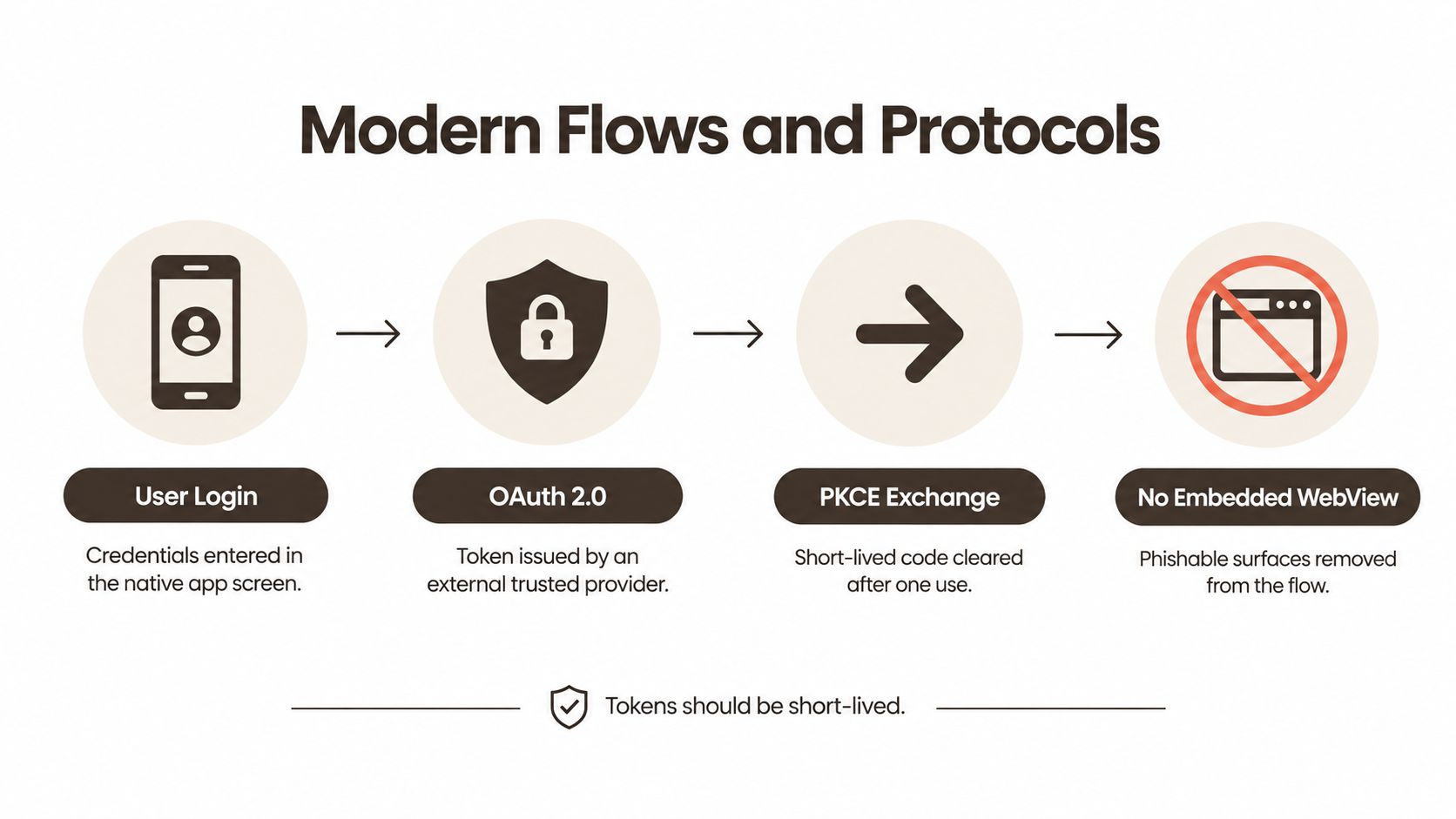 A diagram illustrating modern mobile app authentication flows including OAuth 2.0, PKCE exchange, and secure browser usage.
Use the authorization code safely
The practical sequence looks like this:
- The app creates a cryptographically random code verifier.
- It derives the corresponding code challenge and includes that challenge in the authorization request.
- The app opens the identity provider in the system browser or an approved OS browser component.
- The user authenticates with the provider, which returns a short-lived authorization code through a registered app callback.
- The app sends the code and original verifier to the token endpoint.
- The authorization server checks that the verifier matches the earlier challenge before issuing tokens.
The code alone isn't enough. If an attacker intercepts it, the attacker still lacks the verifier generated by the legitimate app instance. That separation is why PKCE is a protection layer for native apps, not a substitute for confidential-client authentication.
Don't embed the provider's login page inside a WebView. An embedded view can create a convincing credential-collection surface, prevents the platform from applying its normal browser protections, and makes it harder for users to recognize where their credentials are going. The system browser also lets the identity provider reuse an existing trusted session without asking the user to type credentials into your app's UI.
Register callbacks and enforce transport security
Use claimed HTTPS links or platform-specific universal and app links where your identity provider supports them. The callback should resolve to the legitimate application, and the server should validate state, redirect URI, issuer, audience, and nonce values as appropriate for the chosen protocol and provider.
All authentication and token traffic must use HTTPS. Treat certificate validation, redirect handling, and SDK configuration as production security code, not integration details to revisit later. The API should validate token signatures, expiry, issuer, audience, scopes, and authorization on every protected operation.
For a broader review of the service boundary around your mobile client, this guide to stopping API attacks is useful context. A secure login exchange can't compensate for an API that trusts client-supplied roles or accepts an access token without checking its intended scope.
Separate login from authorization
Authentication answers, “Who is this?” Authorization answers, “What may this identity do here?” Keep those decisions separate. A user may be correctly authenticated yet lack permission to view another user's document or perform an administrative action.
The mobile app can request only the scopes it needs, while the backend enforces resource ownership and role checks. Avoid putting secrets, private client credentials, or authorization decisions in the application bundle. Mobile binaries can be inspected, so anything shipped to the device should be treated as potentially discoverable.
Choosing Your Authentication Factors
The right factor depends on both assurance and recovery. Biometrics and passkeys can make everyday access nearly invisible, but neither eliminates the need for account recovery, device replacement handling, or a carefully bounded fallback. Passwords remain familiar, yet familiarity is not the same as resistance to phishing or reuse.
 A young woman sitting on a park bench while browsing on her smartphone for mobile authentication.
Biometrics
Face or fingerprint verification is an excellent local user-presence check. The app generally receives a success or failure result from the operating system rather than handling the underlying biometric template. That keeps the experience quick and lets the platform apply its own sensor, lockout, and device-policy controls.
Biometrics don't identify a person to your server by themselves. They release a device-held key or authorize a cryptographic operation. Your backend still needs a valid session, and you should decide what happens when the user disables biometrics, adds a new fingerprint, or fails the local challenge.
For a plain-language explanation of the mechanism and its limits, see what biometric authentication is. The implementation detail matters: use the platform authentication APIs, bind the result to the intended action, and don't treat a client-side “biometric succeeded” flag as server authorization.
Passkeys
Passkeys use public-key cryptography and are designed to resist phishing. The private key remains under platform control, while the server stores and verifies the public key. A user can open the passkey with a device biometric or PIN without exposing a reusable password to a login page.
They work especially well for returning users and account creation flows where you want to avoid password storage entirely. Plan for synchronization and recovery behavior across the platforms you support, and explain clearly what users should do if they lose access to their device ecosystem.
Passwords and fallback factors
Passwords are still useful as a compatibility or recovery path, but they should be treated as a liability to contain. Never log them, retain them in local app storage, or use them as the only proof for a sensitive action when stronger factors are available.
SMS can reach users who lack another option, but it shouldn't be your preferred high-assurance factor. SIM changes, interception, and social engineering make phone possession a weaker signal than a phishing-resistant authenticator. A recovery path should use multiple signals and deliberate review rather than turning a phone number into a master key.
| Factor | Best fit | Main trade-off |
|---|---|---|
| Biometric unlock | Frequent access on a personal device | Depends on device capability and local policy |
| Passkey | Primary passwordless sign-in | Requires thoughtful account recovery |
| Password | Compatibility and bounded fallback | Reuse and phishing risk |
| SMS recovery | Last-resort access path | Phone-number takeover risk |
The combination is more important than any individual factor. Use a passkey or device biometric for ordinary access, then require a fresh challenge for a sensitive change. Preserve a recovery route, but make it narrower than the trust it is replacing.
Securing Token Handling and Storage
A successful login does not make a device trustworthy indefinitely. It gives the app credentials with a defined lifecycle, and weak lifecycle management can turn a lost, rooted, backed-up, or malware-infected device into a larger incident. Treat authentication as progressive trust: preserve low-friction access for routine use, then raise verification when the session reaches sensitive data or actions.
OWASP's mobile application security guidance advises teams not to store passwords or long-lived session IDs on the device. Use revocable access tokens, session timeouts, remote logout, and re-authentication for sensitive actions.
Keep the device's secret inventory small
The app should retain only what it needs to call the API. Store persistent secrets in platform-protected facilities. On Android, use secure credential and key-management services. On iOS, use the Keychain and, where appropriate, hardware-backed key protection.
Keep tokens out of plain preferences, local databases, logs, analytics events, crash reports, clipboard content, and URL parameters. Production builds should never print authorization headers. A secret that never reaches the device is easier to protect than one copied across every application layer.
Scope access tokens to the resources and operations that require them. Refresh material needs stricter handling because it can create new access tokens. The server should revoke sessions individually, across one device, or for the whole account.
Make revocation operational
A “log out everywhere” control works only when the backend invalidates the relevant sessions. Track sessions by device or installation without collecting unnecessary identifying data, show users where sessions exist, and let support or administrators revoke them when compromise is suspected.
Timeouts should match the resource and its risk. A reading app and an app handling sensitive records do not need identical session behavior. Require a fresh authentication event before changing recovery details, elevating privileges, exporting data, or confirming an irreversible transaction.
A token is not proof that the person at the screen is still authorized to perform every action.
Handle refresh failures explicitly. Clear unusable local material, return the user to a safe sign-in state, and prevent loops that repeatedly retry expired credentials. On account deletion, device removal, or remote logout, remove the local session and invalidate the server-side session.
Token lifecycle is one layer. If the product also gates physical access, treat that as a separate control and see how to add gate control to your app without confusing it with identity authentication. Keep server-side authorization equally strict, and review API security best practices when configuring permissions, token validation, and resource access.
Implementing MFA and Progressive Verification
MFA should appear when the risk justifies the interruption, not as a blanket obstacle. A challenge on every screen creates prompt fatigue, while no step-up verification leaves sensitive actions exposed after a legitimate login. Use a policy engine that evaluates what the user is doing, which session is being used, and how much trust the current evidence supports.
Decide when to step up
Begin with the action, then consider the session context. Browsing, searching, and changing low-risk preferences can usually remain within the normal session. Require fresh verification for:
- Account recovery changes: Updating an email address, phone number, or recovery factor.
- Privilege changes: Adding an administrator, changing permissions, or connecting a new integration.
- High-impact transactions: Confirming a transfer, purchase, deletion, or another irreversible operation.
- Sensitive data access: Opening restricted records or exporting information.
- Unfamiliar context: Signing in from a new device or from a session that differs materially from the established pattern.
Bind the challenge to the exact operation. A generic “approve login” request gives the user little context and can encourage blind approval. The server should create a one-time transaction context, display the intended action, verify the selected factor, and authorize only that operation.
Prefer strong, low-friction factors
For returning users, a platform biometric can activate a device-bound credential. Passkeys let the operating system handle authentication without requiring password entry. Push approval can suit workforce applications, provided the notification identifies the action clearly and makes accidental approval harder.
Prioritize phishing-resistant factors over SMS-only login. Okta's secure sign-in trends report also found that 7% of users in January 2025 did not use a password for any sign-in. That finding supports passwordless authentication as a workable operational choice, while factor selection still needs to reflect device coverage, recovery options, and the sensitivity of the product.
Design failure and recovery paths
An MFA design is incomplete until it handles lost devices, unavailable sensors, offline conditions, and prompts the user did not initiate. Offer a fallback factor that preserves a comparable assurance level. Rate-limit attempts, notify users when factors change, and delay or review high-risk recovery operations.
Keep the experience progressive. Start with the least disruptive factor that provides enough confidence, then escalate when the action, device, or session raises risk. Do not make users repeat a strong verification step without a reason, but do require fresh proof before trust increases.
Measure more than completed challenges. Monitor false challenges, repeated failures, recovery requests, support contacts, and suspicious approvals. A policy that repeatedly blocks legitimate users will push them toward insecure workarounds. A policy that never challenges anyone provides no meaningful progressive verification.
Building a Cohesive Authentication Strategy
A resilient mobile identity system has a clear sequence:
- Offer passwordless or biometric sign-in where the device supports it.
- Use the system browser with OAuth Authorization Code and PKCE.
- Keep access tokens scoped, revocable, and short-lived, with secure platform storage.
- Enforce authorization on the backend, not in client-side UI logic.
- Escalate verification for sensitive actions, new devices, and recovery changes.
- Provide recovery without granting more trust than the evidence justifies.
- Log security-relevant events without recording credentials or tokens.
Teams selecting an identity provider should evaluate protocol support, native platform integration, recovery controls, session revocation, operational visibility, and the quality of its SDKs. This selection criteria for identity platforms provides a useful checklist for that review.
AppLighter is one implementation option for React Native teams. Its Expo starter kit includes preconfigured authentication, session management, and protected routes, which can give a product team a structured place to apply secure token storage, backend authorization, and progressive verification rather than assembling those concerns ad hoc.
The target state is simple for legitimate users and difficult for attackers: routine access feels immediate, sensitive actions demand clear proof, and every session can be revoked when conditions change.
AppLighter gives Expo and React Native teams a starter kit with authentication, session management, protected routes, navigation, and an edge-ready API layer already wired into the project. If you're building a mobile app where secure sign-in and progressive verification must ship alongside the product, visit AppLighter to review the available foundation.