Infrastructure Planning for Mobile Apps: A Practical Guide
A practical infrastructure planning guide for mobile apps. Covers architecture, CI/CD, scaling, security, and cost for Expo, Supabase, and edge APIs.
 Parth
Parth
A small team usually notices infrastructure problems at an awkward moment. The MVP is live, the first users are returning, and a request arrives that the original plan never covered. The app has a two-table schema, one Supabase project, manual over-the-air updates, and a backend that works perfectly in development. Then traffic becomes uneven, offline writes collide, and a harmless feature starts pushing database and bandwidth costs in the wrong direction.
That's the purpose of infrastructure planning. You aren't trying to predict the future with perfect accuracy. You're making the assumptions visible while changing them is still cheap. In an Expo, Supabase, and Hono/TypeScript stack, the best plan is usually a short working document that connects product flows to data, deployments, security, observability, and operating cost.
Table of Contents
- Why Infrastructure Planning Matters Before You Ship
- Turning Product Requirements into a Planning Brief
- Choosing Your Architecture for Expo and Supabase
- Setting Up Deployment and CI/CD From Day One
- Planning for Scale, Cost, and Real User Numbers
- Security and Monitoring You Should Not Skip
- A Reusable Infrastructure Planning Checklist and Templates
Why Infrastructure Planning Matters Before You Ship
Most Expo and Supabase apps don't fail on launch day. They fail after the team has built enough confidence to stop questioning the original assumptions. A feed that was expected to be read occasionally becomes the home screen users refresh constantly. A form that was always online needs to work in a train tunnel. A single Supabase project becomes both production and experimentation, while a manual release process makes every urgent fix stressful.
I've seen teams spend days debating whether to use a different API framework when the underlying issue was simpler. Nobody had decided who owned migrations, how mobile clients would handle an old schema, or what happened when an OTA update reached a device with stale local data. The technology wasn't the bottleneck. The missing agreements were.
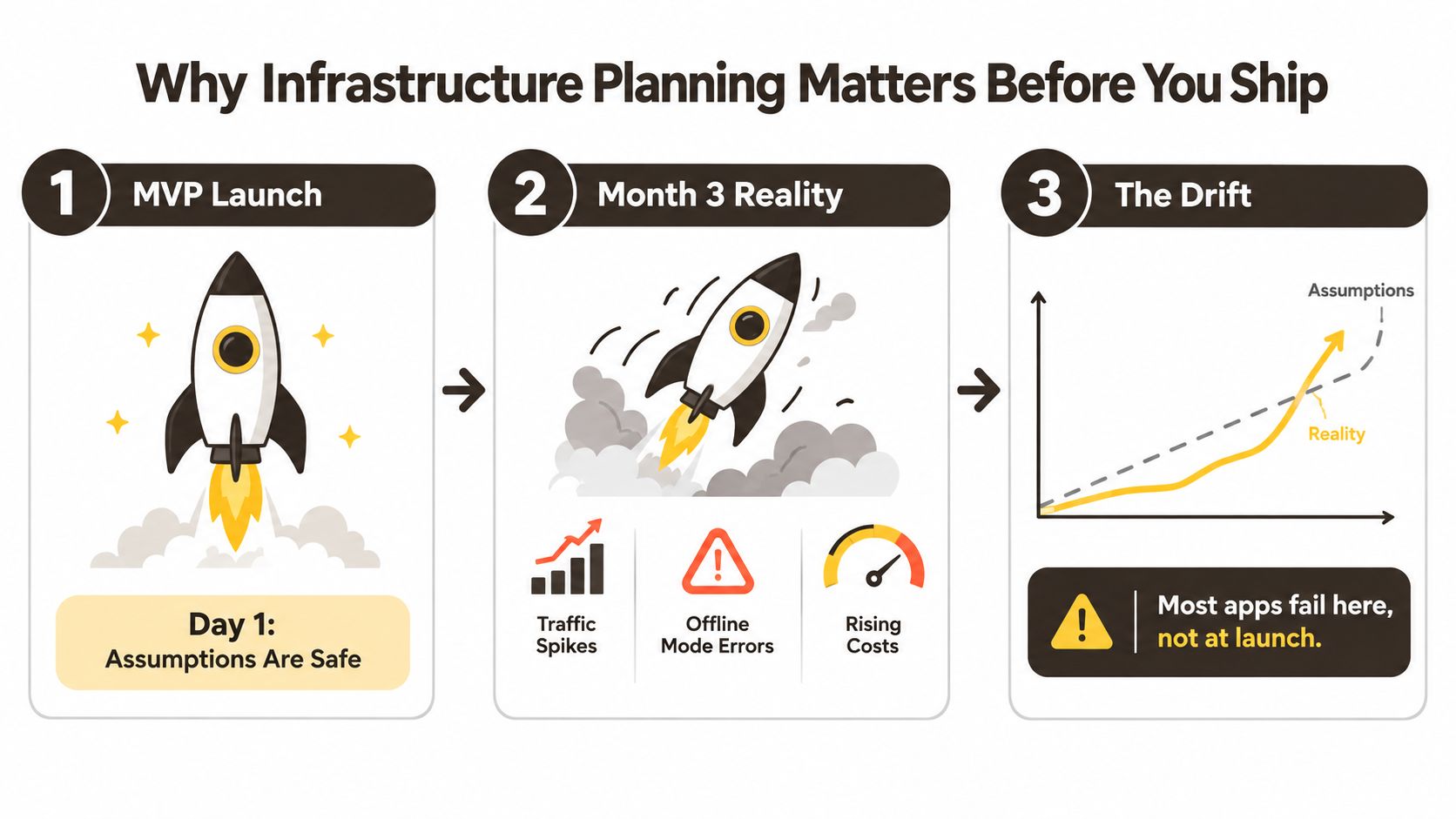 A diagram illustrating why infrastructure planning is crucial to prevent failure after an initial app launch.
Plan for drift, not perfect prediction
A planning brief should answer practical questions:
- Capacity: Which user journeys create the most reads, writes, uploads, and background work?
- Failure behavior: What does the Expo client show when authentication, storage, or the API is unavailable?
- Ownership: Who reviews a migration, rotates a secret, responds to an alert, and approves a production release?
- Change: How can the schema and API evolve while older app binaries remain in use?
Forecasting deserves particular skepticism. The World Bank's reference-class forecasting research reports that 9 out of 10 rail projects overestimate traffic, while 84% of rail passenger forecasts miss by more than ±20%. It also reports average cost overruns of 44.7% for rail and 20.4% for roads. A mobile app isn't a railway, but the planning lesson transfers cleanly: don't build your architecture around an optimistic demand curve that nobody has challenged.
Practical rule: Treat every important forecast as an assumption with an owner, a validation method, and a trigger for changing the plan.
Start with a one-page brief before choosing services. Record the expected user journeys, offline rules, data sensitivity, release workflow, and known unknowns. Add an architecture decision only when it answers one of those requirements. Good governance can also help teams reduce cloud costs with governance, but governance shouldn't mean a heavyweight approval process for every small change.
The useful plan is the one the team opens before a migration, a launch, or a cost review. A polished diagram that nobody consults after kickoff is less valuable than a plain document that keeps mobile, backend, and operations decisions aligned.
Turning Product Requirements into a Planning Brief
“Fast,” “global,” and “works offline” are product intentions, not infrastructure requirements. Convert each one into a statement that a developer can test and a product owner can accept or reject.
Begin with the user journeys in the Expo app. Write down the screens involved, the data each screen reads, the mutations it performs, and whether the action can wait for a connection. A social-style feed may load a page, fetch the signed-in profile, resolve relationship state, download media metadata, and submit analytics. That is a different workload from a settings screen with one profile query.
Translate vague goals into testable behavior
Use a small set of planning dimensions:
- Concurrency: Describe how many active sessions the system must handle during a busy period, rather than relying only on total registrations.
- Request shape: Estimate the reads, writes, uploads, and function calls created by each core journey.
- Latency: Define an acceptable p95 target for the first useful screen and for important API mutations.
- Offline tolerance: State which screens remain usable without connectivity, how long local data may remain stale, and how conflicting writes are resolved.
- Data location: Record residency, retention, deletion, audit, and access requirements before selecting a region or storage pattern.
A requirement such as “the app should feel quick on mobile” can become: the main read flow has a measured p95 target on a representative 4G test, the interface displays cached content while a refresh runs, and the user receives a clear state when the request exceeds the agreed limit. You can choose the exact threshold with the product team. The important part is that “quick” no longer hides an unresolved decision.
Copy this one-page brief
| Field | Example | Source |
|---|---|---|
| Core journeys | Sign in, browse feed, create post, edit profile | Product discovery |
| Read and write shape | Paginated feed reads, post writes, media upload | Expo screen mapping |
| Capacity assumption | Expected active sessions and busiest usage pattern | Product forecast |
| Latency target | p95 target for first useful content and mutations | Product and UX decision |
| Offline behavior | Cached reads, queued writes, conflict rule | Mobile design |
| Data classification | Account, profile, private content, public content | Security review |
| Residency and retention | Approved regions, deletion behavior, retention owner | Compliance review |
| Availability behavior | Degraded screen, retry state, support path | UX and operations |
| Release constraints | App Store release, OTA policy, rollback method | Mobile delivery |
| Known unknowns | Media volume, sharing behavior, partner integrations | Risk register |
| Decision owner | Named person for each unresolved item | Team agreement |
Keep this brief beside the repository. When someone proposes adding a Hono service, a second database, or a new synchronization library, compare the proposal with the brief instead of evaluating it in isolation. The document should change as evidence arrives, but every change should explain which assumption moved.
Infrastructure demand is also cross-sector in the wider economy. PwC's Global Infrastructure Outlook projects annual infrastructure spending rising from US$4.4 trillion in 2024 to US$6.9 trillion by 2050, with a cumulative requirement of US$151.1 trillion over 25 years. The scale is different for an app, but the planning principle is familiar: capacity, financing, sequencing, and renewal need coordination over time, not a one-time launch estimate.
Choosing Your Architecture for Expo and Supabase
There are three sensible shapes for this stack. None is universally correct. The right choice depends on where business logic lives, how much operational work the team can absorb, and which requirement from the brief is currently under pressure.
| Option | Best When | Main Components | Upgrade Trigger |
|---|---|---|---|
| Supabase-first | MVPs and small apps with straightforward CRUD | Supabase Auth, Postgres, RLS, PostgREST, Storage, Edge Functions | Repeated custom logic, difficult validation, or rising operational coordination |
| Supabase plus Hono | The team needs a dedicated TypeScript boundary | Expo, Supabase Auth and Postgres, Hono API, shared schemas, edge deployment | API ownership, jobs, integrations, or workload isolation becomes complex |
| Split platform | Several teams or demanding workloads need independent control | Managed Postgres, separate API tier, job layer, storage, observability | The team can justify the permanent operational cost of multiple systems |
Start with the smallest complete shape
The Supabase-first option is strong when the app mostly authenticates users, reads relational data, applies row-level permissions, and uploads files. PostgREST removes a layer of boilerplate, while RLS keeps authorization close to the data. Supabase Edge Functions can handle focused server-side actions without forcing the team to operate a separate API.
The limitation appears when business rules become scattered across clients, database triggers, and functions. A mobile client should not be the final authority for pricing, permissions, eligibility, or a multi-step write. Expo OTA updates can distribute JavaScript changes quickly, but they don't replace a versioned server contract, and they can't safely assume every installed binary changes at the same time.
Add Hono for an explicit boundary
A Hono/TypeScript layer makes sense when mobile and web need the same validation, when a workflow touches several tables, or when integrations need a controlled API surface. Keep Supabase as the system of record, authenticate requests with the user session, validate input at the Hono boundary, and return stable response shapes to the Expo client.
That extra layer costs something. You now own deployment, logging, compatibility, and rate limiting in another place. It can still be the simpler long-term choice if it prevents business rules from being duplicated across screens. For broader context on separating application concerns, web application architecture for SaaS is useful, but apply those patterns to the requirements you have.
A split stack should be earned. Moving to managed Postgres, a separate API tier, and a job system can isolate workloads and team ownership, but it also creates more migrations, credentials, dashboards, and failure modes. Hermes performance, OTA compatibility, and offline synchronization remain Expo concerns regardless of where the API runs. More services won't fix an unclear sync model.
Choose the simplest architecture that satisfies the brief. Promote a component only after a measurable requirement is being missed, not because a blog post says the MVP stack is embarrassing.
Before moving from prototype to production, use the same discipline described in prototype to production. The key decision isn't whether Supabase or Hono is fashionable. It's whether the current boundary makes ownership and failure behavior clearer.
Setting Up Deployment and CI/CD From Day One
A production mobile workflow needs three things to move together: the Expo binary, the JavaScript bundle, and the backend schema or API. If one changes without the others, a release can pass local testing and still fail for users with an older binary or a partially applied migration.
Create the delivery skeleton before feature work expands:
eas.json: Define development, preview, and production profiles. Keep environment-specific settings explicit..github/workflows/: Add pull request checks for TypeScript, ESLint, Jest, and a non-interactive EAS build where appropriate.supabase/config.toml: Commit project configuration with the repository.- Migration folder: Treat every schema change as a reviewed, ordered migration.
- Environment file: Commit
.env.examplewith names and safe placeholders, never live credentials.
Pin the Node and EAS CLI versions used by local development and GitHub Actions. Store EXPO_TOKEN and SUPABASE_ACCESS_TOKEN as repository secrets. Keep preview builds separate from production, and promote a tested preview channel before submitting or publishing a release.
Make the pipeline prove compatibility
A pull request check should catch type errors, lint failures, unit test regressions, and build configuration mistakes. It shouldn't pretend to validate the whole product. Add a small set of integration checks for authentication, RLS behavior, critical Hono routes, and migration application.
A tagged release can run a separate workflow that builds the production profile, deploys the approved Supabase and Hono changes, and records the commit associated with each artifact. That gives the team a way to answer a basic incident question: which mobile binary, JavaScript update, API version, and database migration were active together?
OTA updates need their own policy. Use them for compatible JavaScript and asset changes. Require a store release when native modules, permissions, or runtime behavior changes. Add a rollback path and test it before a bad bundle becomes an emergency.
The pipeline should be boring enough that a small team can maintain it. For a practical mobile-focused reference, compare the release flow with CI/CD for mobile, then remove anything your product doesn't need.
A short walkthrough can help the team align on the mechanics before the first production release.
Planning for Scale, Cost, and Real User Numbers
A launch with a few hundred testers can still produce an expensive production profile if each session uploads images, triggers several Hono requests, and reads the same Supabase data repeatedly. User count is only one input. A quiet authenticated app, a media-heavy feed, and a collaboration tool can place very different demands on the database, storage, bandwidth, builds, and edge execution.
Start with workload shape before estimating cost. For an Expo, Supabase, and Hono/TypeScript stack, record these drivers for each expected usage tier:
- Database: Row count, indexes, query frequency, connection behavior, backups, and growth of large tables.
- Auth: Active users, sign-in frequency, provider mix, and account deletion workflow.
- Storage and bandwidth: Upload volume, transformed media, cache behavior, and downloads per session.
- Build delivery: EAS build frequency, preview builds, production rebuilds, and team concurrency.
- Edge execution: Hono or Supabase Edge Function requests, execution time, external calls, and retries.
- Operations: Error tracking, logs, alerting, support time, and recovery work.
The planning brief should distinguish forecast assumptions from measured usage. Teams often overestimate signups and underestimate media processing, repeated reads, or support work. That produces a polished budget for the wrong product.
Use a workload model, not a fake budget
Provider pricing and plan limits change, so keep the planning table qualitative until you have current quotes and measured usage.
| Component | 1k MAU | 10k MAU | 100k MAU |
|---|---|---|---|
| Supabase database | Usually light, schema and query design dominate | Monitor indexes, connection patterns, and table growth | Plan isolation, maintenance, and workload boundaries |
| Auth | Usually light | Review provider mix and account lifecycle | Treat auth operations and abuse controls as a dedicated concern |
| Storage and bandwidth | Often driven by a few media-heavy users | Media delivery can become a primary cost driver | Cache aggressively and separate delivery from transactional reads |
| EAS builds | Predictable if preview builds are disciplined | Team concurrency and rebuild frequency matter | Budget release automation and build capacity explicitly |
| Hono or Edge Functions | Keep calls focused and observable | Identify hot routes and repeated requests | Consider workload isolation and edge cost against operational complexity |
| Operations | Minimal dashboards may be enough | Add ownership, alerts, and log retention decisions | Fund incident response, capacity reviews, and controlled change |
For a social-style app, calculate one representative session rather than averaging all activity together. Count the feed page, profile lookup, reaction mutation, media upload, notification registration, and analytics call. Then multiply those operations by the active-session pattern in the planning brief. Separate cacheable reads from authenticated writes. A single average can hide the write path or media operation that creates pressure first.
Pull the right cost levers first
If Hono runs in a serverless environment, inspect connection behavior before adding infrastructure. Too many short-lived database connections may call for connection pooling. React Query can cache read-heavy data in the Expo client where stale content is acceptable. Batch related writes instead of sending one request for every small interaction. Move media delivery away from transactional database queries when the access pattern demands it.
Do not add Cloudflare Workers or another edge layer just because the app already uses edge functions. Add Hono when the API boundary, latency requirements, or ownership model justify the extra service. Compare invocation volume, database egress, observability, and the team's ability to operate another deployment. The right threshold comes from measured logs and failure patterns, not a universal user count.
Coordination creates costs that a spreadsheet can miss. If the mobile team changes a response shape while Hono and Supabase migrations are released separately, retries, hotfixes, and rollback work can exceed the original hosting bill. Keep API contracts, migration ownership, and compatibility windows in the repository so Expo clients, TypeScript routes, and database changes move together.
For a clear explanation of how traffic direction affects security and network design, use this guide to ingress vs egress explained for security. Review the cost model whenever a feature adds media, background jobs, or a new integration.
McKinsey's 2026 global infrastructure report estimates US$106 trillion of infrastructure investment through 2040, including US$36 trillion for transport and logistics, US$23 trillion for energy and power, US$19 trillion for digital, and US$16 trillion for social infrastructure. For an app team, the practical lesson is that digital capacity depends on connected constraints. Data, connectivity, energy, and delivery capacity should be considered together when the product's workload grows.
Security and Monitoring You Should Not Skip
A new Expo release can appear healthy while a permissive Supabase policy exposes another user's records. Test security at the same boundary where the app reads and writes data. Enable Row Level Security on every exposed table, then write policies around the authenticated user, record ownership, organization, or role. Hiding an operation in the Expo client is not authorization.
Review each new table before it reaches production:
- RLS: Enable it during the migration that creates the table.
- Policies: Define
select,insert,update, anddeletepermissions separately, then test both allowed and denied cases. - Public access: Remove accidental anonymous access and verify behavior with an unprivileged session.
- Secrets: Keep credentials in EAS Secrets, Supabase Vault, or a server-side secret store. Never ship them in the Expo bundle.
- Token lifecycle: Rotate signing secrets and document the session impact before changing them.
- Abuse controls: Rate-limit sensitive Hono routes with a token bucket backed by an appropriate in-memory or KV mechanism.
Instrument the path users actually take
Add Sentry to Expo with @sentry/react-native, upload source maps through the EAS workflow, and attach route or feature context to captured errors. A crash without release and screen context takes longer to reproduce. On the backend, send Supabase logs to a destination the team reviews, and expose a minimal Hono health route that confirms service availability without returning internal details.
Alert on signals that lead to an owner and an action:
- Error rate: A release produces a sharp rise in mobile or API exceptions.
- Latency: A critical route exceeds its agreed p95 target.
- Database pressure: Connections, storage, or slow queries leave the planned range.
- Authentication abuse: Repeated failures or unusual access patterns require review.
- Cost movement: Usage departs from the workload model.
- Release health: A preview or production deployment fails its smoke checks.
Monitoring is a list of signals that tells a named person what action to take, not a collection of dashboards.
Infrastructure resilience needs the same discipline. For an Expo, Supabase, and Hono stack, document how the app behaves during a provider outage, a failed migration, an expired credential, or unavailable media storage. Review offline behavior, dependency failure, and recovery steps as features and usage change. Use this performance monitoring guide to shape the checks, then keep implementation proportional to the risk. A living failure plan prevents the team from discovering during an incident that nobody owns recovery.
A Reusable Infrastructure Planning Checklist and Templates
Infrastructure planning should live with the code and change with the product. Review it when the app reaches a meaningful user milestone, adds a high-volume feature, changes its data model, or introduces a new external dependency. Don't wait for an incident to discover that the plan has no owner.
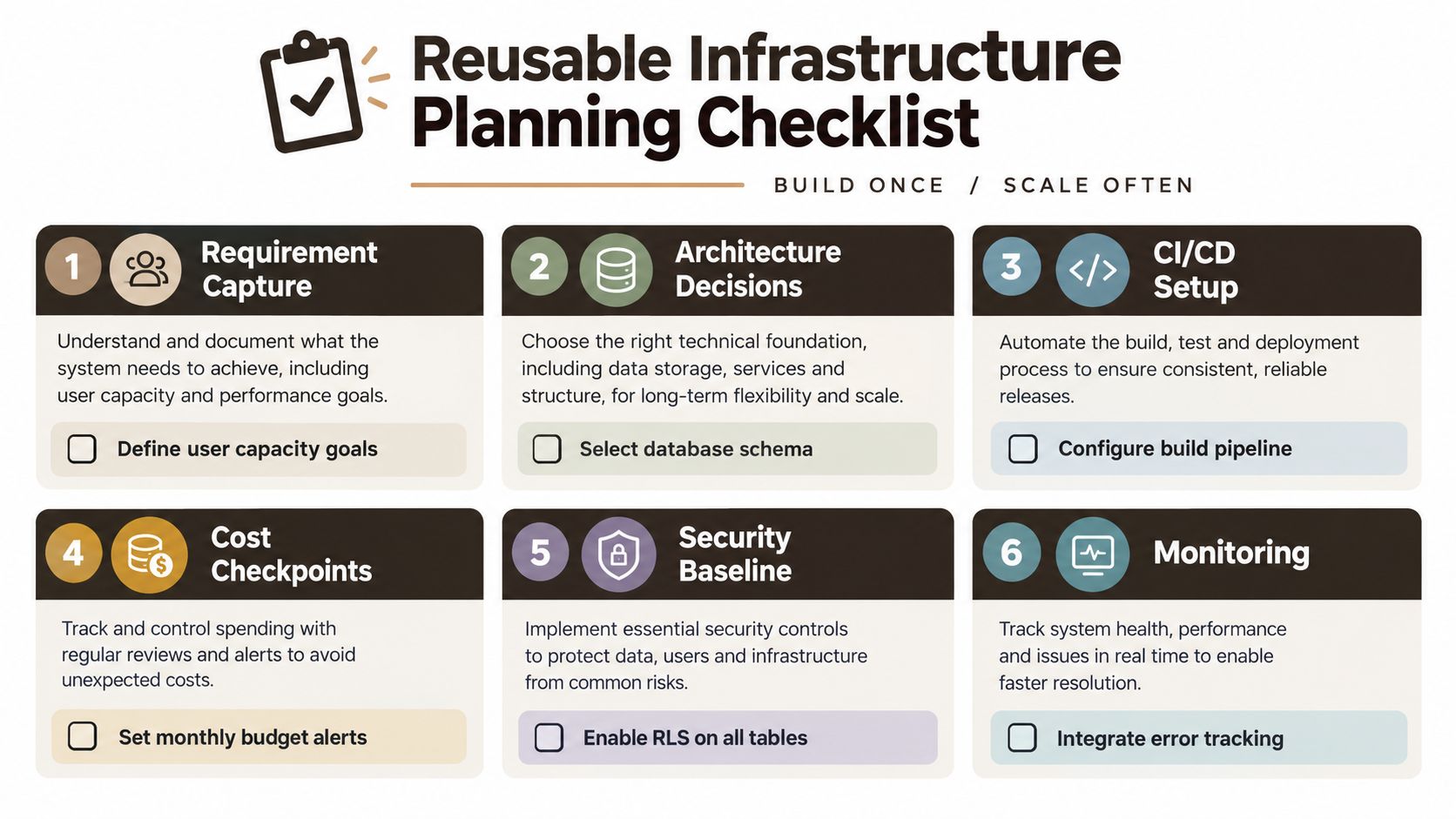 A six-step reusable infrastructure planning checklist for software development, focusing on building once and scaling often.
Keep the operating checklist short
- Requirements: Map Expo journeys to reads, writes, uploads, latency targets, offline rules, and data constraints.
- Architecture: Record why Supabase-only, Supabase plus Hono, or a split platform satisfies the brief.
- Delivery: Commit
eas.json, GitHub Actions workflows,supabase/config.toml, and migrations. - Promotion: Separate development, preview, staging, and production values and credentials.
- Cost: Review database growth, bandwidth, EAS usage, function calls, and operational tooling.
- Security: Enable RLS, test policies, protect secrets, rotate credentials, and rate-limit sensitive routes.
- Monitoring: Track crashes, API health, latency, database pressure, authentication abuse, and cost changes.
- Recovery: Document rollback for OTA updates, store releases, migrations, and backend deployments.
Two items catch teams off guard repeatedly. First, mobile clients don't upgrade in lockstep, so server contracts and migrations need compatibility windows. Second, offline behavior is a product decision, not just a local cache setting. Decide what happens when a queued write conflicts with a server change before users create the conflict.
Save these templates in the repository
# Infrastructure Planning Brief

## Product
Core journeys:
Expected active-session pattern:
Critical user actions:

## Non-functional requirements
Latency targets:
Offline behavior:
Availability and degraded states:
Data residency and retention:

## Architecture
Supabase responsibilities:
Hono responsibilities:
Client cache and sync approach:
Storage and media approach:

## Delivery
Development environment:
Preview environment:
Production environment:
OTA policy:
Rollback owner:

## Risks
Known unknowns:
Validation method:
Decision owner:
Review date:
# Architecture Decision Record

Decision:
Requirement addressed:
Options considered:
Chosen option:
Why it fits the brief:
Operational cost:
Upgrade trigger:
Owner:
Review date:
# Promotion Flow

Pull request -> type check, lint, tests
Preview -> Expo preview build and integration checks
Staging -> approved migration and Hono deployment
Production -> tagged release, production build, smoke checks
Rollback -> named owner, documented command, verification step
# Monthly Review

Review workload assumptions:
Review slow queries and API latency:
Review storage, bandwidth, and build usage:
Review security findings and secret rotation:
Review crashes and failed deployments:
Record decisions and next review date:
A living document doesn't need elaborate tooling. It needs current assumptions, named owners, and a direct link to the decisions that shaped the Expo, Supabase, and Hono implementation. Start by copying the brief into your repository, fill it out with the team, and refuse to approve the next major feature until its capacity, failure, security, and release behavior are explicit.
AppLighter gives you a production-oriented starting point with Expo, a Supabase adapter, and a Hono/TypeScript edge-ready API layer, so you can spend less time wiring the foundation and more time validating the planning decisions that matter. Visit AppLighter to see how its authentication, navigation, state management, and delivery setup can support your next mobile app.