Authentication Requirements: A Practical Checklist Guide
Clear authentication requirements checklist covering legal, UX, and security needs. Build compliant, user-friendly login flows with confidence.
 Sanket
By January 2025, multi-factor authentication had reached 70% adoption overall, according to industry market data on MFA adoption. That figure changes the engineering question. Authentication is no longer a small login feature you add after the product works. It's a typed, testable system of requirements covering identity proof, sessions, recovery, devices, compliance, and increasingly, software agents acting on a user's behalf.
A useful authentication specification tells a team exactly what must happen, when it must happen, and how success will be verified. The checklist below is designed for that purpose. You can copy individual requirements into a product specification, assign them to engineering or compliance owners, and assemble a defensible auth design without searching through disconnected policy documents.
Table of Contents
- What Authentication Requirements Actually Cover
- Why Authentication Requirements Matter in 2026
- Legal and Compliance Requirements You Cannot Skip
- UX Requirements That Keep Users Signed In
- Security Requirements Beyond a Strong Password
- Platform-Specific Requirements Across iOS Android and Web
- Authentication Requirements for AI Agents and Edge Flows
- Quick-Reference Checklist of Every Requirement
- Glossary of Authentication Requirement Terms
- Frequently Asked Questions About Authentication Requirements
What Authentication Requirements Actually Cover
Authentication requirements define what a sign-in system must satisfy before it grants, renews, or restores access. Treat each requirement like a typed checklist item with three fields:
- Control: the mechanism, such as password screening, MFA, or session expiry.
- Trigger: the event that activates it, such as account creation, a new device, or a sensitive transaction.
- Acceptance threshold: the result that passes review, such as a minimum length, assurance level, or recorded event.
For example, “Passwords must be at least 12 characters and checked against a known breach list on creation.” Engineers can test that statement against the right trigger and outcome. “Use strong passwords” leaves the implementation and review criteria undefined.
Store these items in a working checklist library, not a narrative policy. A product manager can select interaction rules, a security engineer can assign threat controls, a platform engineer can map device behavior, and a compliance owner can verify required records. Cross-references show where one item affects another, so the team can assemble an auth specification in one pass.
The four requirement categories
- Legal and compliance: assurance levels, records, retention, and sector controls.
- UX: sign-in, recovery, accessibility, and error-handling rules.
- Security: defenses against guessing, token theft, session abuse, and account takeover.
- Platform-specific: constraints from iOS, Android, browsers, app stores, and credential managers.
Categories can overlap without becoming one vague “auth” ticket. A password policy maps to security and compliance. A Face ID fallback maps to platform and UX. A step-up challenge for a high-risk action maps to security, product, and sometimes regulation.
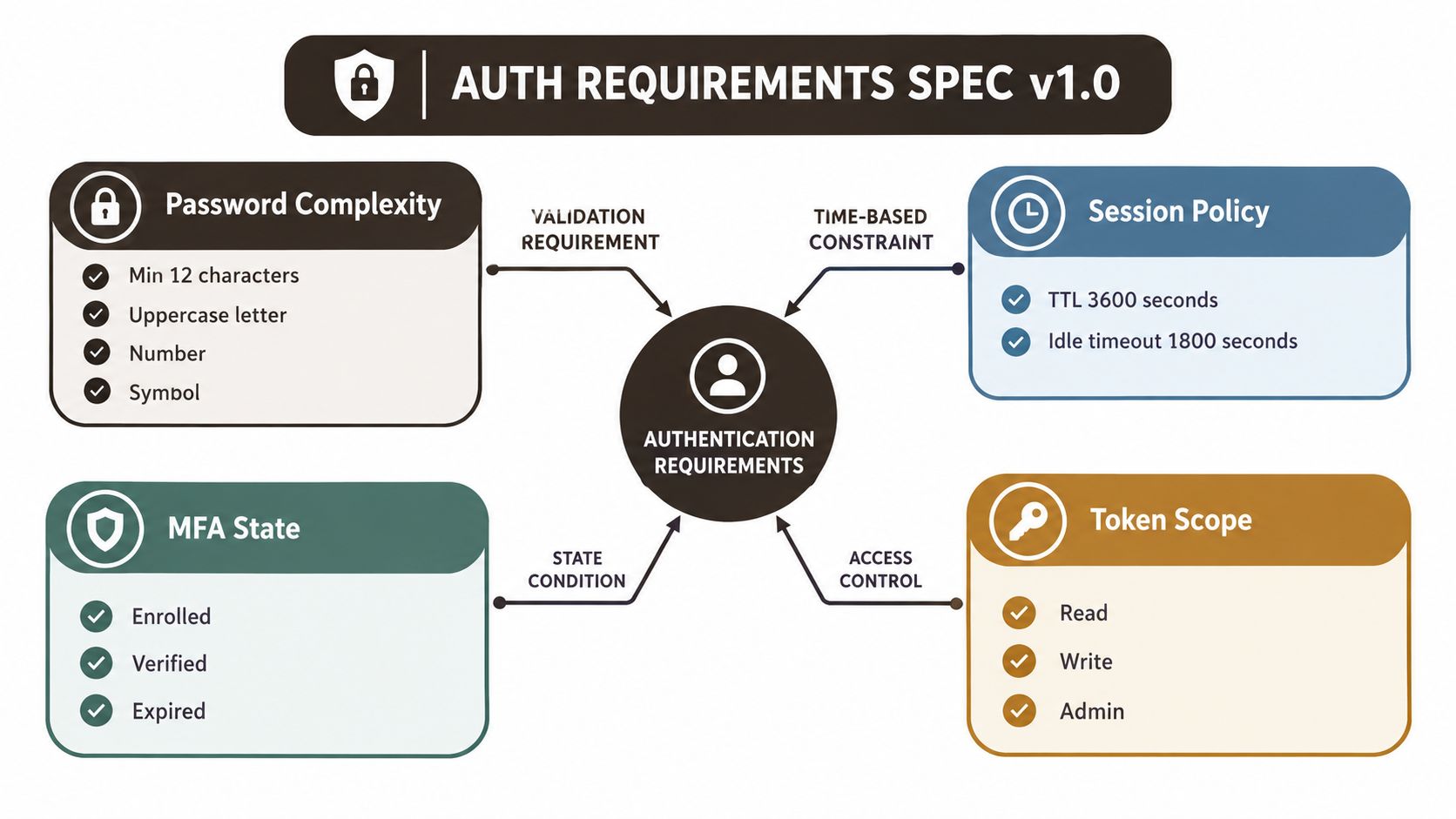 A diagram outlining authentication requirements including password complexity, session policies, MFA states, and token access scopes.
Email recovery is another checklist dependency. Verification and reset messages need a trustworthy sending domain. Use an SPF and DKIM checker to identify configuration issues that could stop users receiving critical authentication messages.
Why Authentication Requirements Matter in 2026
Technology organizations reported 87% MFA adoption, compared with 52% in retail and 42% in transportation and warehousing, according to reported MFA adoption data. This breakdown matters more than a single overall adoption figure. It shows that MFA is a normal product expectation in some sectors while remaining a larger delivery gap in others.
Regional investment points in the same direction. A 2025 MFA market report estimated that North America generated 34.40% of global MFA revenue and Europe generated 29.00%. It also projected Asia-Pacific as the fastest-growing region at a 16.80% CAGR. Regulatory mandates, identity infrastructure, remote access, digital banking, and customer data protection are making stronger authentication part of routine product operations.
For a product team, authentication is a dependency graph, not a single login screen. Stolen credentials can be reused, weak recovery flows can be abused, and users can be persuaded to share one-time codes. A compromised account may expose personal data, interrupt employee access, trigger payment fraud, and reduce customer trust. Legal consequences vary by sector and jurisdiction, so the auth specification must link each control to the obligations that apply to the product.
Engineering principle: Authentication is a system property. It includes enrollment, sign-in, sessions, recovery, account changes, service-to-service access, and audit evidence.
Use the checklist as typed requirements: assign every control an owner, define the event that triggers it, and record how verification will work. This makes dependencies visible. A login rule can affect account opening, transaction approval, protected-record access, and the recovery path. Products handling financial activity, healthcare data, employee accounts, or administrative access need those links documented before implementation.
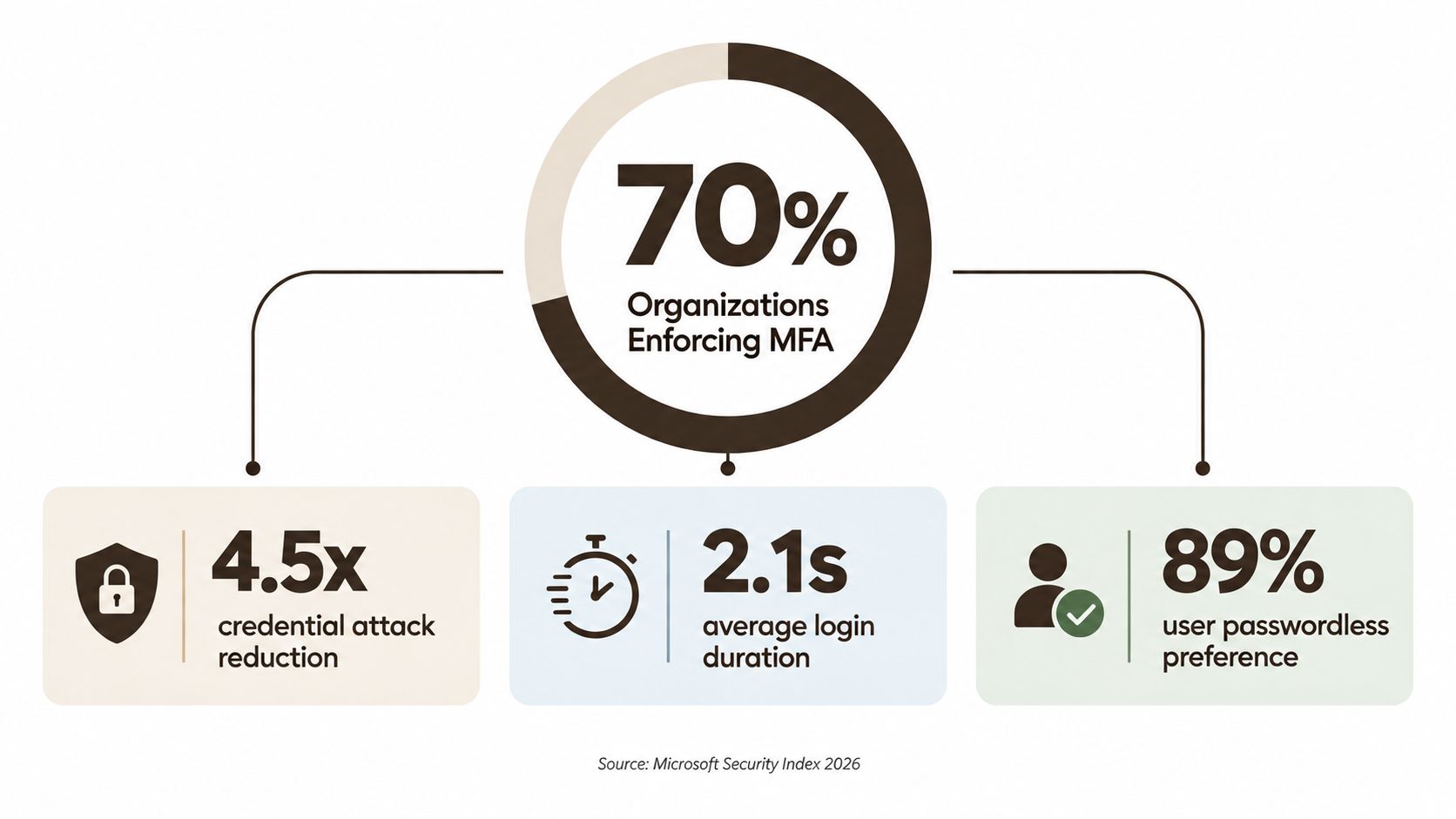 A data visualization chart highlighting MFA adoption, credential attack reduction, login speed, and user preference for passwordless authentication.
A broader market view is available in this short video on authentication requirements and MFA:
Legal and Compliance Requirements You Cannot Skip
A single assurance level should govern more than the login screen. Start by defining the consequence of account compromise, then select an authenticator and flow that address that risk. NIST SP 800-63-4 places authentication within a digital identity framework covering authenticators, federation, assurance, and lifecycle management. Your typed checklist should therefore assign assurance requirements to initial sign-in, session renewal, recovery, and step-up actions.
NIST's assurance model gives the team a shared vocabulary. AAL1 supports basic single-factor authentication. AAL2 requires multi-factor authentication. AAL3 calls for stronger, hardware-based protections suited to particularly sensitive access. Choose the applicable tier from the impact of compromise, not from the label on a screen.
Copyable policy controls
OWASP's Authentication Cheat Sheet supplies practical defaults for the control library. With MFA enabled, passwords under 8 characters are considered weak. Without MFA, passwords under 15 characters are considered weak, and the maximum length should be at least 64 characters so users can create passphrases. The guidance also supports MFA for all users, or at minimum privileged users, reauthentication before factor changes, and out-of-band notification when a factor is replaced.
Use a privacy and compliance review to connect these controls to data handling, retention, and user rights. Authentication records can contain personal data even when the password itself is never stored. Add an owner, trigger, verification method, and evidence requirement to each control.
| Regulation | Region | Authentication threshold | Triggering use case |
|---|---|---|---|
| NIST SP 800-63-4 | United States framework | Select and document the applicable assurance level | Sign-in, federation, recovery, and step-up |
| OWASP Authentication guidance | Cross-industry | Enforce password length, MFA, factor-change reauthentication, and safe recovery | Account creation, login, and credential changes |
| PSD2 Strong Customer Authentication | EEA | Use two factor categories where the rule applies | Payment and other regulated banking actions |
| HIPAA Security Rule, 164.312(d) | United States healthcare | Authenticate the person or entity requesting access | Electronic protected health information |
| GLBA Safeguards Rule | United States financial services | Apply safeguards appropriate to customer information risk | Customer account and financial data access |
| PIPEDA | Canada | Protect personal information through reasonable safeguards | Access to Canadian personal data |
| PCI DSS 4.0 requirement 8 | Cardholder environments | Apply identity and authentication controls required for in-scope access | Cardholder data systems and administration |
These obligations take priority over convenience preferences. If a shorter password, persistent session, or SMS fallback conflicts with the required assurance level, follow the obligation and redesign the flow around it. Record the decision, scope, exception process, and evidence a reviewer can inspect. Each row should map to an implementation task and a test case, so the checklist becomes an auth specification rather than a policy document that sits apart from the product.
UX Requirements That Keep Users Signed In
A secure login can still fail as a product if users can't understand it, complete it, or recover from an error. Write UX requirements as observable tests instead of subjective goals.
The flow should support password manager autofill in WebKit, Gecko, and Blink, provide inline validation for email and phone fields, and expose clear focus states for keyboard and assistive-technology users. Accessible controls should align with WCAG 2.2 AA, including visible focus rings, sufficient contrast, and screen-reader announcements for MFA prompts.
The sign-in acceptance checklist
- Latency: Target end-to-end login completion in under 2 seconds on broadband. Measure from submission to the first authenticated application state, not just the API response.
- Recovery: A normal credential recovery flow should complete in under 90 seconds when the user has access to the registered recovery channel.
- Errors: Don't reveal whether an email exists in the system. Explain the next action without telling an attacker which field was valid.
- Autofill: Test password managers on WebKit, Gecko, and Blink, including mobile browser behavior and field labels.
- MFA prompts: Announce the challenge state to screen readers, preserve focus, and provide an accessible fallback when a biometric or push prompt fails.
- Passwordless entry: Put passkeys or magic links on the primary sign-in screen when they're supported by the product's risk model.
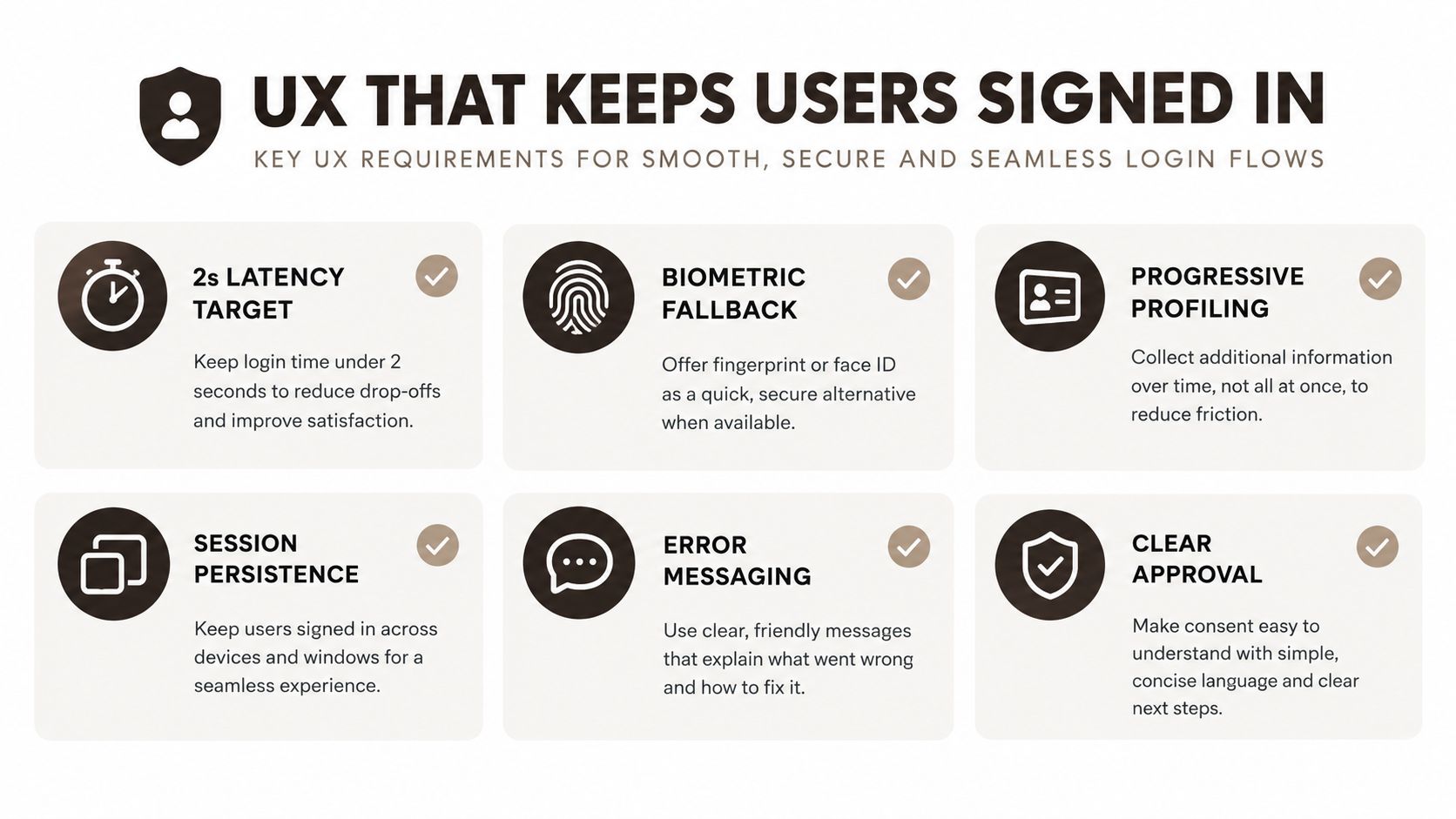 A visual guide outlining six essential UX requirements for creating smooth, secure, and seamless user login flows.
Trust signals help users detect account misuse. Consider showing the last successful login location, listing active devices, and giving users a way to revoke a session. Those signals should be useful without exposing sensitive location detail to someone who has gained partial access.
Every item needs telemetry. Log events such as login_started, login_failed, mfa_prompted, mfa_completed, recovery_started, and recovery_completed, while avoiding raw passwords, complete recovery tokens, or unnecessary personal data. QA can then distinguish a security control that blocked an attacker from a usability problem that blocked a legitimate user.
Security Requirements Beyond a Strong Password
Password complexity is only one control, and it doesn't defend every important path. An attacker may target the login endpoint, reset flow, refresh token, browser session, factor replacement process, or support workflow instead.
Controls that map to threats
Rate-limit login, token issuance, and reset endpoints. A practical starting policy is 5 attempts per email per 15 minutes, combined with exponential backoff. Apply controls by more than one signal, such as account, device, IP reputation, and network context, so an attacker can't bypass the limit by rotating one identifier.
Use short-lived access tokens of 15 minutes, rotating refresh tokens bound to the device, and an absolute session timeout of 30 days with reauthentication for sensitive actions. Store passwords with Argon2id or bcrypt and a per-user salt, protect stored secrets with AES-GCM, use TLS 1.3 in transit, and keep signing-key wrapping behind an HSM-backed process.
| Control | Threat mitigated | Threshold |
|---|---|---|
| Login and reset rate limits | Credential guessing and automated recovery abuse | 5 attempts per email per 15 minutes, then exponential backoff |
| Short-lived access tokens | Stolen-token replay | 15-minute access-token lifetime |
| Rotating refresh tokens | Refresh-token theft and reuse | Rotate on use and bind to the device |
| Absolute session expiry | Forgotten or abandoned sessions | 30-day maximum, with sensitive-action reauthentication |
| Password hashing | Database disclosure | Argon2id or bcrypt with a unique per-user salt |
| Transport encryption | Network interception | TLS 1.3 for data in transit |
| Anomaly detection | New-device abuse, impossible travel, and stuffing | Evaluate signals before granting or continuing access |
| Audit logging | Undetected account and admin activity | Record every auth event in tamper-evident storage |
| Revocation | Compromised session persistence | Revoke access quickly after a confirmed compromise |
Detect impossible travel, new devices, and credential-stuffing patterns. A high-risk transaction should trigger step-up authentication rather than relying on the original session alone. Factor replacement deserves the same treatment, because an attacker who controls recovery can bypass a strong original login.
For products that use SMS notifications or verification, review the threat model and the delivery provider carefully. A secure messaging platform overview can help teams compare operational capabilities, but messaging delivery doesn't replace a sound identity policy.
Biometrics should activate a device-bound credential, not become a server-side secret. For the implementation distinction between a biometric signal and the credential it protects, see this guide to what biometric authentication means.
Platform-Specific Requirements Across iOS Android and Web
A single auth policy still needs three implementations. iOS, Android, and web expose different credential stores, browser behaviors, notification paths, and recovery constraints.
On iOS, AuthenticationServices supports passkeys and Sign in with Apple. If a product offers third-party social login, implement the Apple flow and account-linking behavior deliberately. Passkeys stored in iCloud Keychain inherit Apple-managed synchronization behavior, so the product must define what happens when a user changes devices or loses access to the Apple account.
Android uses Credential Manager as the unified entry point for passkeys, federated identity, and traditional credentials. Avoid designing against older, fragmented patterns when the supported Android version and library stack provide the unified API.
The web exposes WebAuthn and the Credential Management API, but browser session behavior remains different. Cookie policies, Safari limitations, and the phase-out of third-party cookies in Chrome can affect embedded login, cross-site flows, and silent session restoration.
| Requirement | iOS | Android | Web |
|---|---|---|---|
| Passkeys | AuthenticationServices and iCloud Keychain behavior | Credential Manager | WebAuthn and browser credential APIs |
| Social identity | Sign in with Apple when applicable | Federated identity through supported providers | OIDC or SAML provider flows |
| Biometrics | Face ID or Touch ID with fallback | Fingerprint or device credential fallback | Platform authenticator or security key |
| Magic links | Universal Links | App Links and intent handling | Verified HTTPS redirect |
| Step-up delivery | APNs and in-app challenge | FCM and in-app challenge | Push, email, or authenticator flow |
| Recovery secrets | Platform-secure storage where appropriate | Android secure storage | Protected server-side recovery process |
Deep links require explicit tests for expired links, already-used links, wrong-account links, and links opened on a different device. Recovery codes shouldn't sit in ordinary app-local storage. Protect them with the platform's secure storage facilities and expose them only during deliberate recovery actions.
For a Supabase-backed React Native implementation, this complete guide to Supabase Auth in React Native provides relevant implementation context. Keep the requirement set identical across platforms, then document the platform-specific adapter and its test evidence.
Authentication Requirements for AI Agents and Edge Flows
An AI agent isn't a human user with a browser. It may call an API, delegate a task, invoke an MCP server, or operate through an edge function. The identity model therefore has to answer which actor acted, for which user, for what purpose, and with what authority.
Recent guidance identifies OAuth 2.1 with PKCE and dynamic client registration as a baseline direction for agentic systems, alongside formal agent identity, scoped short-lived tokens, per-task authorization, and audit logs that distinguish agent actions from human actions. Treat an agent token as a task credential, not as a permanent copy of the user's session.
Typed requirements for non-human principals
- Identity class: Map every agent, worker, edge function, and device fleet to a named identity type.
- Token claims: Include audience and purpose claims, with scopes limited to the task.
- Lifetime: Keep agent credentials short-lived and make revocation explicit.
- Consent trail: Record the user approval, requested action, authorized scope, and resulting decision.
- Runtime binding: Bind workloads to a specific runtime, region, version, or attested device where risk requires it.
- Service authentication: Prefer mTLS, SPIFFE or SPIRE identities, or signed JWTs from a trusted issuer over shared API keys.
- Verification: Use introspection, fine-grained authorization, device posture, and anomaly signals at the point of action.
- Audit context: Log the human principal, agent principal, tool, task, resource, decision, and timestamp.
Edge verification moves checks closer to the CDN or execution boundary. That can reduce dependence on a central session lookup, but it also makes key rotation, cache invalidation, clock handling, and revocation design more important.
Teams designing agent workflows can use these agent readiness tips for developers as a planning reference, then turn each recommendation into a requirement with a test and an owner. The key change is conceptual: authentication now covers session-level and action-level identity, not only the initial login screen.
Quick-Reference Checklist of Every Requirement
Use this table as a review artifact. Add the owner, status, and evidence link in your issue tracker or compliance repository. “Required” means the control blocks release when it's missing. “Recommended” means it should be scheduled unless a documented risk decision says otherwise.
| Category | Requirement | Owner | Priority | Status | Verification evidence |
|---|---|---|---|---|---|
| Legal | Map the product to a NIST assurance level | Security and compliance | Required | Required | Approved auth specification |
| Legal | Apply OWASP password, MFA, and factor-change controls | Security | Required | Required | Automated and manual test results |
| Legal | Review PSD2, HIPAA, GLBA, PIPEDA, or PCI scope | Compliance | Required | Required | Signed applicability assessment |
| UX | Test login latency against the product target | Product engineering | Recommended | Recommended | Performance trace |
| UX | Support autofill, accessible focus, contrast, and MFA announcements | Frontend | Required | Required | WCAG 2.2 AA test report |
| UX | Test recovery completion and safe error messages | Product and QA | Required | Required | Recovery test cases |
| Security | Rate-limit login, token, and reset endpoints | Backend | Required | Required | Load and abuse tests |
| Security | Hash passwords and protect keys and secrets | Platform security | Required | Required | Configuration review |
| Security | Rotate refresh tokens and document revocation | Backend | Required | Required | Session lifecycle tests |
| Security | Detect anomalous access and step up high-risk actions | Security | Recommended | Recommended | Detection and response tests |
| Platform | Implement native passkey and deep-link behavior | Mobile and web | Required | Required | Device and browser matrix |
| Platform | Test biometric fallback and secure recovery storage | Mobile | Required | Required | Device test evidence |
| Agent and edge | Give every non-human actor a scoped, auditable identity | Platform | Required | Required | Token and identity review |
| Agent and edge | Validate audience, purpose, runtime, and revocation | API security | Required | Required | Authorization tests |
| Governance | Log authentication events without unnecessary personal data | Security and privacy | Required | Required | Log schema and retention review |
Use explicit status tags such as required, recommended, and optional in planning. A reviewer should be able to mark each row complete or incomplete without interpreting ambiguous prose.
Glossary of Authentication Requirement Terms
Adaptive authentication: A policy that changes the challenge based on risk signals such as device, location, behavior, or transaction context.
AAL: NIST's Authenticator Assurance Level. AAL1 represents single-factor assurance, AAL2 requires MFA, and AAL3 requires stronger hardware-based protection.
Account recovery: The process for restoring access when the normal authenticator is unavailable. It isn't the same as changing a known password.
Federated identity: Authentication delegated to an identity provider through protocols such as OIDC or SAML.
Passkey: A FIDO2 discoverable credential used with a device or credential manager. It uses public-key cryptography rather than a reusable password.
Session binding: Connecting a session to contextual signals, such as a device, so token use outside the expected context can be challenged or revoked.
Step-up authentication: An additional authentication challenge required before a higher-risk or high-risk action.
Token scope: The set of resources or operations a token may access. Scopes should reflect the task, not the maximum privileges of the user.
Continuous authentication: Ongoing evaluation of signals after login, including device posture, behavior, and anomaly indicators.
Credential reset: Changing or replacing a credential after a user has authenticated or completed a recovery process.
Frequently Asked Questions About Authentication Requirements
Can passkeys replace passwords everywhere?
Not automatically. Synced passkeys are treated as AAL2-compliant under updated NIST guidance, while AAL3 still requires hardware-bound, non-exportable credentials and stronger controls, as discussed in recent passkey adoption and assurance coverage. Use passkeys broadly where their assurance and recovery model fit, but assess privileged administration, high-sensitivity actions, and regulated workflows separately.
When should a product require step-up MFA?
Require it when the action has materially greater consequences than ordinary browsing or account access. Examples include changing recovery factors, exporting sensitive data, approving a payment, or granting administrator privileges. Map the action to the required NIST assurance level and, where applicable, the relevant PSD2 or sector rule.
Can we exempt users from MFA?
Only with a documented reason, narrow scope, compensating controls, an expiration date, and monitoring. Privileged users shouldn't receive broad exemptions just because a flow is inconvenient. OWASP guidance supports requiring MFA for all users or at least privileged users.
What should authentication logs contain?
Record the actor, authentication method, result, device or session identifier, relevant risk decision, factor change, and revocation event. Don't store passwords, complete bearer tokens, or unnecessary location data. Retain enough context to investigate an incident while applying the privacy and retention rules that govern your product.
How should passwordless migration work?
Run passkeys alongside legacy credentials during a controlled migration. Give users a clear enrollment path, preserve safe recovery, monitor fallback use, and define when legacy methods will be restricted. Don't remove the old path until support, device coverage, and account-recovery evidence justify the change.
What's the difference between authentication and authorization?
Authentication establishes who or what is making the request. Authorization decides what that identity may do. A valid user session doesn't automatically authorize an agent to delete records, access every tenant, or perform an irreversible action.
AppLighter provides Expo and React Native starter kits with preconfigured authentication, session management, protected routes, and Supabase-backed flows for mobile applications. Use the AppLighter foundation to implement the platform checklist, then add the assurance, threat, recovery, and agent controls required by your product.