Applications of Data Base: Real-World Uses in Modern Apps
Explore practical applications of data base technology across mobile and cloud apps, from authentication to analytics, with examples for React Native stacks.
 Sanket
Maya has just installed the first build of her fitness app on her phone. She creates an account, uploads a profile photo, records a workout, watches her weekly streak change, and receives a notification when a friend joins her challenge. The interface feels immediate, but each action depends on data being stored, checked, connected, and returned at the right moment.
That's the practical meaning of applications of data base technology. A database isn't merely a place to keep records after the app is finished. It supports authentication, profiles, feeds, relationships, search, notifications, analytics, and increasingly AI features. Your React Native interface is the visible layer. The database is the working memory and rule system underneath it.
Table of Contents
- The App on Your Phone Runs on a Database
- What a Database Actually Does
- Core Jobs Databases Handle in Every Application
- A Brief History of How We Got Here
- Choosing the Right Database Type for Your App
- Database Applications in Mobile and Modern Stacks
- Beyond Storage Emerging Database Applications
- Putting It All Together Before You Ship
The App on Your Phone Runs on a Database
Maya opens the app and enters her email and password. The client sends those credentials to an authentication service, which checks the account record and creates a session. The app then requests Maya's profile, including her display name, avatar reference, preferred units, and fitness goals. What she experiences as “logging in” is a coordinated sequence of reads and writes.
When she logs a workout, the app writes a new record. That record needs an owner, a timestamp, a workout type, and perhaps duration or notes. The streak counter isn't magic either. The backend reads Maya's recent activity, applies the app's streak rules, and returns a new value for the screen. If the app stores streaks directly, it updates that field. If it calculates them from workout history, it queries the underlying events.
Her friend's notification follows another path. Maya's friend joins a challenge, so the system writes a membership record or event. A server-side process notices the new data and delivers a push notification. The app later reads the challenge membership so both users see the same state.
Practical rule: Every important screen should have a clear answer to two questions, “Which data does this screen read?” and “Which action writes or changes that data?”
This is why modern apps often behave like database front ends wearing a user interface costume. The UI collects intent and displays results. The database preserves state, enforces relationships, and makes the result available to the next device or session.
At MVP scale, you don't need a complex distributed architecture for every feature. You do need a dependable source of truth. Supabase and Vibecode DB give an Expo or React Native app a structured way to call that source, so you can focus on the product behavior instead of passing loose JSON between screens.
What a Database Actually Does
Think of a database as a self-organizing library rather than a digital filing cabinet. A table is like a shelf dedicated to one category, such as users or workouts. A row is one book on that shelf, representing a single user or workout. A column is an information label on the book's index card, such as email, duration, or created date.
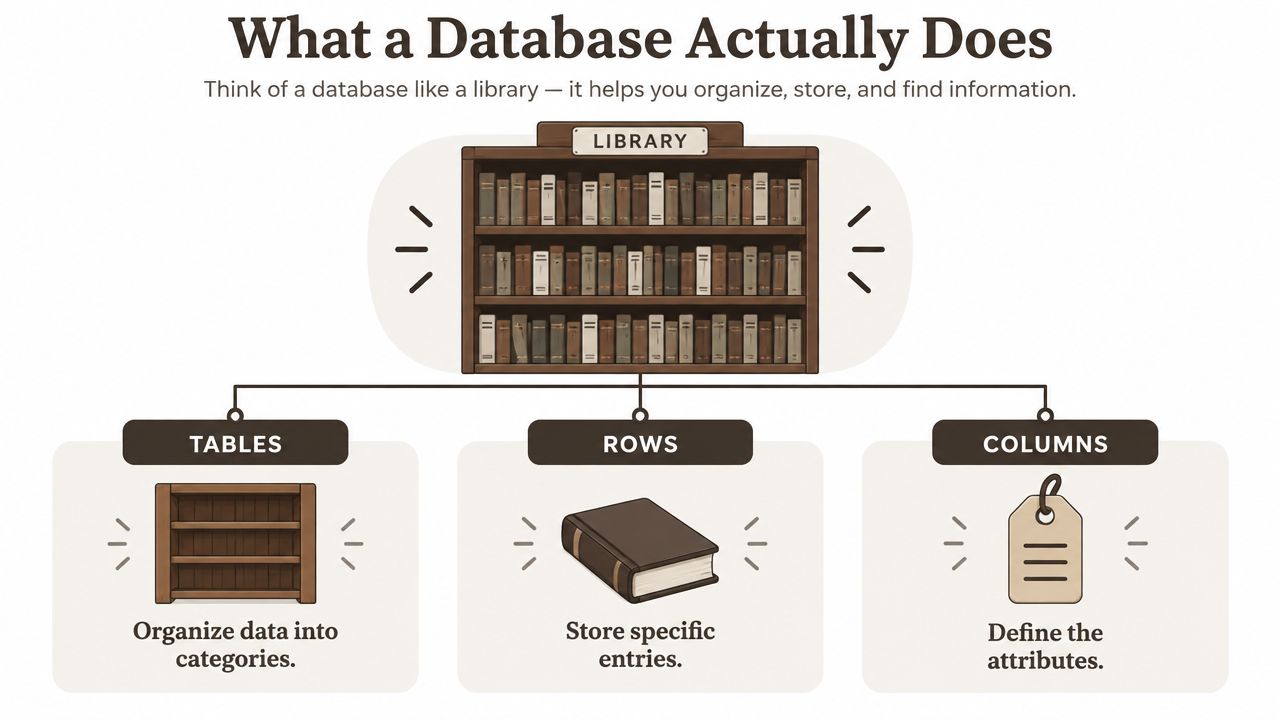 A diagram comparing a database to a library with sections for tables, rows, and columns.
A query is a request to the librarian. “Find Maya's workouts from this week” tells the database which shelf to use, which entries to inspect, and which results to return. The database doesn't scan every record blindly. An index works like a card catalog, helping it locate commonly requested values such as a user ID, email address, or timestamp.
Rules keep the collection trustworthy
A schema defines the library's filing rules. It says which fields exist, which values are required, and how records connect. A primary key identifies one row. A foreign key connects a row to a record in another table. A uniqueness rule can prevent two accounts from using the same email address.
Those constraints matter because mobile clients aren't trustworthy by default. A user can tap twice, lose connection halfway through a request, or run an old app version against a newer backend. Database rules provide protection even when the client behaves unexpectedly.
Relationships are cross-references between shelves. A workout can belong to one user, while a workout may contain many exercise entries. A query can combine those related records and return the exact shape needed by the profile or history screen. This operation is called a join in relational databases.
A database also handles concurrent requests. One user might save a workout while another loads a leaderboard, and several devices may update the same challenge. The engine coordinates those operations and can use transactions to keep related changes together.
That distinction is important for a React Native developer. Supabase exposes a hosted PostgreSQL database through APIs, authentication, storage, and real-time features. Vibecode DB provides an application-facing database layer that can work with mock data during development and a Supabase adapter when you connect the shipped app to hosted data.
Core Jobs Databases Handle in Every Application
A fitness app can look simple because its screens are familiar. Underneath, the database performs several different jobs. Keeping those jobs separate helps you choose tables and queries deliberately instead of creating one oversized “data” object.
Five jobs behind one familiar product
1. Persistent storage keeps information after the app closes. A profiles table might store a user ID, display name, avatar path, and preferences. The profile screen sends a query filtered by the authenticated user ID, then renders the returned row.
2. Authentication and authorization decide who can enter and what they can access. Authentication creates a session. Authorization checks whether that session may read or change a row. In Supabase, row-level security policies can restrict profile access so a signed-in user sees only permitted records.
3. Relationships connect separate pieces of the product. A workouts table can reference profiles.id, while an exercises table references workouts.id. The app can fetch a workout with its exercises without duplicating the user's identity across every record.
4. Real-time behavior keeps screens current when another event changes shared data. A challenge leaderboard can react to a new workout or score update. This relates to the broader problem of keeping copies consistent across clients, which is explained in this guide to data synchronization.
5. Analytics and event logs preserve what users do, not just what their current profile looks like. An activity_events table can record workout completion, screen visits, challenge joins, and notification interactions. Aggregations can then answer product questions without altering operational records.
| Database Job | App Feature | Example Table | User Sees |
|---|---|---|---|
| Persistent storage | Profile and workout history | profiles, workouts | Saved details after reopening |
| Authentication and authorization | Login and private records | auth.users, profiles | A signed-in account with protected data |
| Relationships | Exercises inside workouts | workouts, exercises | A complete workout detail view |
| Real-time updates | Shared challenges | challenge_scores | A leaderboard that changes without a manual refresh |
| Analytics and event logs | Progress and product measurement | activity_events | Progress summaries and personalized insights |
At MVP scale, these jobs may live in a small number of tables. That's fine if each table has a clear responsibility and the access rules are explicit. Enterprise systems usually separate workloads more aggressively, but the underlying questions remain the same: what happened, who owns it, how does it relate to other data, and who may see it?
A Brief History of How We Got Here
Early database systems organized information through hierarchical or network structures. Developers often had to follow rigid paths through records, which made data access closely tied to the way the system stored relationships. That approach could work for known navigation patterns, but it made changing the application's questions more difficult.
Edgar F. Codd published his relational model paper in 1970, introducing a more flexible way to represent data as related tables. By 1974, IBM had developed System R, widely cited as the first relational database management system. Oracle's first commercial SQL relational database followed in 1979, and SQL became an ANSI standard in 1986. These milestones are summarized in this overview of database evolution.
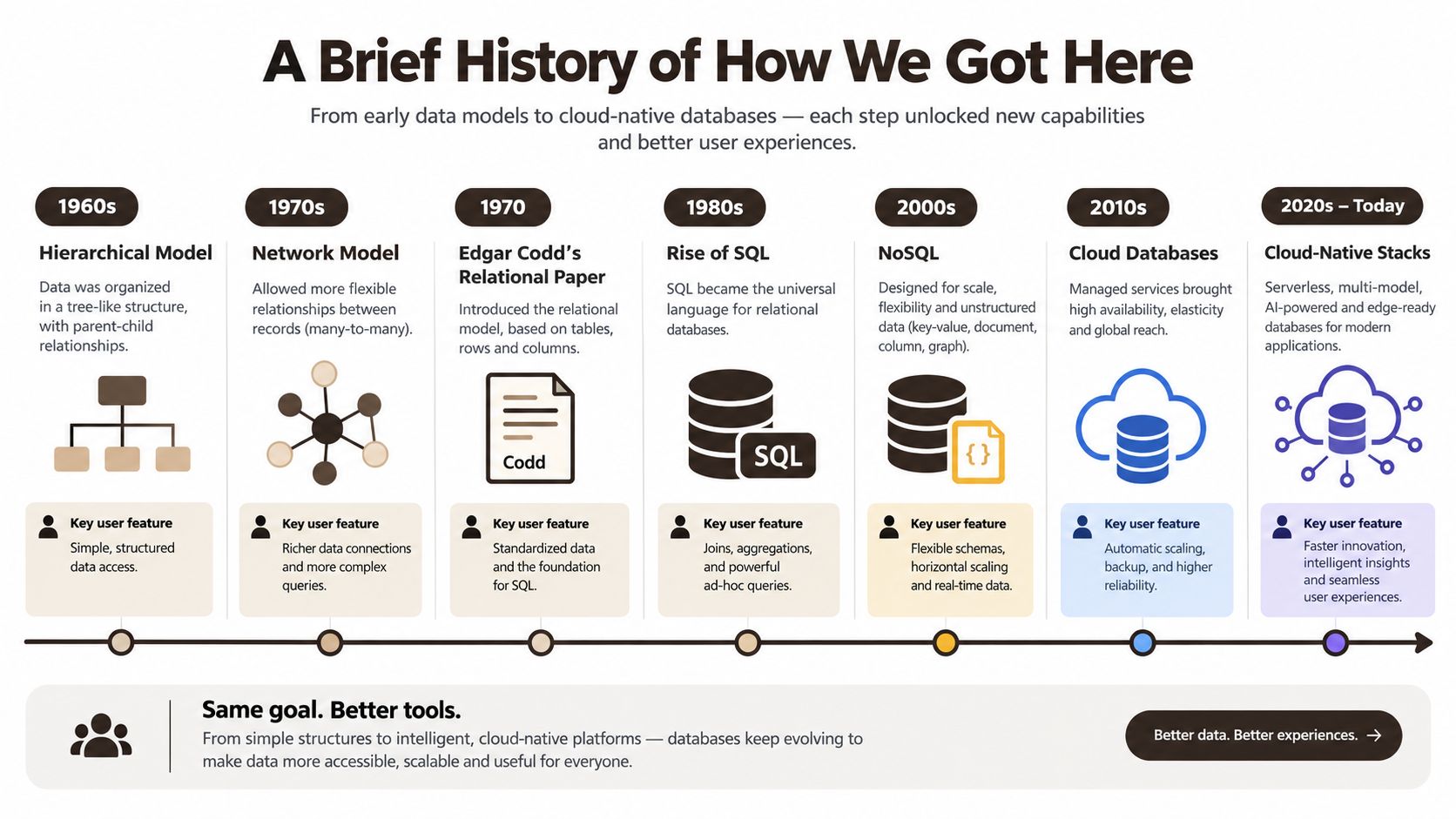 A timeline infographic illustrating the evolution of database technologies from 1960s hierarchical models to modern cloud-native stacks.
SQL changed what developers could ask of stored data. Instead of manually navigating pointers, an application could describe the result it needed. Transactions made it possible to update related records as one consistent operation, which is essential for flows such as payments, inventory changes, and account balances.
The web introduced different pressures. Document, key-value, and column-family databases became popular for workloads where flexible records, high traffic, or specialized access patterns mattered more than traditional joins. A feed item, chat payload, or offline cache can fit naturally into a document-shaped model.
Cloud platforms then moved much of the operational work away from the application team. Managed PostgreSQL, serverless products, hosted authentication, and real-time APIs let an indie developer use mature database capabilities without maintaining every server component. Supabase represents this modern combination, while Vibecode DB gives a React Native project an adapter-oriented way to work with mock and hosted backends.
The industry has continued expanding. One industry report estimates the global database market at $76.5 billion in 2023, with a projected $147.9 billion by 2028 and a compound annual growth rate of 10.2% from 2023 to 2030 according to the cited market overview. Those estimates reflect how databases now support transactional software, cloud data platforms, analytics, and AI-oriented applications.
Choosing the Right Database Type for Your App
Choose a database family by asking what your app needs to retrieve and protect, not by following a trend.
SQL databases, including PostgreSQL and MySQL, fit structured data with strong relationships. User accounts, subscriptions, orders, permissions, and financial records usually benefit from typed columns, foreign keys, joins, and transactions. Supabase PostgreSQL is a sensible default for many mobile MVPs because one relational system can support authentication-linked records, feeds, reporting, and real-time subscriptions.
NoSQL databases, such as MongoDB, Firestore, and DynamoDB, suit document-shaped data or access patterns where flexible schemas matter. A product catalog, chat thread, or offline-first cache may be easier to represent as nested documents. The trade-off is that you often design records around known reads rather than relying on arbitrary relational queries.
Vector databases address similarity by meaning. With pgvector in PostgreSQL, Pinecone, or Weaviate, an app can store embeddings and retrieve content that resembles a query, even when the words don't match exactly. This is useful for semantic search, recommendations, and AI assistants.
| App Feature | Recommended Database | Schema Style | Query Pattern | Example Stack |
|---|---|---|---|---|
| Accounts and subscriptions | SQL | Structured relational tables | Filters, joins, transactions | Supabase PostgreSQL |
| Chat messages and flexible content | NoSQL or SQL with JSONB | Documents or mixed relational data | Key-based reads, chronological queries | Firestore or Supabase |
| Similar workouts or semantic search | Vector with relational source | Embeddings linked to source rows | Nearest-neighbor similarity | Supabase with pgvector |
| Offline-first local state | Document or local store | Flexible nested records | Local reads and later synchronization | React Native cache with hosted backend |
The boundary isn't absolute. PostgreSQL can store JSONB for flexible fields and support vector search, so one product doesn't automatically need several databases. A small team should prefer fewer operational surfaces until a real workload proves that specialization is necessary.
For a practical comparison of relational choices, ThirstySprout's database guide gives useful context on Oracle and PostgreSQL. If you're evaluating database needs for a smaller organization, this guide to databases for small businesses can help frame the decision around cost, maintenance, and growth rather than features alone.
Database Applications in Mobile and Modern Stacks
A React Native app usually talks to the database through an API client rather than opening a raw database connection. That boundary matters. The client handles presentation and user actions, while Supabase or a Vibecode DB adapter handles authentication, data access, and the connection to the backend.
Authentication and profiles
Start with an identity record and an application profile.
profiles
- id
- display_name
- avatar_url
- preferred_units
- created_at
The id should map to the authenticated user. A profile screen can request the row for the current session, while an update operation changes only allowed fields. Row-level security policies then enforce ownership at the database boundary, not merely inside JavaScript conditionals.
The same identity can support session restoration, OAuth callbacks, settings, and ownership checks. This is one reason backend-as-a-service products are useful for mobile developers. The architectural role is described in this explanation of backend as a service.
Feeds and content
A social or fitness feed might use:
posts
- id
- author_id
- body
- created_at

post_reactions
- post_id
- user_id
- reaction
The author_id connects a post to its profile. post_reactions prevents the post record from becoming a crowded collection of changing counters. A feed query can filter by creation time, order results, and request a page of records. Search can use PostgreSQL text-search features, while JSONB can hold optional metadata that doesn't deserve a dedicated column yet.
Vibecode DB can keep the client-facing calls consistent while you develop against mock data and later connect an adapter backed by Supabase. That reduces the temptation to scatter database-specific details across every screen.
Real-time collaboration
For chat, use a table such as:
chat_messages
- id
- conversation_id
- sender_id
- body
- created_at
The initial screen load reads existing messages. A Supabase real-time subscription then listens for new rows associated with the conversation. When a message arrives, the client inserts it into local state or invalidates the relevant TanStack Query cache. The user sees the conversation update without repeated polling from the app.
Analytics that can answer product questions
Operational tables tell you the current state. An activity_events table tells you how users reached that state:
activity_events
- id
- user_id
- event_name
- properties
- occurred_at
A daily aggregation can group events by date and user. A materialized view can hold frequently requested summaries such as active-user counts, retention cohorts, or funnel stages. For broader context on how teams build analytics systems, see how Blocsys Technologies builds analytics solutions.
Don't put every analytic calculation inside the mobile client. Client-side calculations disappear when the user closes the app, vary across versions, and can be manipulated. Store the event once, then calculate reporting views centrally.
Beyond Storage Emerging Database Applications
CRUD operations answer direct questions, such as “Which workouts did Maya save?” More advanced database applications answer questions about patterns, including “Where did her routine break?” or “Which activity sequences commonly lead to a completed challenge?”
Gaps-and-islands analysis is one practical example. A time-ordered event table can reveal missing dates, continuous activity streaks, outages, duplicate events, or suspicious breaks in a sequence. Window functions such as LAG and LEAD help compare one event with its neighbors, while grouping logic turns consecutive records into identifiable islands. This introduction to gaps-and-islands analysis explains the pattern and its use with time-based data.
A fitness app can use the result to identify a current streak, flag a lapsed user, or detect a missing synchronization window. You don't need a separate analytics platform to prototype the query. Supabase PostgreSQL can run it, and Vibecode DB can provide the application workflow around the data.
Vector search changes another assumption. Instead of matching the exact phrase “short beginner workout,” an app can compare an embedding for that request with embeddings for stored workout descriptions. A recipe app can retrieve meals by semantic similarity, such as flavor or dietary intent, when those concepts aren't present as identical keywords.
Recent market coverage describes databases as supporting AI-native workloads such as semantic search, recommendation, anomaly detection, and generative AI. It also identifies HTAP, vector search, and serverless database adoption as important directions, including transactional workloads at 51.40% of 2025 demand and HTAP growing at a 16.2% CAGR through 2031, as reported in this database landscape analysis. Treat those figures as market-report estimates, not a reason to add AI infrastructure before your product needs it.
Putting It All Together Before You Ship
Before releasing your first database-backed build, verify these parts:
- Authentication and profiles: Confirm that protected records map to the authenticated user. Check that profile reads and writes follow explicit access policies.
- Data validation: Test required fields, foreign keys, duplicate submissions, invalid timestamps, and repeated taps. Put important rules in the database or trusted backend, not only in the UI.
- Backups: Confirm that your hosted database has a recovery process, and practice restoring important data.
- Performance monitoring: Inspect queries behind busy screens, add indexes for real filters, and test complete application flows rather than database speed alone. Microsoft's database benchmarking guidance recommends production-like query mixes or application-level load tests against a copy of production data, with concurrency increased until performance stabilizes.
Supabase and Vibecode DB can handle much of the surrounding plumbing, including authentication, CRUD access, adapters, and client integration. You still need to check that the configured rules match the product and its user flows.
Ship the smallest version that proves the workflow. Improve its schema, queries, and policies in response to real usage instead of preparing for theoretical scale.
AppLighter provides an Expo and React Native starter environment with Vibecode DB, a Supabase adapter, authentication, CRUD operations, and TanStack Query integration. Visit AppLighter to start with an organized database-aware mobile foundation.