AI Code Examples a Practical Reference for Expo React Native
Practical AI code examples for Expo, React Native, Supabase, and Hono APIs. Copy-ready patterns, guardrails, and verification workflows for production apps.
 Sanket
You've pasted a generated screen into your Expo app, watched Metro reload without an error, and felt done. The screen renders, the button directs, and the demo works. The problems show up later, in an untyped API response, a Supabase policy that exposes another user's rows, or an offline mutation that disappears when the app restarts. That's the gap this reference closes.
Table of Contents
- From Prompt to Production in an Expo React Native Project
- Why Mobile Developers Use AI Code Examples in 2026
- Prompt Patterns That Produce Reliable AI Code Examples
- Claude Code Rules for Expo Supabase and Hono Work
- Cursor Plugin and Hook Patterns for Generated Code
- A Worked AI-Assisted Flow for a Feature
- Copy-Ready Examples for Auth Validation and Offline Caching
- A Verification Workflow That Treats Examples as Untrusted Code
- The Trust Gap Most Examples Ignore
- Quick Reference Matrix of Pattern Output and Verification
From Prompt to Production in an Expo React Native Project
A green reload tells you almost nothing about production readiness. It doesn't tell you whether the generated Hono route validates its body, whether a new Supabase table has row-level security enabled, or whether the component handles loading, empty, and error states on iOS, Android, and web. Treating a first run as a finished feature is how small snippets become expensive rewrites.
The reliable habit is to treat every generated block as an untrusted implementation proposal. You accept it into a branch, not into main. You read the diff, run the type checker and tests, and decide whether to accept, revise, or regenerate before you ask for the next piece. Small, staged changes keep the blast radius manageable.
What a production-ready snippet carries with it
Every pattern that follows ships with three attachments, not just code.
- A typed contract: A shared schema or TypeScript type defines what the screen sends, what Hono accepts, and what Supabase returns.
- A guardrail: A project rule or editor hook stops the model from drifting into untyped fetches, inline secrets, or destructive migrations.
- A verification step: A test, scan, or manual check proves the snippet behaves under failure, not only on the happy path.
A snippet earns a commit when you can explain what it does, what it rejects, and what happens when the network drops.
That standard sounds slower than copy and paste. In practice it's faster, because you stop debugging code you never really read. AI code examples become useful when generation is the middle of the workflow, not the end of it. You prompt with constraints, generate a narrow diff, verify it against explicit gates, and only then move on. The sections below give you the prompts, rules, hooks, worked flow, copy-ready patterns, and a quick lookup matrix to run that loop on a real Expo, Supabase, and Hono stack.
Why Mobile Developers Use AI Code Examples in 2026
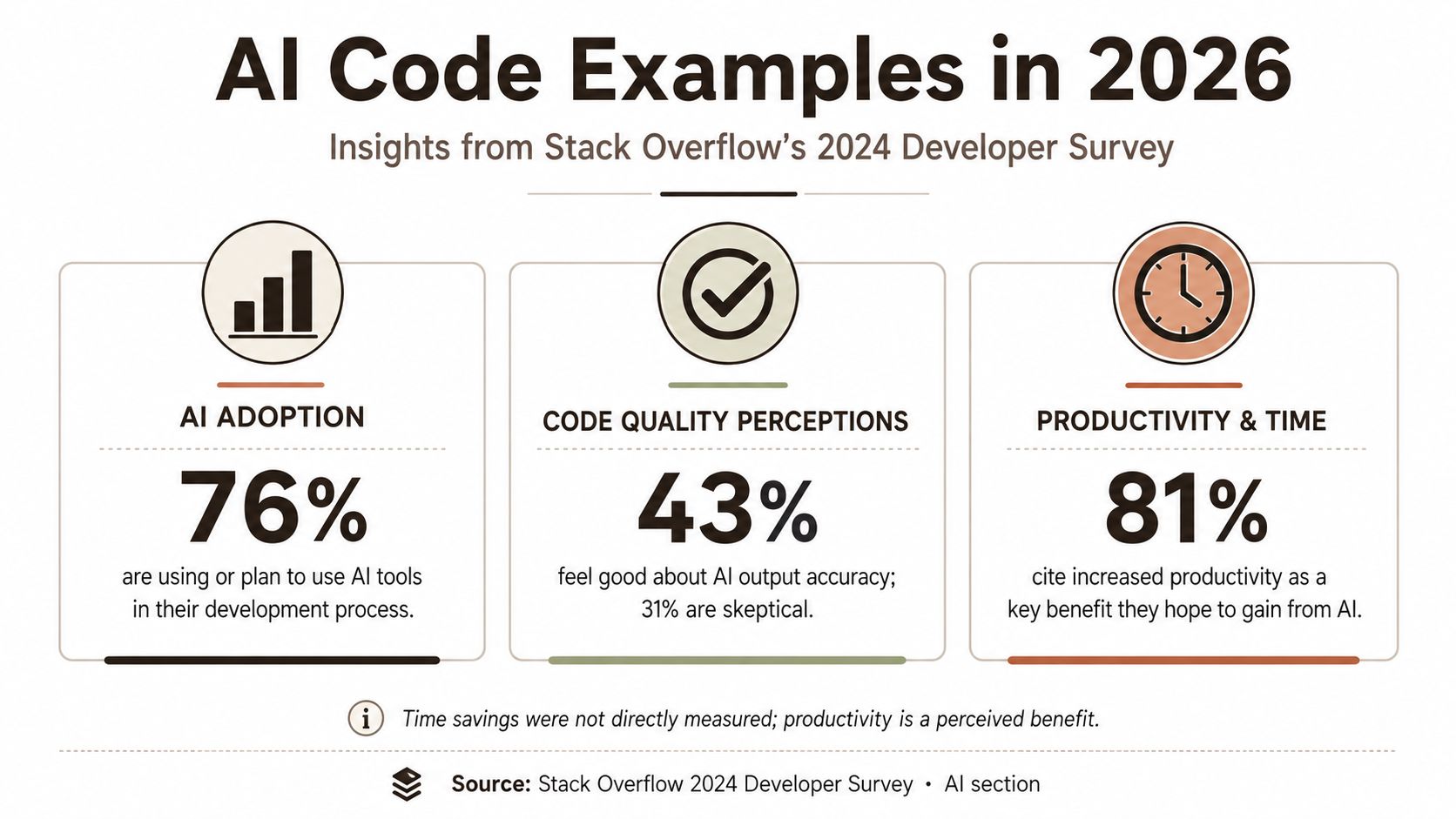
Adoption isn't hypothetical anymore. The Stack Overflow 2024 Developer Survey covered more than 65,000 developers and found 76% of respondents were already using or planning to use AI tools, up from 70% in 2023, while the share actively using them rose from 44% to 62% in the same survey. For mobile work specifically, that survey context includes 60% of mobile developers already using code assistants, compared with 75% of frontend developers in the same survey.
Developers keep reaching for these tools because the payoff is concrete. In the same survey, 81% of respondents cited increased productivity as the leading benefit, followed by 62% for faster learning and 58% for improved efficiency in the same dataset. Controlled evidence points the same way. A 2023 randomized experiment with 95 professional programmers found the Copilot group averaged 71.17 minutes against 160.89 minutes for the control group among those who finished, reported as approximately 55.8% faster in that study. A later field analysis in the same research line covered 4,867 developers and found Copilot users completed 26.08% more pull requests per week on average.
 An infographic showing Stack Overflow 2024 Developer Survey data on AI adoption, code quality, and productivity.
Where the gains actually come from
The wins concentrate in scaffolding, routine functions, API usage, documentation, testing, and exploratory prototypes. They don't remove judgment. The 2024 survey also found only about 42 to 43% of developers trusted AI-generated output, and 45% of professional developers judged AI tools bad or very bad at complex tasks in that survey. So the value isn't blind generation. It's acceleration plus a verification layer that mobile developers control.
Prompt Patterns That Produce Reliable AI Code Examples
A prompt that says “build a notes screen” returns a polished demo and three hidden gaps: no empty state, no permission failure, and a fetch helper that casts whatever the server sent. Reliable prompts read like the ticket you would hand a senior contractor: platform, contract, states, files, and the moves that are off limits. That discipline is the practical core of prompt engineering for developers, and it matters more than model choice.
Task: Expo Router screen `app/notes.tsx` for signed-in users.
Data: GET /notes from `api/notes.ts`; response type `NotesResponse`.
States: loading, empty, error retry, offline read-only.
May edit: app/notes.tsx, api/notes.ts, __tests__/notes.test.tsx.
Must not: add dependencies, change migrations, put secrets in client code, disable lint or types.
Done when: `tsc`, `eslint`, and named tests pass; paste diff and test output.
Feature scaffolding improves when the prompt names every visible state before naming the UI. Ask for the screen, the user role, the source of truth, and the exact tokens to reuse. If the prompt omits error and empty states, the model will happily optimize the happy path.
API client prompts should start from pasted Hono request and response types, then demand runtime validation, typed errors, and no any escape hatch. The recurring failure is silent assertion: TypeScript looks satisfied while the payload was never checked.
Test-first prompts flip the power balance. Request failing tests for success, unauthorized access, and malformed input, then ask for the smallest implementation that passes. Treat the returned snippet as an untrusted proposal: the written constraints give you something to diff against, and the tests give you a gate that survives regeneration.
Claude Code Rules for Expo Supabase and Hono Work
Repeating the same constraints in every prompt is fragile. You'll forget one on a Friday afternoon, and that's the session where the model generates a destructive migration. Project rules move those constraints into files the tool reads every time, so your conventions apply whether you remember to type them or not.
How to structure the rules
Keep a rules directory in the repo and split rules by scope. Project-wide rules cover TypeScript strictness, component style, and import conventions. Scoped rules apply to one area, such as migrations, API routes, or test files, so the model gets relevant guidance without a wall of unrelated instructions.
Separate hard rules from soft rules. Hard rules are never negotiable. Never commit secrets. Never place service role keys in client code. Never edit a shipped migration. Soft rules express preference, such as preferring functional components or colocating tests with the code they cover. Mixing the two weakens both, because the model can't tell which instructions it may bend.
Rules that pay for themselves in this stack
- Migrations stay additive: New migrations may add tables, columns, and indexes. Dropping or renaming requires an explicit human instruction in the session.
- Row-level security is mandatory: Every new Supabase table enables row-level security in the same migration, with policies scoped to the authenticated user.
- Every Hono route validates: Request bodies, params, and queries pass through a zod schema before a handler runs, and error responses follow one typed shape.
- No dynamic execution from strings: Generated code must not build imports, SQL, or shell commands from string literals or unvalidated input.
- Responses get checked: Client code validates API responses against a schema instead of trusting the network payload.
Starter kits can ship these files prewired. AppLighter, for example, is an Expo starter that includes Claude Code rules and Cursor tooling alongside its Supabase and Hono setup, which saves you writing the first version from scratch. Whether you start from a kit or a blank repo, customize three or four rules to match your project on day one. Rules you wrote yourself get maintained. Rules you copied and never read get ignored.
Cursor Plugin and Hook Patterns for Generated Code
A model can acknowledge your rule file and still hand back a diff that fails tsc. I learned this the day Cursor generated a Hono handler that matched my validation rule in style and skipped the schema entirely. Rules shape what gets written. Hooks decide what gets kept. The second part is what you wire up here.
 A developer coding on a laptop with a list of next steps written on a notepad nearby.
Pick a hook by when it fires, because each timing suits a different job:
| Hook timing | What it runs | What it catches |
|---|---|---|
| onSave | Formatter | Style noise that hides real problems in review |
| onAccept | ESLint or Biome, then tsc | Banned imports, unsafe patterns, untyped responses |
| Manual or CI | Custom validation script | Project sins: unvalidated fetch calls, direct service role usage |
If the type check fails, block the diff. Fixing types later usually means never.
The custom validator earns its place only if it stays boring. Mine is a short script that greps accepted diffs for fetch calls without a response schema, hardcoded URLs, and Supabase queries issued from screen components instead of the API layer. Those three are the mistakes generated code repeats most often in an Expo and Supabase project, and none of them trip a default lint config.
When a check fails, paste the exact compiler or linter output back into the session and ask for a correction. Models repair well against concrete error text. "Fix this" gets you a different guess. "TS2322: Type 'string' is not assignable to type 'number'" gets you a targeted repair.
A Worked AI-Assisted Flow for a Feature
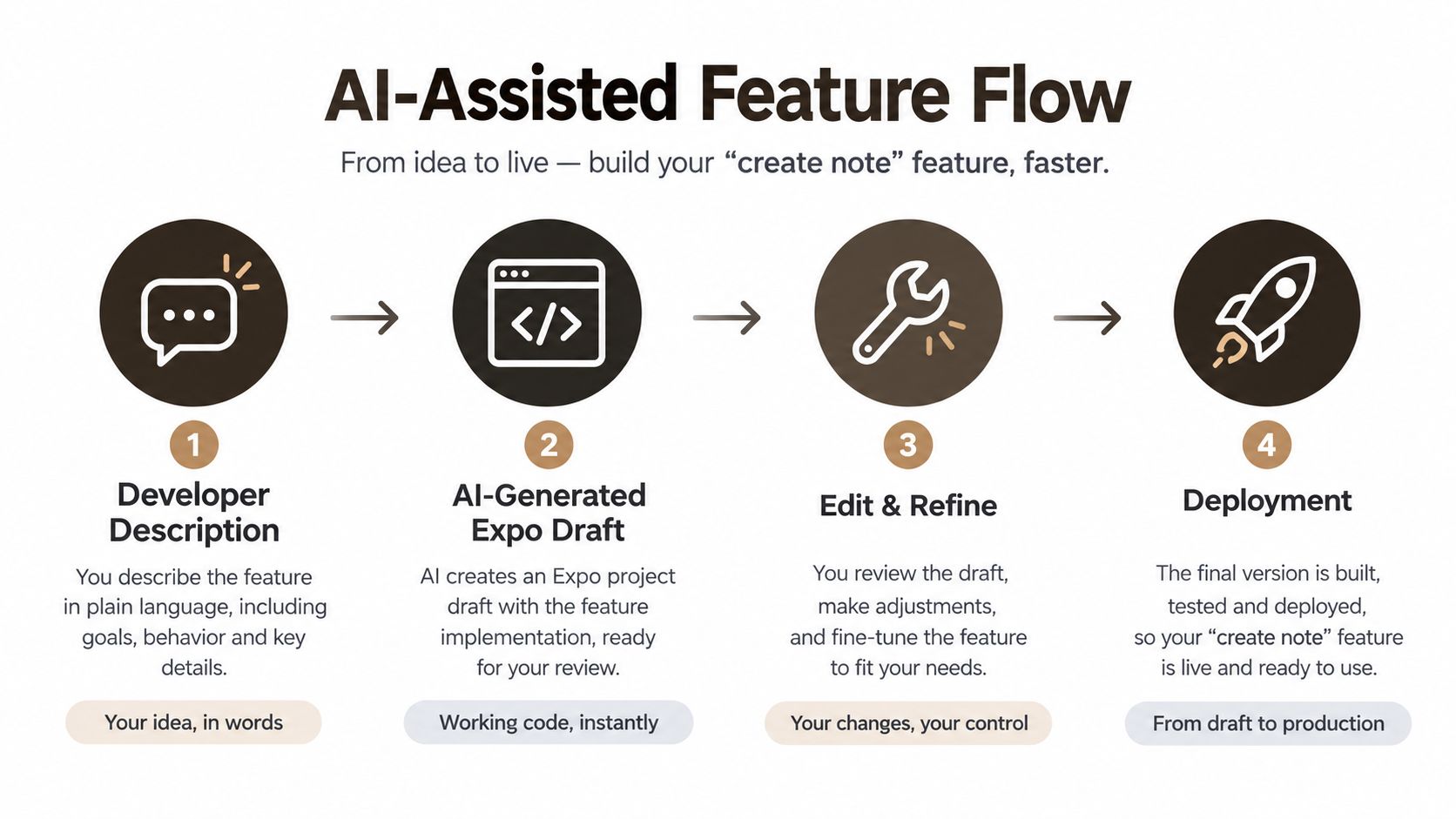
Patterns are easier to judge inside one feature, so take a simple create note flow from description to merged diff. The point isn't the note. It's the checkpoints between stages, because each stage gives you a small diff you can review. This staged approach is the practical core of AI-assisted coding in a real project.
The flow below shows the four stages, from your description to a deployable change.
 A four-step infographic showing an AI-assisted feature development workflow from initial idea to live production deployment.
Stage the work, checkpoint every stage
Stage one, the migration. Ask for a notes table with an owner column, timestamps, row-level security enabled, and policies that let a user read and write only their own rows. Review the SQL before anything else exists. Reject it if security is missing, even if the columns look right, because retrofitting policies later is where leaks hide.
Stage two, the Hono route. Ask for a POST handler that validates the body with zod, checks the authenticated user, inserts through Supabase, and returns your standard typed error shape. Your checkpoint is a test with a valid body, a malformed body, and no session. Two of those three must fail safely.
Stage three, the Expo screen. Ask for the form, the mutation, optimistic feedback, and error and offline states, wired to the typed client from stage two. Review the diff for direct database calls that bypass your API, because models love shortcuts that break your architecture.
Stage four, the gates. Run lint, type check, unit tests, and the route tests together. Nothing merges on a partial pass.
The short walkthrough below shows the same generate, review, and verify rhythm in motion.
The same staging handles bugs. Paste the failing test, ask for the smallest patch, and refuse the fix until the previously failing test passes and the surrounding suite stays green. A patch you can't tie to a failing test is a guess, however confident it looks.
Copy-Ready Examples for Auth Validation and Offline Caching
These four patterns cover the jobs Expo, Supabase, and Hono projects repeat most often. Each one is described as the output you should demand from generation, plus the check that makes it production code. Adapt the names and fields. Don't drop the checks.
Auth session handling in Expo
Ask for an auth provider that restores the Supabase session on launch, stores it with secure platform storage, listens for session changes, and exposes a typed user or null to the app. Navigation guards read that state and route signed-out users to your auth screens.
Your verification is behavioral. Sign in, kill the app, relaunch, and confirm the session restores. Sign out and confirm protected screens are unreachable and cached user data is cleared. Generated auth code often handles sign-in and forgets sign-out cleanup, which leaks the previous user's data into the next session on a shared device.
Supabase migration with row-level security
Ask for a migration that creates the table, adds an owner column referencing the auth user, enables row-level security, and defines select, insert, update, and delete policies scoped to that owner. Inserts must also check that the owner value matches the caller, so a user can't create rows in someone else's name.
Verify with two test users. User A creates a row. User B must not read, update, or delete it through the API or a direct query. If you only test with one user, you've tested nothing about isolation.
Hono route with validation
Ask for a route that parses the body through a zod schema, rejects invalid input with your typed error response, verifies the session before touching data, and returns a response that matches the shared contract. The handler should contain no unvalidated property access on the request.
Offline caching with TanStack Query
Ask for a query layer that persists the cache, queues mutations while offline, retries on reconnect, and rolls back optimistic updates when the server rejects a change. Then test it in airplane mode. Create a note offline, restart the app, go back online, and confirm exactly one server record exists. Duplicates after retry mean your mutation needs an idempotency strategy, and generated code rarely adds one unprompted.
A Verification Workflow That Treats Examples as Untrusted Code
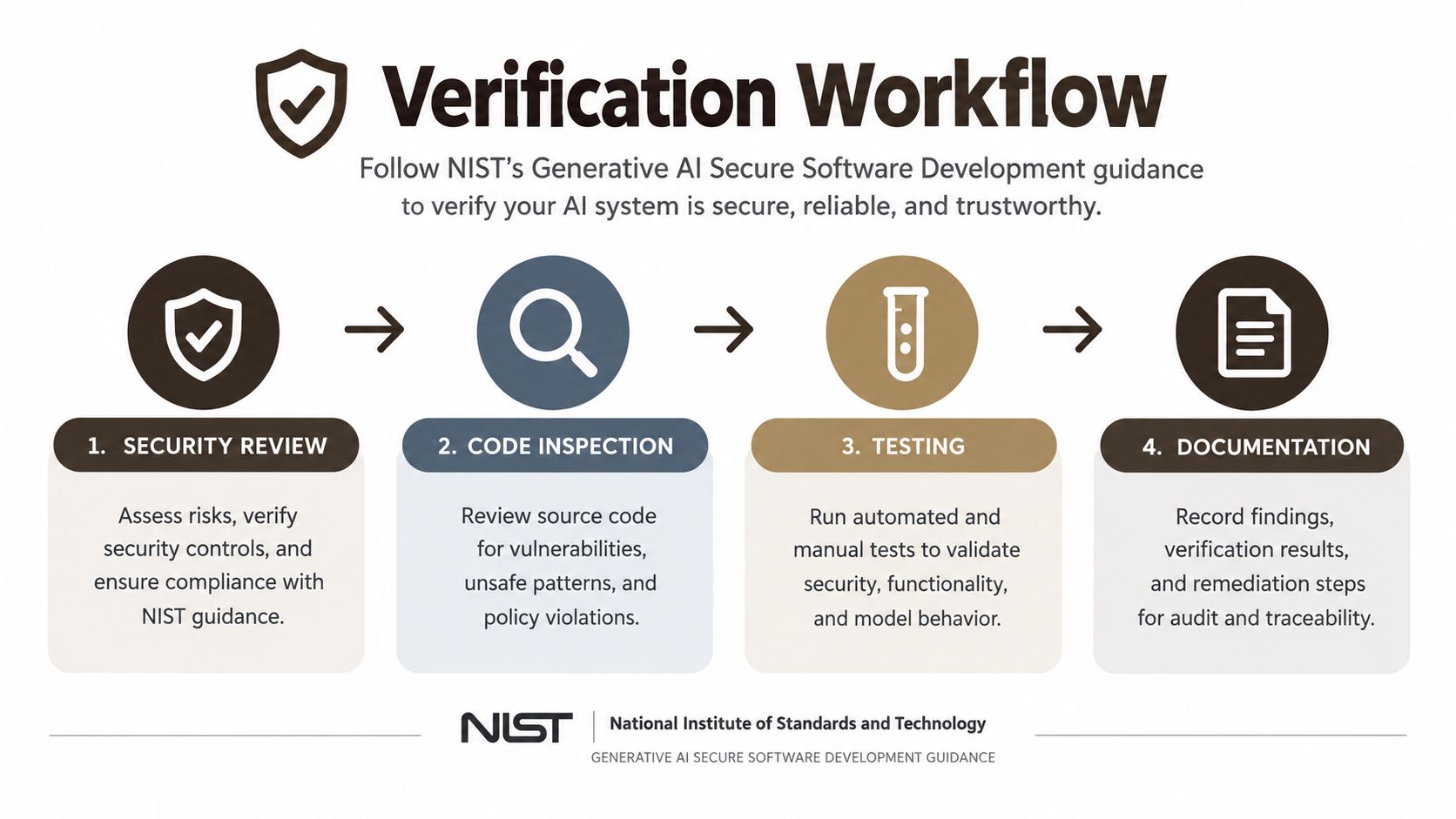
Pasting is easy. Knowing whether the result is correct and safe is the work. NIST guidance on generative AI secure software development frames the controls plainly, calling for teams to validate and sanitize model inputs and outputs, log interactions in context, and encode data so generated content cannot trigger unauthorized code execution.
 A four-step verification workflow infographic for ensuring secure, reliable, and trustworthy generative AI software development.
Translate the guidance into this stack
- Validate at every boundary: Schema-validate API responses on the client and request bodies in Hono, so malformed data fails loudly at the edge.
- Treat generated power tools as hostile: Review generated SQL, shell commands, URLs, and dynamic imports line by line before they run anywhere.
- Keep secrets out: Ban secrets from prompts, generated files, and client bundles, and scan for them automatically.
- Gate the merge: Require lint, type check, dependency scanning, unit tests, and security tests in CI before a generated diff can land.
The acceptance test discipline matters as much as the checklist. SWE-bench Verified contains 500 human-validated tasks from real GitHub issues across 12 open-source Python repositories, scored by applying a patch and running project tests. Borrow that standard locally. Your project's tests, including regression tests that must keep passing, decide whether a snippet is good. Resemblance to code you'd write doesn't.
When a generated block fails and you need a structured way to repair it rather than regenerate blindly, Zemith's practical AI coding guide is a useful companion for working through broken output methodically. Pair that repair loop with the broader discipline of testing mobile applications end to end, covering iOS, Android, and web where your app ships. Report what passed, what regressed, and what review found. That's evidence. A confident looking diff isn't.
The Trust Gap Most Examples Ignore
A generated auth screen compiles on the first try, the demo looks clean, and the tutorial ends there. Six weeks later a malformed API response crashes that screen in production, and the table it created grants broader read access than anyone reviewed. Example galleries stop at the screenshot. Production risk starts exactly at that stopping point.
Developer sentiment reflects the gap. The Stack Overflow 2025 Developer Survey release reports 46% of developers do not trust AI output accuracy, compared with 33% who do, while 45% say debugging AI-generated code is time-consuming. An independent 2025 study referenced alongside that release examined more than 100 large language models and found security vulnerabilities in 45% of tested code samples, with cross-site scripting failures in 86% of relevant cases.
Skepticism in practice is a short set of questions with testable answers. Do the app and the API share a checked contract? Can one user's session reach another user's rows? What packages did the diff pull in, and who audited them? What happens on a dead network, a 500, or an empty list? Generated code optimizes for the success path, so every one of those answers should come from a test or a reviewer rather than from trusting the output.
One more check costs nothing and catches the most. Read each line the way you'd read a diff from a teammate you haven't met yet. If you couldn't defend it in review, it doesn't ship.
AI can shorten implementation and lengthen delivery at the same time, when a team has no repeatable way to review what it generates.
Be wary of any example, polished ones included, that arrives without a verification recipe. The recipe is the product. The snippet is just the starting point.
Quick Reference Matrix of Pattern Output and Verification
Keep this matrix open when you're about to paste generated code into a project. Find the pattern, confirm the output shape matches what you asked for, and check that the named gate has run. If a row's verification gate hasn't passed, the snippet isn't production code yet, whatever it looks like in the simulator.
AI Code Example Quick Reference
| Pattern | Generated Output | Rules and Hooks Applied | Verification Gate |
|---|---|---|---|
| Auth flow | Session provider, secure storage, route guards | No secrets in client rule, lint and type check on accept | Relaunch restore test, sign-out clears cached user data |
| API client | Typed fetch wrapper with validated responses | Ban untyped fetch validator, shared contract rule | Malformed payload test fails with typed error |
| Hono route | Handler with zod validation and typed errors | Every route validates rule, format and lint chain | Valid, invalid, and unauthenticated request tests pass |
| Supabase migration | Additive table change with row-level security policies | Additive only rule, security mandatory rule | Two-user isolation test across read, update, and delete |
| Offline mutation | Persisted cache, queued mutations, optimistic rollback | Type check gate, no direct database calls from screens | Airplane mode create, restart, reconnect without duplicates |
| Test scaffolding | Failing tests for success, auth, and bad input cases | Test-first prompt pattern, CI test gate | Tests fail before implementation and pass after, with no regressions |
Use the matrix as a pre-commit habit, not a poster. Thirty seconds against these rows catches the missing policy, the unvalidated body, and the untested offline path before they become production incidents. When a new pattern enters your project, add a row for it, with its own output shape and gate, so the next generated version gets judged by the same standard.
If you want this workflow wired up instead of assembled piece by piece, AppLighter gives you an Expo and React Native starter with Supabase, a Hono and TypeScript API layer, authentication, navigation, and AI tooling including Claude Code rules and Cursor plugins already configured. Start from guardrails that are in place on day one, generate your first feature against them, and spend your review time on product decisions instead of project setup.