Expo vs React Native A Developer's Definitive Comparison
Choosing between Expo vs React Native? This guide provides a nuanced comparison of developer experience, native modules, and build workflows to help you decide.
 Parth
Parth
The fundamental difference between Expo and React Native isn't about which is "better"—it's about workflow. Expo gives you a managed, streamlined path that hides the messy native stuff, letting you build fast. It’s perfect for getting an idea off the ground quickly. On the other hand, the bare React Native workflow offers total control, dropping you right into the native iOS and Android projects. You'll need this power for apps that require very specific, and sometimes obscure, native features.
This isn't a battle between two different technologies. It's a choice between a guided experience and a manual one.
 A laptop displaying mobile app designs, two smartphones, and a plant on a wooden desk, with 'EXPO vs React Native' text.
Understanding Your Development Path
Deciding between Expo and the bare React Native workflow is one of the first—and most important—calls you'll make. This choice dictates everything from how you set up your project to how you ship it to the app stores. Think of Expo as an all-inclusive toolkit and the React Native CLI as a set of powerful, individual tools. Both can build amazing apps, but they're made for different needs and teams.
Expo is essentially a framework and a platform built around React Native. Its goal is to simplify the entire process. It bundles a curated set of tools and APIs that solve common mobile development headaches, letting you stay in JavaScript or TypeScript for almost everything.
The bare workflow, in contrast, gives you a standard React Native project with the native iOS (.xcodeproj) and Android (.gradle) project files wide open from the start. This gives you ultimate flexibility, but it also means you're on the hook for managing native dependencies, build configurations, and setting up your environment.
This is where a starter kit like AppLighter comes in. It takes Expo's solid foundation and accelerates development even more by offering a production-ready structure for things like authentication and navigation right out of the box.
Key Workflow Distinctions
The path you choose has real consequences, both immediately and down the road. Getting this right from the start can save you from a painful migration later.
| Feature | Expo (Managed Workflow) | React Native (Bare Workflow) |
|---|---|---|
| Initial Setup | Incredibly fast. You can be running on a device in minutes with the Expo Go app. | Can take hours. Requires a full Xcode and Android Studio setup. |
| Native Code Access | Mostly hidden, but you can tap into it with config plugins when needed. | Full, direct access from day one. You own the native projects. |
| Build Process | Simplified cloud builds using EAS (Expo Application Services). No local setup needed. | Manual. Requires deep knowledge of the native build toolchains (Xcode, Gradle). |
| Best For | Startups, MVPs, rapid prototyping, and teams who want to stick to JavaScript. | Apps with complex, custom native integrations or very specific OS-level features. |
2. Understanding The Core Differences
Before diving into a feature-by-feature comparison, it's important to understand the fundamental philosophies behind Expo and React Native CLI. This isn't just about different tools; it's about choosing between a managed workflow and a bare workflow. That single decision shapes everything from how you start your project to how you ship it to users.
Expo offers a managed workflow, which is essentially an opinionated framework built right on top of React Native. Its entire purpose is abstraction. Expo works hard to hide the messy parts of native development—fiddling with Xcode settings, fighting with Gradle dependencies—so you can stay focused on writing JavaScript or TypeScript code.
Think of it as a powerful accelerator. By providing a curated SDK with ready-to-use native APIs for things like the camera, push notifications, and device sensors, Expo saves you from countless hours of tedious configuration. It gives you a self-contained development environment built for speed and simplicity.
Let's break down how this looks in practice.
The Expo Managed Workflow Philosophy
At its core, the managed workflow is all about the developer experience. You can spin up a new project and see it running on your phone in minutes using the Expo Go app. You don't even need to have Xcode or Android Studio installed on your machine to get started. For quick prototypes and building an MVP, this is a massive advantage.
Of course, this simplicity comes with a trade-off: a bit less control. While modern Expo has opened up significantly with development builds and config plugins, you are still working within a curated ecosystem. This ensures stability and makes updates painless, but it might mean you can't use a brand new or very niche native module right away.
The real magic of Expo is that it lets you build a truly native app while thinking like a web developer. It handles the platform-specific ceremony, letting you focus on features instead of wrestling with build tools.
The React Native Bare Workflow Philosophy
On the other side of the coin, running npx react-native init drops you straight into the bare workflow. From day one, you have direct access to the native ios and android project folders. This gives you unlimited power and flexibility—there are zero restrictions on the native code you can write or the third-party libraries you can integrate.
This level of access is non-negotiable for some apps. If you need to integrate a proprietary hardware SDK or perform deep performance optimizations at the native level, the bare workflow is your only real choice. But with great power comes great responsibility.
Your team is now fully responsible for managing native dependencies, build configurations, and code signing for both platforms. This requires real-world experience with Xcode, Swift, Android Studio, and Kotlin. The learning curve is steeper, and the initial setup process is undeniably slower.
To put these differences into perspective, here is a quick overview.
High-Level Comparison: Expo vs React Native CLI
This table breaks down the fundamental differences in philosophy and initial setup between the two approaches.
| Feature | Expo Managed Workflow | React Native CLI (Bare Workflow) |
|---|---|---|
| Core Philosophy | Abstraction and speed. Prioritizes developer experience and rapid iteration. | Full control and flexibility. Grants direct access to all native project files. |
| Initial Setup | Extremely fast. No native toolchains (Xcode/Android Studio) required to get started. | Slower. Requires installation and configuration of Xcode and Android Studio. |
| Native Code Access | Limited by default, but possible via development builds and config plugins. | Unrestricted. Full access to ios and android folders from the very beginning. |
| Who It's For | Teams prioritizing speed, web developers transitioning to mobile, and most typical apps. | Teams with deep native requirements or existing native mobile engineers. |
Ultimately, the choice isn't just a technical one. It's a strategic decision that depends on your project's roadmap, your team's skills, and your timeline. For many, the benefits of Expo's managed approach are compelling. In fact, by cutting down on setup time and complexity, teams often report getting prototypes built up to 50% faster. You can explore more about these development speed advantages.
Comparing The Developer Experience
Your choice between Expo and the bare React Native workflow will fundamentally shape your daily life as a developer. This isn't just about how you start a project; it dictates how you'll test, debug, and push updates down the line. Honestly, the developer experience is probably the biggest factor separating these two paths.
 A person's hands hold a smartphone, with code on a computer monitor and 'Fast Development' on a tablet in the background.
The difference is obvious from the first command. With Expo, you can run npx create-expo-app and see a live app running on your actual phone in less than five minutes. This magic is powered by the Expo Go companion app, which completely removes the need to set up a native build environment on your machine.
Contrast that with a bare React Native project. Kicking things off with the CLI means you're in for some serious environment configuration first. You have to install and correctly configure Xcode for iOS and Android Studio for Android, a process that can easily eat up several hours, especially if you hit the usual snags with mismatched toolchain versions.
The Initial Setup Showdown
The setup process really tells you everything you need to know about the philosophy behind each approach. Expo is all about getting you from zero to coding as fast as humanly possible by hiding the native complexity.
- Expo: Install Node.js, run one command, and scan a QR code. That's it. You're now live-reloading code changes from your editor directly to your phone.
- React Native CLI: You’ll be installing massive applications like Xcode and Android Studio, tweaking environment variables, downloading platform-specific SDKs, and configuring simulators or provisioning physical test devices.
For anyone new to mobile development, or for teams that just need to build a prototype quickly, this initial hurdle with the bare workflow can be a real deal-breaker.
Iteration Speed And The Development Loop
Once you’re set up, the next big thing is your development loop—how quickly can you write code, see the change, and fix any bugs? Here again, Expo’s managed ecosystem gives it a clear edge with its highly polished tooling.
Both workflows use React Native's Fast Refresh, which is great for injecting code changes without wiping your app's state. But Expo’s integrated development server and superior debugging tools just make the whole process smoother and more reliable. Debugging in Expo is a breeze, with clear error messages and built-in tools for inspecting your app's state and performance.
With the bare workflow, debugging can get complicated. You often have to drop down into Xcode or Android Studio's native logging and debugging tools. While these tools are incredibly powerful, they come with a steep learning curve that can slow down any developer whose main skillset is JavaScript.
Expo's opinionated but efficient environment is its greatest strength. It makes deliberate choices to simplify the development process, which translates to faster iteration and a more enjoyable coding experience for the majority of use cases.
This streamlined workflow is exactly why starter kits like AppLighter are built on Expo. It takes care of all the boilerplate—navigation, authentication, state management—on top of Expo's already fast foundation. This lets you jump straight into building the features that actually make your app unique. The combination of Expo's quick development loop and a pre-configured starter kit can cut down what might take weeks into just a few days.
A Deep Dive Into Native Modules and Performance
How your app taps into native device features is a classic sticking point in the Expo versus React Native debate. For years, the story was simple: if you needed custom native code, you couldn't use Expo. That's just not the case anymore, making this a much more interesting comparison.
 Hands typing on a laptop displaying code, with 'NATIVE MODULES' text overlay.
The performance conversation is just as critical. Many developers still operate under the assumption that a bare React Native app is automatically faster, but the reality on the ground is far more complex. We need to look at bundle size, startup time, and runtime efficiency to see where each approach truly stands.
Accessing Native APIs The Expo Way
Expo's managed workflow comes with the Expo SDK, a massive library of packages that wraps common native APIs into easy-to-use JavaScript modules. This covers the essentials like the camera, device sensors, push notifications, and file system access. Honestly, for the vast majority of apps out there, the SDK has everything you need right out of the box.
But the real breakthrough came with Development Builds and Config Plugins. These tools completely changed the game, blurring the line between the managed and bare workflows.
- Config Plugins: Think of these as little scripts that automatically tweak your native project files (like
Info.pliston iOS orAndroidManifest.xmlon Android) during the build process. This is huge because it lets you install third-party React Native libraries that need native setup—something that was once impossible in the managed workflow. - Development Builds: This feature lets you create your own custom version of the Expo Go app, pre-loaded with any native dependencies your project needs. It gives you the incredible speed of Expo's development loop combined with the power to use any native module you want.
The old argument that "Expo locks you out of native code" is officially dead. With Development Builds, you can build, test, and debug apps with custom native modules and still enjoy the streamlined developer experience that Expo is famous for.
Direct Native Code Integration With The CLI
With the bare React Native workflow, you get direct, unrestricted access to the native iOS and Android projects from day one. If you need to write your own custom Swift or Kotlin code, integrate a specialized proprietary SDK, or use a niche library that doesn't have a config plugin, this is your route.
The catch is that you’re on the hook for everything. You'll be manually linking libraries and configuring them directly in Xcode and Android Studio. This demands a solid understanding of native mobile development and its build systems. It offers total control, but that control comes at the cost of complexity and a much slower development cycle.
Debunking Performance Myths
Let's clear the air on performance. Many of the common beliefs about Expo being slow or bloated are based on how things were years ago. The myth that Expo apps are inherently clunkier is largely a relic of the past.
App Bundle Size Out of the box, a fresh Expo app might be slightly larger than a bare React Native one. This is because the Expo SDK bundles a suite of popular native modules. But here's the key: modern build tools are incredibly good at "tree shaking," or stripping out unused code. By the time your app hits the App Store, the final download size difference is often negligible—we're talking just a few megabytes for a typical app.
Startup Time An app’s "time to interactive" (TTI) is what users feel, and there is no inherent architectural reason an Expo-built app should start slower than a bare one. Startup performance has far more to do with how you structure your code, load your assets, and manage your JavaScript bundle size than it does with the workflow you choose.
Runtime Efficiency Once your app is up and running, the performance is identical. Both Expo and bare React Native apps are running the same React Native code on the same JavaScript engine, which is typically Hermes. Any performance bottlenecks will come from your own application logic or the specific native modules you’ve chosen, not from the initial project setup.
For most projects, choosing between Expo and the React Native CLI shouldn't be a decision based on a perceived performance gain. The differences are minimal and are almost always dwarfed by the massive wins in developer experience and build simplicity that Expo delivers. The bare workflow’s real edge is reserved for those highly specialized cases that demand deep, custom native integrations.
Comparing Build and Deployment Workflows
Getting your app from your laptop to the App Store is where the rubber meets the road. It's also where the core philosophies of Expo and bare React Native really diverge. The path you choose here will have a direct, noticeable impact on how fast you can ship and how much time you spend on operational headaches.
The Old-School Way: Bare React Native Builds
With a bare React Native project, you’re in the driver's seat for the entire build process, which means you're responsible for navigating the native toolchains yourself. To build an iOS app, you absolutely must have a Mac running Xcode. You'll be deep in the weeds of managing provisioning profiles, signing certificates, and build schemes—a notoriously complex dance that can easily trip up even seasoned developers.
For Android, the process involves working directly in Android Studio, wrestling with Gradle scripts, and managing keystores. While it's generally less locked-down than Apple’s ecosystem, it still requires a solid grasp of native Android development fundamentals. This hands-on approach gives you total control, but it's also incredibly time-consuming and a breeding ground for configuration errors that can stop a release dead in its tracks.
The Modern Approach: Expo Application Services (EAS)
Expo flips this entire process on its head with Expo Application Services (EAS), its cloud-based build service. EAS essentially takes the native build environment completely off your plate. Instead of fighting with Xcode or Android Studio on your local machine, you just run a single command in your terminal. Expo’s servers take it from there.
The biggest win here? You no longer need a Mac to build an iOS app. A developer on a Windows or Linux machine can build, sign, and submit a production-ready app to the App Store without ever needing to own a macOS device. For freelancers, small teams, and startups, this is a game-changer, removing a major financial and logistical hurdle.
EAS Build isn't just about convenience. It's a strategic tool. By taking over the messy parts of code signing, dependency management, and native builds, it frees up your team to focus on building features, not managing build servers.
EAS securely manages your app signing credentials, automates the creation of your app binaries (.ipa and .apk/.aab), and can even handle the final submission to App Store Connect and the Google Play Console. This creates a repeatable, automated pipeline that dramatically cuts down on the human error common in manual build processes.
How This Affects Your Time-to-Market
The tooling surrounding your workflow plays a huge role here. React Native already holds a commanding 38% market share among cross-platform frameworks, giving you access to a massive and mature ecosystem of libraries. You can read more about React Native's market position at TMS Outsource. Expo builds on top of that strong foundation by smoothing out the roughest edges, especially when it comes to deployment.
For solo developers and entrepreneurs, this is where the magic happens. When you pair Expo with a well-structured starter kit like AppLighter, you get a massive head start. With features like authentication, navigation, and state management already wired up, you can get from a basic idea to a functional MVP faster than you ever could with a bare React Native project built from scratch.
The simplified EAS deployment is the final piece of the puzzle, turning what could easily be a week of configuration nightmares into a single command. This speed is a real competitive advantage. When you're weighing Expo vs. React Native, the build and deployment workflow should be one of your top considerations. If you value speed, efficiency, and less operational overhead, EAS makes a very compelling case for the Expo ecosystem.
How to Make the Right Choice for Your Project
After digging into all the technical details, the "Expo vs. React Native" choice really boils down to three things: your project's goals, your team's skills, and your timeline. There’s no single "best" answer here—just the right fit for your specific situation. This final breakdown gives you clear, scenario-based guidance to help you pick the most effective path.
Making the wrong call upfront can cause some serious headaches down the road, so it’s crucial to align your approach with your project's core needs from day one.
When to Choose the Expo Managed Workflow
Expo is, without a doubt, the way to go when speed and developer experience are your top priorities. It shines by abstracting away all the messy, error-prone parts of native development, letting your team focus almost entirely on building features with JavaScript and TypeScript.
You should choose the Expo workflow if you are a:
- Startup building an MVP: When your main goal is to test an idea and launch fast, Expo's quick setup and streamlined build services (EAS) are a lifesaver.
- Indie developer or small team: Without dedicated native experts on hand, wrangling Xcode and Android Studio can be a massive time sink. Expo gets rid of that overhead completely.
- Web developer transitioning to mobile: The managed workflow just feels more familiar and intuitive, offering a much gentler learning curve than the bare workflow.
- Agency focused on rapid delivery: For client projects with tight deadlines, Expo’s efficiency helps you ship high-quality apps faster.
When to Choose the React Native Bare Workflow
While Expo has grown to cover most use cases, the bare React Native workflow is still the necessary choice for projects with very specific, non-negotiable native requirements. It gives you total, fine-grained control over every single aspect of the native build process and project structure.
You should choose the bare workflow if your app:
- Requires a specific native module that has no Expo config plugin available and isn't something you can create easily.
- Needs deep, custom integrations with proprietary or obscure hardware SDKs.
- Involves writing a significant amount of custom Swift, Objective-C, Kotlin, or Java code.
- Must achieve highly specific performance optimizations at the native level, beyond what Hermes and standard React Native offer.
This decision tree gives a great visual comparison of the build workflows, which is really a key differentiator between the two paths.
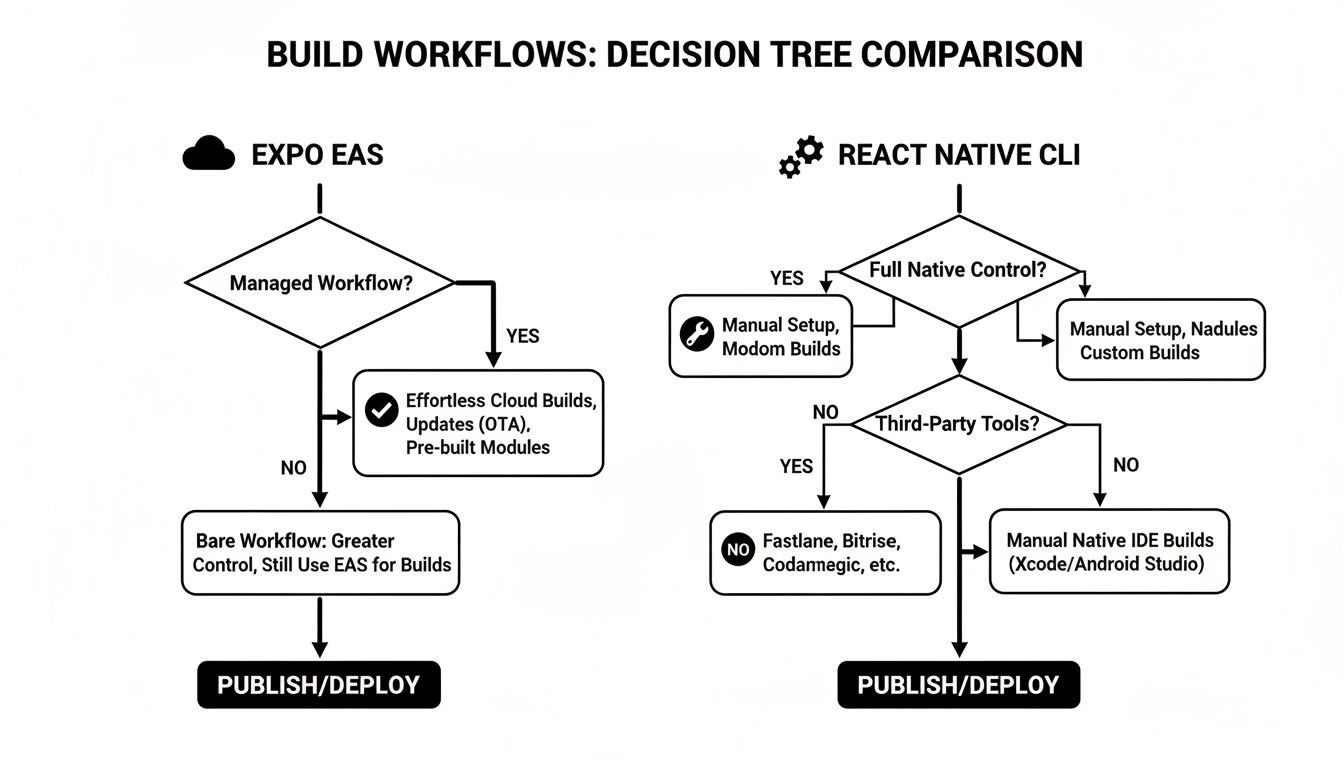 Decision tree comparison of build workflows for Expo EAS and React Native CLI platforms.
As the graphic shows, Expo's EAS abstracts all that build complexity into a cloud service. With the React Native CLI, you're managing the native toolchains directly, hands-on.
For most modern applications, the question is no longer "Can I use Expo?" but "Why wouldn't I use Expo?" Its tooling has matured so much that it now accommodates the vast majority of use cases without sacrificing the speed it’s famous for.
For teams starting out with Expo, a starter kit like AppLighter can be a massive accelerator. It solves common development hurdles by providing pre-configured authentication, navigation, and state management right out of the box. This lets you skip the tedious initial setup and jump straight into building the unique, value-driven features that actually define your product.
Frequently Asked Questions
Even after a side-by-side comparison, some specific questions always pop up when it's time to choose between Expo and the bare React Native workflow. Let's tackle the most common ones.
Can You Switch From Expo To The React Native CLI?
Absolutely. The process is often called "ejecting," though the modern command is npx expo prebuild. Running this will generate the native ios and android directories, essentially turning your managed project into a bare workflow app.
Just be aware that this is a one-way street. Once you generate the native code, you can't go back to the fully managed workflow. You'll take on the full responsibility for managing the native side of things, just like in a standard React Native CLI project.
Is Expo Only For Small Apps Or Prototypes?
That's an old myth that comes from Expo's early days. It’s simply not true anymore. With modern tools like Development Builds and EAS, Expo is more than ready for prime time and is used to power massive applications with millions of users.
The idea that Expo is just for MVPs is outdated. Today's Expo handles custom native code and complex build needs, making it a powerful choice for serious, production-grade apps.
Does Expo Have Performance Overhead Compared To React Native?
Nope. When your app is running, there's no real performance difference. An app built with the Expo SDK runs the exact same React Native code on the same JavaScript engine (usually Hermes) as an app built with the bare workflow.
You might see a slightly larger initial bundle size because of the included Expo SDK modules, but this difference is pretty negligible after app store optimizations. It certainly doesn't impact the app's interactive performance. The choice between Expo and React Native CLI should hinge on your team's workflow and needs, not on chasing phantom performance gains.
Ready to skip the setup and start building your Expo app immediately? AppLighter provides a production-ready starter kit with authentication, navigation, and AI tooling already configured, letting you launch faster. Get started at https://www.applighter.com.
Related Articles
Expo React Native Tutorial: expo react native tutorial for production-ready apps
A practical expo react native tutorial to quickly build a production-ready app with setup, navigation, auth, and deployment.

React Native Maps Guide 2026: Google Maps + Best Libraries
A practical guide to integrating React Native Google Maps in Expo. Learn to set up API keys, add custom markers, optimize performance, and ship your app.

Explore charts react native: Build Interactive Charts in Mobile Apps
Practical guide to charts react native: choose libraries, connect data with Supabase, and optimize performance for Expo apps.